

Today, most of the people who visit your website don’t want to fill out a form or look for a number to call… they prefer to write to you via WhatsApp. And unfortunately if you don’t give them that option, they turn around and end up talking to your competitors.
The solution is to install WhatsApp on your website in order to be available just when someone shows interest. And the good thing about this feature is that no matter if they ask you for a price or if they have a more specific question, with a simple click they can contact you.
But… isn’t it the same as a chatbot? Well, keep reading this guide and here I will tell you why the WhatsApp widget is much more than a simple button, how it differs from a chatbot and how to configure it with Clientify to start capturing and attending in a much more professional way.
Subscribe to Clientify’s blog
Do you like marketing, automation or just seeing how other people do things right? Then subscribe.
Every week we send you what we would like to receive: direct and actionable content.
Key ideas:
- Why is it so important to install WhatsApp on your website?
- Discover how to capture leads at the right time
- Learn how it differs from a chatbot
- Learn how to create it easily with your CRM Clientify
The importance of installing WhatsApp on your website
Yes…to install WhatsApp on your website is to have that green icon at the bottom of your web page.
But the key thing about this button is that it integrates a direct conversation channel with your web visitors right at the moment when they are making decisions; and it also allows you to capture those interested contacts so that, even if they don’t buy yet, they don’t get lost along the way.
Think that by installing WhatsApp on your website you are eliminating barriers: the user who visits you has the possibility to write to you through the channel where he feels most comfortable, without having to wait and with the confidence of knowing that he will receive a direct and human response.
And keep in mind something very important: installing WhatsApp on your website does not mean that you have to open the mobile app every time someone writes to you… by linking the same number you have connected to your CRM, each chat is no longer a single conversation and becomes part of your customer service and sales process.
In addition, by creating this widget with the Clientify CRM itself, you can see where that contact came from, what page they visited before writing to you and if they have spoken to your team before.
A key functionality that combines the immediacy and closeness of a chat with the structure, traceability and automation offered by your CRM, transforming each message into an opportunity and a relationship that you can continue to build in the long term.
Benefits of installing WhatsApp on your website
From experience I tell you…having a WhatsApp widget on your website helps you to improve the user experience and multiply your contact opportunities.
Think that no matter how small the doubt is, if a user sees the WhatsApp icon, he/she will feel confident that he/she will ask and receive an almost immediate answer.
That’s why a well-configured widget is a guaranteed conversation starter:
More conversations:
As we said before, the WhatsApp widget minimizes the barriers that usually slow down a visitor: no long forms, no waiting, no extra steps. With a single click, the person can start a conversation in an app they already use every day.
And that immediacy translates directly into more conversations and more sales opportunities.
Immediate attention:
Responding quickly is not only a matter of efficiency, it is also a sign of professionalism.
Think that when someone writes to you by WhatsApp and receives a response almost instantly, it generates a sense of closeness that, I assure you, is not achieved by email.
That’s why installing WhatsApp on your website allows you to offer agility, but without losing control; which improves the perception of your brand and increases the likelihood that the customer will move forward in the buying process.
Tracking and traceability from the CRM:
The good thing about having this widget connected to a CRM with WhatsApp like Clientify is that you have the possibility to enable an option so that the data of each person that is contacted through this channel is automatically transferred to the CRM.
In this way, you continue to enrich your database so that you can then design and send much more personalized campaigns.
Widget vs Chatbot: when and what to use each one for
Yes… I’m not going to lie to you. The WhatsApp widget and the WhatsApp chatbot at first glance look the same; but their main difference is in when and for what purpose each one intervenes.
WhatsApp Widget:
The widget is the first thing the visitor sees on your website. It is that button that allows the user to start a conversation in a single click.
The idea of this functionality is to capture the user’s intention at the right moment and be the gateway to a new conversation. Think of this widget as appearing at the moment when someone is interested in what you offer and offering them a direct and highly familiar channel to communicate with you.
Also, the nice thing about setting it up directly from a CRM like Clientify is that it allows you to collect basic information through a small form, register the user’s consent and save the contact automatically in the CRM.
As we said before, the key to the widget is its immediacy and its ability to convert visitors into leads; and those leads into conversations.
WhatsApp Chatbot:
Unlike the widget, the chatbot is not designed to capture users, but as a service channel that handles queries from contacts and leads, most of them already existing.
As we have discussed in another of our posts, the WhatsApp chatbot is a software that allows you to maintain a constant level of attention and interaction, without the need for human intervention.
In addition, when created with Clientify’s AI, it allows you to answer frequently asked questions, guide contacts through a conversation, send personalized information and, if necessary, even refer the conversation to an agent, all in an automated way… regardless of the time or volume of messages.
An ideal functionality when it comes to offering continuous and automated support, solving needs and accompanying the customer even when your team is not available.
Do it all with Clientify: capture, automate and close sales
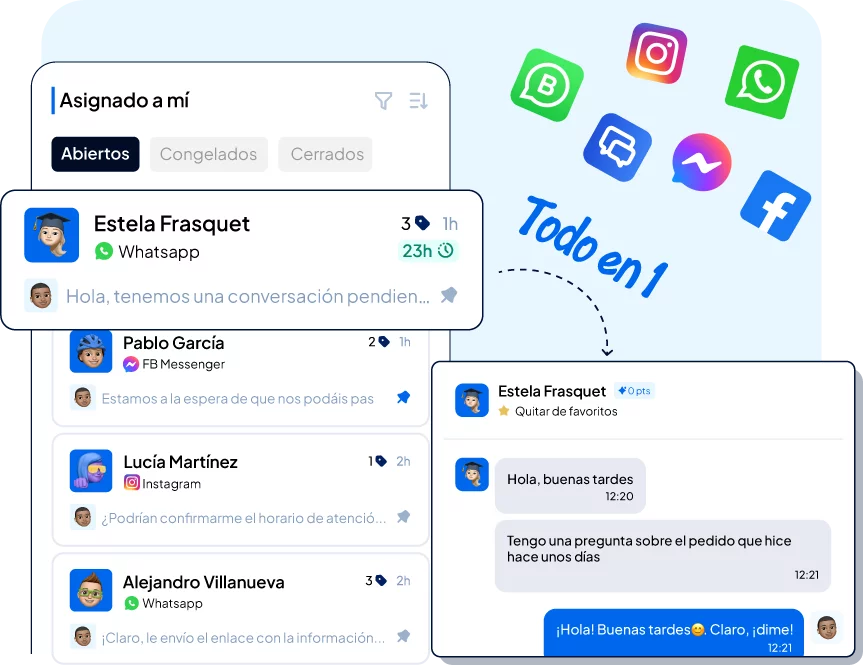
Centralize all your communication, sales and marketing in one place. Try Clientify free for 7 days and feel what it’s like to scale your business with AI without relying on experts.
How Clientify helps you install WhatsApp on your website?
Believe me… installing WhatsApp on your website is much easier and faster than you think.
The good thing about doing it through a CRM like Clientify is that you don’t need to have any technical knowledge or rely on an external developer.
I leave you a guide so that in a few minutes you have the WhatsApp widget active and directly connected to your CRM:
1- Log in to your Clientify account, go to the Communication module and select the Widgets option.
There you will find the button to create a new widget.
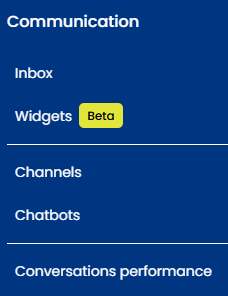
2- Define the name of your new widget and start configuring it.
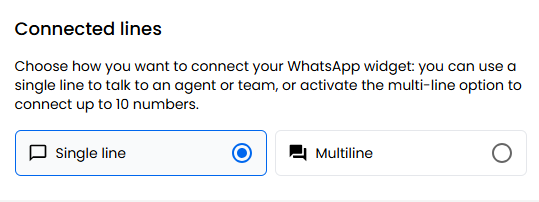
3- It is time to choose if you want to use a single line or multiline. I explain the difference:
Single line is for the widget to redirect to a single WhatsApp number and multi-line is used for those large companies that have different phone numbers per team, locations, cities, etc.
4- To configure the appearance of the widget when it is closed, start by defining the title, status, color and text…and remember that you can always delete the watermark.
Check if you want to activate a form beforehand. If you do not create a form, the chat will be redirected directly to a WhatsApp conversation.
But if you design a form, in addition to redirecting the chat directly to WhatsApp, the data you have requested from the contact will also be automatically saved in your Clientify database (marketing contacts).
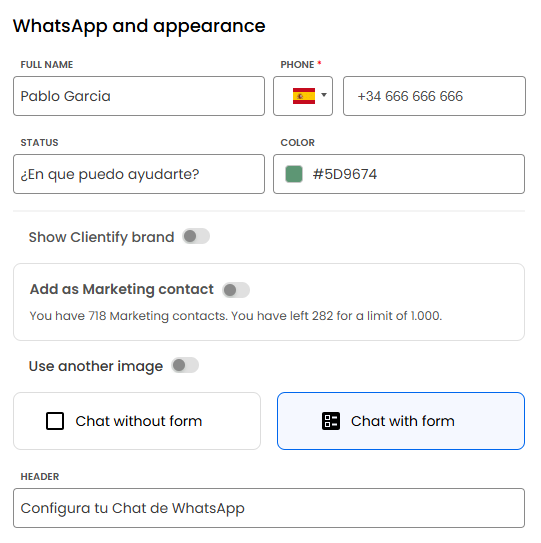
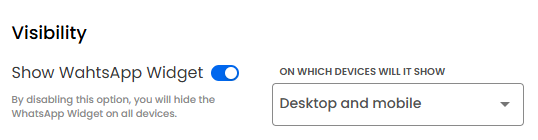
5- Verify the status of the widget and assign it the position and visibility you want it to have on your website.
6- Clientify also allows you to configure the analytics according to the Google pixel.
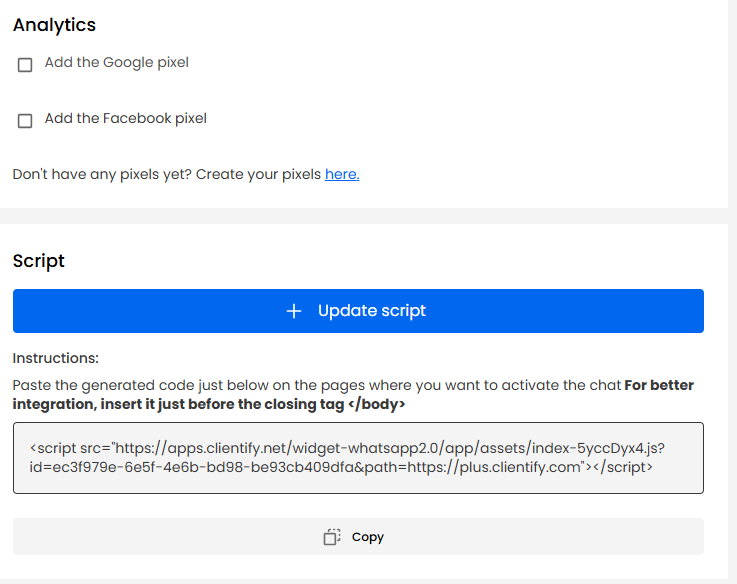
7- Finally, generate the script and follow the instructions to paste the code into your website.
FAQS
1. Where does the widget appear once installed?
The choice is yours. You can display it on the entire site or only on specific pages, such as the home, products or contact. You can also adjust its position on the screen so as not to cover other elements.
2. What does the marketing contacts option refer to?
If you have a previously linked form, the contacts created through it can, or not, be marked as marketing contacts in Clientify, making it easier to segment and manage them, and then use them in campaigns.
3. Are contacts saved in the CRM?
Yes, as long as the widget has the form. In that case, each conversation generates a contact in Clientify with its source, time, language and context.
4. Does it comply with the GDPR and other privacy regulations?
Of course. You can include a link to your privacy policy and a consent box before the user submits their data.
Everything is automatically registered in the CRM.
5. Can I work with several agents at the same time?
Yes, if you connect the multiline widget, conversations can be assigned to different team members automatically according to language, product, zone, etc.
Conclusion
You saw…installing WhatsApp on your website is the key functionality to capture users looking for an immediate contact. Precisely because it’s not just about being available, but about turning every click into a conversation with a real potential sale.
Therefore, the widget helps you transform visitors into leads, while the chatbot ensures that those conversations remain active and organized, even when your team is not in front of the screen.
And the great thing about linking the WhatsApp widget with Clientify is that all conversations are centralized in this CRM, so you can then respond, segment, measure and scale your attention.