

Most still think that to automate WhatsApp you have to leave the app and get into the API.
Wrong, it is no longer necessary, now you can have both at the same time with what Meta calls Coexistence.
Yes, you can now continue to respond from your mobile while your team uses the same number with a platform or CRM with integrated WhatsApp connected to the API.
You don’t need migrations, cuts or anything like that.
But beware: not everything is as pretty as it sounds.
There are limits, disappearing features and more than one small print that no one tells you about (not even the vendors who sell it to you).
So, if you’re thinking of activating Coexistence, read this before you mess with it.
Let’s get down to business.
Do it all with Clientify: capture, automate and close sales
Centralize all your communication, sales and marketing in one place. Try Clientify free and feel what it’s like to scale your business with AI without relying on experts.
What is WhatsApp Coexistence
Meta gave WhatsApp Coexistence…a nice name to something we’ve all been asking for years:
To be able to use the WhatsApp Business app and API with the same number.
Coexistence is an official feature that allows you to keep answering from your mobile, but at the same time connect that same number to a CRM with integrated WhatsApp or a platform to automate messages, log conversations or attend from a team inbox.
In other words: you no longer have to choose between “keeping your app” or “moving to the API”, you can have both operating at the same time without having to migrate.
And the best part is that it is already an official Meta flow (called Embedded Signup) that enables access to the API without disconnecting your current account.
Needless to say, it is fully legal, stable and supported by WhatsApp.
Requirements and conditions to activate Coexistence
Before you go crazy to activate Coexistence, there are a couple of things to be clear about, not all numbers can do it and there are limitations that Meta puts as small print.
1. Your number must be active in the WhatsApp Business app.
No new or recently verified numbers, must have recent activity (messages sent and received), or Meta may reject the connection.
You have to use a verified number in Meta Business Manager.
The process is done from an official provider (BSP) using the Embedded Signup flow.
Without this, coexistence cannot be enabled.
3. It only works with the “Cloud API” version (the new one).
If your provider uses the old “On-Premise API”, there is little you can do.
Meta only allows coexistence with the official cloud infrastructure such as Clientify, which uses 360dialog.
4. You need to open the WhatsApp Business app every 7 days.
If you fail to do so, the number is disconnected from the API and you lose synchronization.
So be careful.
5. Some regions and accounts are not yet enabled.
Meta is activating it in phases.
Most countries in Europe and LATAM already have it, but it is always advisable to confirm this with the provider before making the change.
6. Possible temporary loss of the “Meta Verified” badge.
If your account has the verified badge, it may disappear during activation and take a few days to return.
If you already use WhatsApp Business, have real activity and the number is verified, you can activate Coexistence without much trouble.
But if you are starting from scratch, better create some history in the app first before trying.
What changes when you activate Coexistence
No, not everything stays the same when you activate coexistence.
There are app functions that disappear or behave differently when you activate the API on the same number.
I leave you the important things
| Function | What happens when you activate Coexistence |
|---|---|
| Mailing lists, group or community messages | They are active in the app, but are not displayed in the Inbox |
| Temporary messages / “view once | They are disabled in 1:1 chats. |
| Edit or delete sent messages | Not available, once sent, it stays there. |
| Live location | Blocked in individual chats. |
| Calls from the app | They still work, but only from the main phone. |
| Messages sent from the app | They are marked as “echo” in the API (they do not open automations). |
| API Campaigns | Limited to 20 messages per second (Meta enforces this). |
| Badge “Meta Verified”. | It is kept in the app, but may not be instantly reflected in the API. |
| App inactive for more than 7 days | The connection to the API is broken until it is reopened. |
The good:
- You can still use your normal app to respond.
- Your chats and contacts are maintained.
- You can activate automations and chatbots
The bad:
- You lose certain personal functions (view once, edit, broadcast…).
- When you connect WhatsApp to the Inbox, the previous conversations start from scratch, but remain intact on the mobile.
So, Coexistence is great for testing the API or starting to automate, but it’s not the best way if you already manage a high volume of messages or campaigns.
If you already work with a CRM like Clientify, the campaigns that you used to do with broadcast lists, you can now launch them via API with approved templates and segmentation, so you can automate without losing control or depending on your mobile.
How to activate WhatsApp Coexistence step by step
There is no mystery here. Do this and don’t mess up:
1) Prepare the ground
- Use the WhatsApp Business app with that number for a few days: chat, reply, show activity.
- Have your Meta Business Manager correct (company verified and domain ok).
- Define templates to be used in API (well written and approvable).
2) Choose provider (BSP) with Cloud API + Coexistence
Clear question, “do you have Coexistence with the same number?”
3) Embedded Signup
From the BSP, start the Embedded Signup with your Meta account:
- Select the right company.
- Choose the same number you already use in the Business app.
- Accept permissions and complete the registration.
4) Verify that the app is still alive
Open WhatsApp Business on your cell phone and send/receive a couple of messages.
If it asks you something strange, reauthenticate. Open the app every ≤7 days, mandatory habit, you know, otherwise it deactivates itself.
5) Connect the inbox / platform
In the BSP/CRM:
- Login to Facebook
- Link your current WhatsApp Business number
- Confirm your business name and time zone
- And that’s it!
- Always do a test: 1 message from app and 1 template from API.
All this information is also available in our downloadable, so you can use it whenever you want. Click here to download it.
Subscribe to Clientify’s blog
Do you like marketing, automation or just seeing how other people do things right? Then subscribe.
Every week we send you what we would like to receive: direct and actionable content.
App only vs Coexistence vs API only
Check this out:
| Scenario | WhatsApp Business app only | Coexistence (app + API) | API only (full migration) |
|---|---|---|---|
| Size/equipment | Self-employed or 1-2 persons | 2-10 persons | +10 agents and several teams |
| Daily volume | Low: <100 chats | Medium: 100-1,000 chats | High: 1,000+ chats |
| Mobile operations | 100% mobile | Mobile + team inbox | 100% team inbox |
| Automation | Basic (quick answers) | Media: templates, simple rules | Advanced: routing, bots, complex flows |
| Campaigns | Broadcast lists from the app | By API (without app broadcast) | By API to scale |
| App functions | All available | Several functions are lost (broadcast, view-once, edit/delete) | App is not used |
| Technology | App + web | App + Cloud API | 100% Cloud API |
| Mounting | Almost nil | Medium (Embedded Signup, settings) | High (serious project) |
| Risks | Chaos if you grow | Depends on opening app every 7 days | Requires discipline, compliance and support |
| When to choose | You start up and have few chats | You want to scale without cutting the app | You already operate at volume and need full control |
Multi-device and multi-agent What exactly are they?
This is where most people get messed up.
Multi-device is not the same as multi-agent, to make it clearer I leave it here:
1. Multi-device (free and limited)
Available for any WhatsApp Business account (even without Coexistence).
Allows linking up to 4 devices + 1 main phone.
Perfect if you are two or three people responding from different computers or tablets.
But beware: you all see the same chats and there is no control of who answers what and if you log out or clear cache, you have to reconnect manually.
In my opinion… it’s fine for small teams or basic care, but if you already have volume and more than one agent, it falls short right away.
Official multi-agent Meta Verified Business
Meta is gradually rolling it out.
Allows more than 4 devices and assign conversations to each agent, each user has their own space and you can see who attended to whom.
Sounds good, but there’s a catch:
- Only available for companies subscribed to the “Meta Verified Business” plan.
- It is not yet available for purchase in all countries.
- Calls only work from the main phone.
3. Real multi-agent (Cloud API + CRM or platform)
We are talking about big things here.
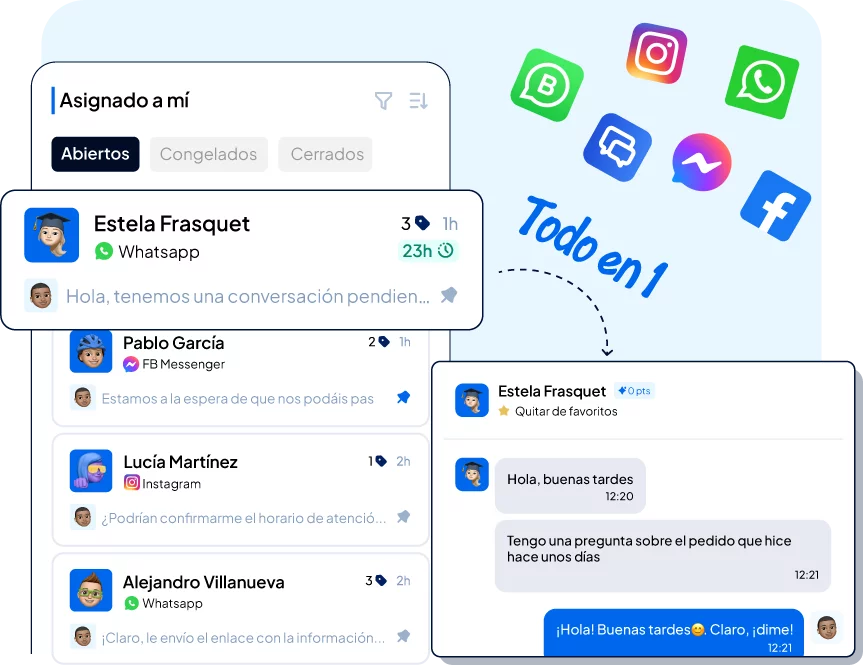
This is where Coexistence becomes powerful: your number is still active in the app, but the API opens a team inbox within a platform (like Clientify, for example).
From there you can:
- Automatically assign chats to each agent.
- View metrics (response times, volume, conversions).
- Create automatic flows or responses according to the type of customer.
- Manage campaigns and templates without touching your cell phone.
With the API connected to Clientify you can work from a team inbox: assign conversations, view metrics per agent and keep all the history in one place.
Best practices and mistakes being made
Most companies that activate Coexistence do so without understanding what they are touching.
And then come the “I’m not receiving messages”, “my broadcasts were deleted” or “my number is down”.
So here’s the short list of do’s and don’ts if you don’t want to break anything.
Common errors
1. Activate it with a new number or without history – Meta rejects it or breaks it after a few days, use an active number with real chats.
2. Do not open the app for weeks – If more than 7 days pass without opening WhatsApp Business, the API connection is cut off and the provider cannot do anything.
3. Use a provider that does not have real Cloud API – If they use the old version (on-premise), the flow fails, it only works with official Cloud API.
4. Believing that you can still use broadcast lists or temporary messages – In the Inbox they are gone… so if you were relying on that, you have to adapt your way of communicating.
5. Sending campaigns without segmenting – Meta can block your number if it detects abuse or high block rate.
6. Not measuring anything – If you don’t know how many messages you send, how many are read or how much you sell on WhatsApp, there is no point in activating the API.
Good practices
1. Start with Coexistence as a test, not as a final. It is useful to test the API without leaving the app, see how your team responds and measure.
2. Document your flow. Who attends, how conversations are assigned and what responses are used. S
3. Do maintenance. Open the app once a week, review logs, templates and metrics.
4. Educate the team. Let everyone know what functions disappear, what is automated and what is done by hand.
5. Create useful templates, not spam. Well written, with custom variables and human tone, if you wouldn’t open them, don’t send them.
Frequently Asked Questions
Can I use the WhatsApp Business app and the API with the same number?
Yes, it’s called Coexistence. You keep your app active and connect that same number to the Cloud API to automate and serve from a team inbox.
Will I lose my chats when I activate it?
No. Your conversations are still in the app. What changes is that some functions of the app are disabled when you use API (broadcast, view once, edit/delete messages, etc.).
Do I have to open the app from time to time?
Yes, open the app at least every 7 days. Otherwise, the connection to the API is cut off and you will have to reactivate it.
What about the app’s diffusion lists?
With Coexistence you will not be able to use them. If you need campaigns, they are made by API with templates and segmentation.
Does Coexistence work for teams?
Yes, but with nuances. If there are several of you, it is better to use the API with a team inbox to assign chats and measure. The multi-device of the app is only for basic things.
When should I migrate to full API and leave the app?
When the volume is already beyond you, you need SLAs, advanced routing, serious reporting and campaigns at scale. If you’re serious about WhatsApp, the app gets in the way.
Can I activate Coexistence with a new number?
This is not a good idea. Use a number with real recent activity in the app or Meta may reject the process.
Is there a risk of blockages if I run API campaigns?
Yes, if you spam or don’t segment. Use approved templates, valuable content and control frequency. Measure blocking and opt-outs.
Coexistence is the bridge from “I answer from mobile” to “we operate WhatsApp as a team sales channel”.
It allows you to test the API without cutting the app, understand your metrics and sort the process.
Activate it with a live number, accept the app limitations and start small.
If the operation scales and you need full control, the next step is API complete with inbox, rules and reporting.
Ready to go? If you want to test Coexistence without cutting the app and with control, connect it to Clientify and we will help you with the Embedded Signup and setup.