

If WhatsApp is the channel you use most to talk to your customers, how are you currently managing it? Can you respond automatically without having to rely on someone who is glued to their mobile all the time?
If your answer is no, then you need a chatbot…but not just any chatbot. A chatbot with AI that connects directly with your WhatsApp and allows you to automate responses, filter queries, assign conversations; thus improving your attention and multiplying your sales.
Imagine having an assistant available 24/7 who responds instantly, understands your customers, guides them to the right product or service and helps you not to miss any sales opportunity…believe it or not: it’s possible.
And that’s why I wrote this post where I tell you what an AI chatbot is and how it works, how to create one and what mistakes you should avoid.
Subscribe to Clientify’s blog
Do you like marketing, automation or just seeing how other people do things right? Then subscribe.
Every week we send you what we would like to receive: direct and actionable content.
What is an AI chatbot for WhatsApp and when is it good for you to use it?
A chatbot with artificial intelligence is an automated computer program that uses natural language processing (NLP) to understand what your contacts and customers write to you via WhatsApp; in order to maintain fluid conversations and resolve queries.
Precisely the key is that, in addition to following a rigid script, it also interprets the intent of the message thanks to those language models that are trained to converse like a person.
So watch out: when you get more messages than you can handle, when you struggle to respond quickly, when you rely too much on one person, or when customers ask the same question over and over again…that’s when you need to implement an AI chatbot for WhatsApp.
And it is in those moments when this type of chatbot not only frees up your time, but also improves the customer experience and prevents you from losing opportunities due to lack of follow-up.
Traditional chatbot vs. AI chatbot
As we discussed in this post, a traditional chatbot works from buttons and keywords.
It is much simpler and more limited than the chatbot with AI since you have to define flows, actions and texts beforehand so that, depending on which option the user selects, the chatbot provides a predetermined response.
And as we said before, an AI chatbot for WhatsApp uses NLP to understand complete sentences, variations, errors, which helps it to interpret in order to generate and provide automatic responses, keeping conversations much more fluid and always with a human tone.
Why is an AI-enabled chatbot on WhatsApp key for your business?
Having an AI chatbot for WhatsApp that responds quickly, covers extended hours and prevents conversations from going unanswered is just as or even more important than the product or service you offer…think that what your customer experiences in each interaction weighs as much as what they buy.
- Faster attention and available around the clock:
An AI-enabled chatbot for WhatsApp allows you to respond in seconds, even when you’re offline. This reduces wait times, prevents customers from leaving for the competition and gives the feeling that you are always present. - Automated basic support without overloading the team:
This chatbot resolves frequent queries, guides the user, delivers instructions and handles common requests without human intervention. This means less burden on your team and more time to address complex or higher value queries. - Better sales lead screening and qualification:
Before passing a conversation to the sales team, an AI-powered chatbot can ask key questions, identify needs, qualify the prospect and collect relevant data. It is ideal for the lead to reach a human agent, already pre-qualified; which accelerates the closing of opportunities and avoids spending time on contacts that do not meet the sales criteria. - Automated booking and appointment management:
Tourism, health, education or beauty businesses use this type of chatbots to manage reservations, confirm appointments, send prior instructions, modify schedules or reschedule without anyone having to intervene. An ideal functionality to reduce errors, lower the operational burden and improve the customer experience. - Personalized notifications and effortless follow-up:
If your business handles many customers, the chatbot allows you to automate payment reminders, important notices, confirmations, status updates or post-service messages; which maintains the link without your team having to do it manually. And by sending personalized messages, it makes the customer feel closer and more organized.
What are the prerequisites for enabling an AI-enabled chatbot for WhatsApp?
Before launching your AI chatbot for WhatsApp, you need to have some key pieces ready. They are not complicated, but they are mandatory by META.
These are the 4 requirements your company must meet:
1- Have WhatsApp Cloud API:
This WhatsApp API is the professional version of WhatsApp and the only one that allows automations, chatbots, several connected agents, massive campaigns and use of official templates .
However, META will soon launch a new version of WhatsApp, called coexistence , which allows your current WhatsApp Business number to continue to be used for this type of marketing actions.
2- Have a Meta Business Manager configured and verified:
This is what allows META to validate that your company exists, that the data is correct and that you have permissions to use the API. If it is not verified, you will not be able to move forward.
3- Have an exclusive number for WhatsApp API:
Currently, you musthave a number that is not in use in the regular app. If it is active, you will need to unlink it before migrating it to the API.
But note that this is likely to change with the new WhatsApp coexistence version to be released by META.
4- Use an official provider or platform compatible with the API:
You must have a CRM implemented that is a WhatsApp partner, such as Clientify, that allows you to create, train and activate your chatbot with AI.
Do it all with Clientify: capture, automate and close sales
Centralize all your communication, sales and marketing in one place. Try Clientify free and feel what it’s like to scale your business with AI without relying on experts.
How to create your AI chatbot for WhatsApp step by step with Clientify?
Now… you have seen that chatbots are key for the attention in any type of business, but you are probably wondering how complicated it is to create them.
Well, the idea is that you can follow these steps in a simple way and without the need of technical knowledge; so that in a few hours you will have your assistant working and attending your clients automatically.
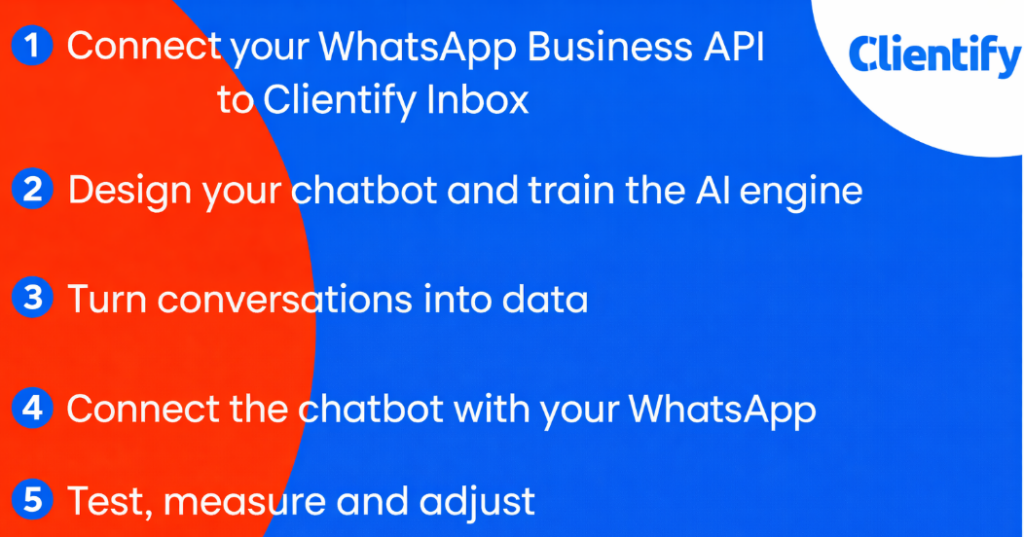
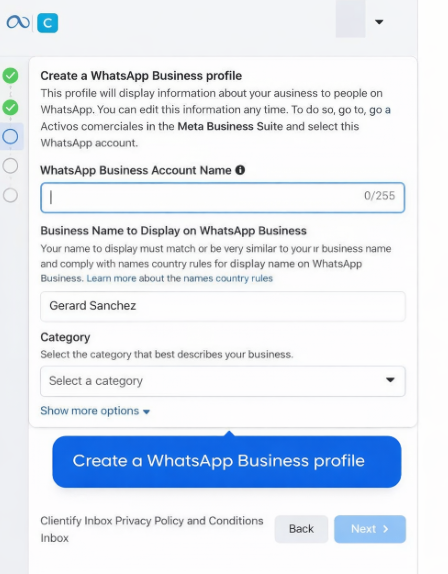
Step 1 – Connect your WhatsApp Business API to Clientify’s Inbox
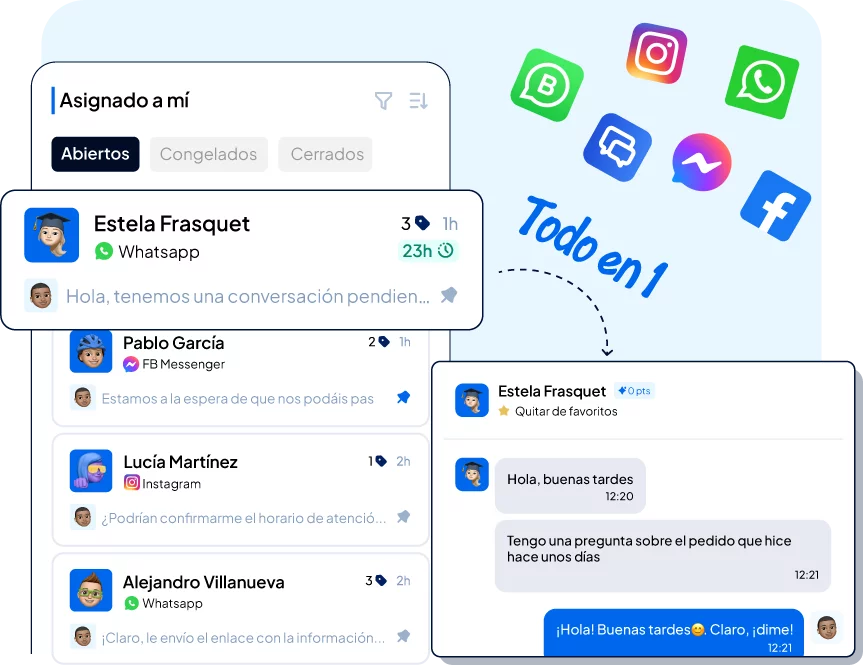
The first thing you have to do is to connect your WhatsApp API number to our CRM Clientify. This way all the conversations you receive, both through this channel and others, will arrive in this single inbox called Inbox.
The good thing about this is that as soon as you plug it in, your computers stop working with hundreds of tabs or cell phones always in hand to startseeing every message in one place, along with emails, network messages and other channels.
Having your WhatsApp channel connected to Clientify allows you to assign conversations, view the complete history and ensure much faster response times without losing the thread or context.
Step 2 – Design your chatbot and train the AI with your business content.
Once you have your WhatsApp integrated and working, the most interesting part comes: creating your chatbot with AI.
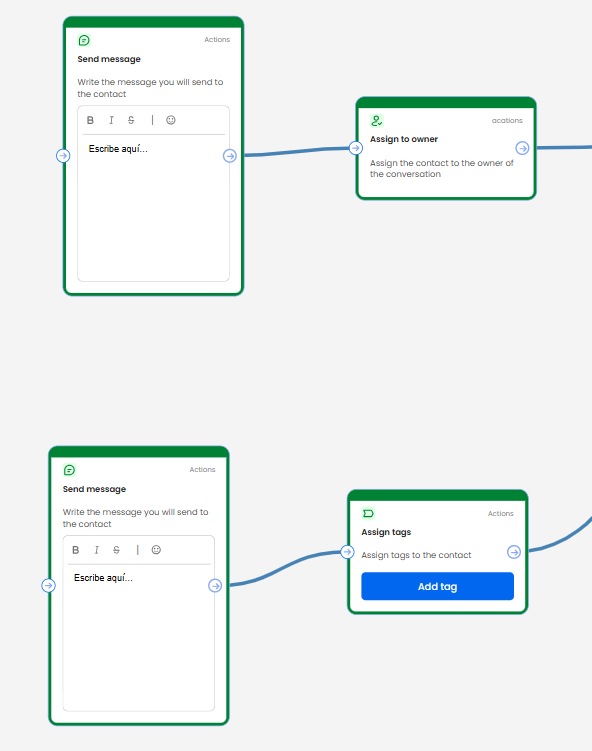
The great thing about Clientify, as we have already mentioned on several occasions, is that you don’t need to be a coding or development expert. You do it all step by step in a visual builder by dragging and dropping question, action, decision, AI blocks… all as if you were building a conversational map.
Note that this step is where you have to decide whether you want to use this AI-enabled chatbot for WhatsApp as a support agent, sales agent or both.
It is important that when completing your “knowledge base” you are clear enough about what your company does, what sector it is in, what your objectives are, what value you offer, etc.; while in the “behavioral objective” you include as much information as possible about your products, services, prices, features, etc.
Note that, for this, you can upload or connect the sources you want the chatbot to use to respond: texts from your website, internal documents, FAQs, policies, sales scripts or any content that represents well how you work and what you offer.
All this information is what will allow the AI to define how it should respond, what information it should collect, when to pass to a human agent, etc… all with the possibility of adjusting the tone so that it always sounds like your brand.
Step 3 – Convert conversations into data
One of the advantages of having the chatbot inside your CRM is that every interaction leaves useful data.
This feature gives you the ability to automatically tag contacts based on what they ask, add lead scoring points when someone shows buying intent, automatically create opportunities, assign internaltasks to agents, and much more.
In this way, you go from answering for the sake of answering to turning each chat into a source of information that helps you sell better.
Step 4 – Connect the chatbot with your WhatsApp
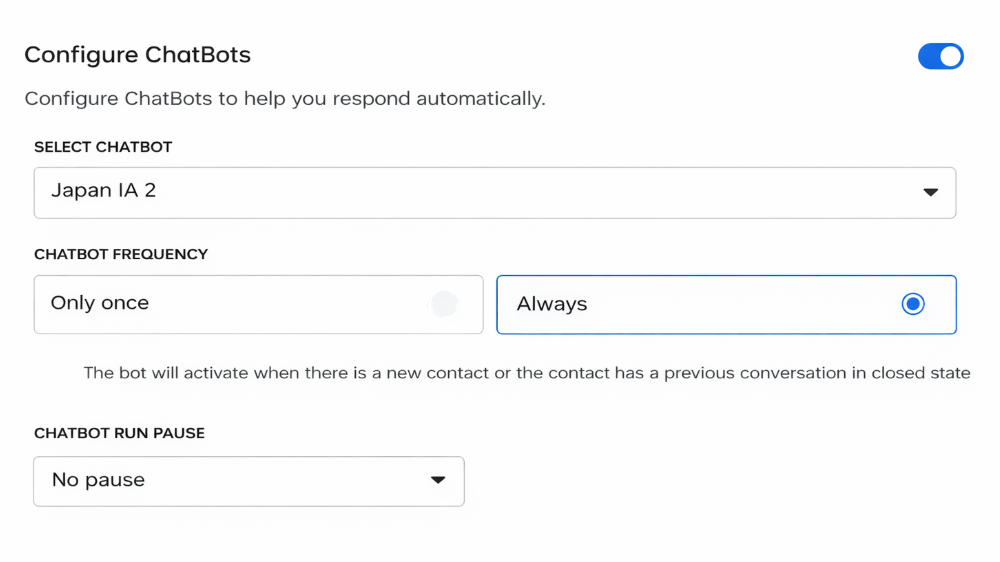
Once you have created your chatbot, it’s time to connect it to your WhatsApp. This is one of the simplest and most important steps.
From the Communication module in Clientify and selecting the channels option, you will enter the WhatsApp API. In configuration you have the possibility to connect any of the chatbots you have previously created.
Step 5 – Test, measure and adjust
Remember that before launching the AI chatbot to all your customers, the ideal is to test it yourself.
This way you will see if the bot answers the typical questions, if the price and product information it is providing is correct, if it understands the questions asked, if it guides the conversation in a natural way, etc.
And the important thing is that if you detect some answers that do not convince you, you can always go back to the settings, adjust the instructions, enrich the knowledge base and repeat the test; and only when you are comfortable with the result, activate it for all WhatsApp traffic.
On the other hand, Clienitfy has different reports that allow you to analyze how many conversations each agent is managing, the number of conversations that are open, closed or frozen, the number of mass messages (campaigns) that were delivered, how many of them were read, etc.
Think of all these metrics as key to adjusting messages, amplifying responses, detecting friction points and deciding which conversations should remain automated and which should be taken to an agent.
The 6 mistakes to avoid with your AI chatbot
Designing an AI chatbot with Clientify is easy, but for it to really work and fulfill its purpose, it is important to avoid these mistakes.
And yes…although they may seem like small details, they are precisely the ones that make the difference between a bot that saves time; and one that causes complaints, blockages in WhatsApp and frustrated customers.
1. Opt-in and GDPR:
Before you start automating, you need to make sure that your contacts have given permission to receive messages. WhatsApp is very strict about this and META can limit sending if it detects misuse.
In addition, in Spain and Latin America you must comply with RGPD or local privacy regulations, which implies informing the user what you will use their data for and how they can unsubscribe .
A well-configured chatbot always respects schedules, approved template categories and avoids sending promotional messages without consent.
2. Cold, repetitive and non-personalized responses:
One of the biggest mistakes is to leave the bot with generic answers, allowing the AI to respond without having trained it with the knowledge of your business. This generates generic answers, without personality or that do not fit with what the customer needs.
It is also a good idea to periodically review conversations to detect patterns, improve wording and adjust creative limits.
The great thing about Clientify, as we said before, is that it allows you to adapt the tone, design natural responses and also uses the information you have stored about the contact, such as name, booking date, last treatment purchased, travel date, and more.
This way you get a bot that responds quickly, but without losing the human touch.
Failure to define clear objectives:
If your bot does not have a defined function, it will not give you the results you expect. Make it clear, when designing it, if you want to capture leads, build loyalty or just automate your attention.
4. Relying solely on the chatbot:
Be careful, because not everything must be solved by the AI.
There are times when the customer needs to talk to a person: complaints, sensitive issues, closing a sale or complex requests. The key is to define clear rules to activate the handover and train the chatbot to recognize when a conversation exceeds its range of action.
The handoff should feel natural: the bot prompts, gives context and the agent continues without the customer having to repeat their entire story.
5. Not testing its integration and conversation level before launching it:
Make sure the chatbot is properly created and linked to the correct WhatsApp channel you need.
Remember to do the tests in order to check all possible paths of a conversation before activating it.
6. Forgetting to follow up:
Although a well-developed chatbot is key for engagement, automation or loyalty, you need teams to be aware of the steps of each contact and customer, so that they can then analyze their metrics and adjust flows based on actual results.
| Error | What does it mean | Consequence | How to avoid it |
| 1. Not having Opt-in and not complying with GDPR | Automate without user permission or without complying with privacy regulations. | Meta blocking, shipping limitations and legal risk. | Ask for consent, use approved templates and respect WhatsApp schedules/rules. |
| 2. Cold, generic or non-customized answers | Poorly trained AI, with no real knowledge of the business. | Robotic conversations, low confidence and frustrated customers. | Train AI with real content, review conversations and use contact data to personalize. |
| 3. Not defining clear chatbot objectives | Bot without purpose: it is not sales, support or loyalty oriented. | Poorer performance and low conversion. | Decide its function before designing it and adapt the flow to the objective. |
| 4. Relying only on the chatbot | Pretending that AI solves everything without human agents. | Problems in complaints, sensitive cases or complex sales. | Configure intelligent handover, with automatic referral to agents based on intent. |
| 5. Do not test before activating | Launch the bot without validating responses, flows or links. | Live errors, incorrect information and poor customer experience. | Test from mobile, review conversational paths and adjust before publishing. |
| 6. Failure to track and measure results | Leave the chatbot unchecked and unoptimized. | Stalled conversations, repeated mistakes and missed opportunities. | Analyze CRM metrics, review actual conversations and adjust flows periodically. |
Frequently Asked Questions:
1. Do I need to know how to program to create an AI chatbot for WhatsApp?
No. Today you can create a fully functional chatbot without writing a single line of code. Platforms with a visual builder, such as Clientify, allow you to design flows, train the AI and define responses by dragging blocks.
All you need to do is understand what conversations you want to automate and what tone your bot should have to sound like your brand.
2. What is the difference between an AI chatbot on WhatsApp and a traditional web chatbot?
An AI chatbot in WhatsApp understands natural language, interprets intentions and can hold open-ended conversations, not just follow a rigid menu. Traditional web bots are often limited to buttons or prearranged decisions.
In WhatsApp, AI makes the conversation flow as if you were chatting with a real person, without forcing the user to navigate a form disguised as a chat.
Can I use the same chatbot with AI on WhatsApp, Instagram and other channels?
Yes. Most platforms that combine AI + CRM allow you to reuse the bot’s knowledge in different channels. You can have the same conversational logic on WhatsApp, Instagram, Facebook, adjusting only the context and some details of the flow.
This ensures consistency, less work and a unified experience for your customers.
4. What kind of companies get the most out of an AI chatbot?
Almost all of them receive many repetitive messages or have active commercial processes.
Ecommerce, travel agencies, medical centers, academies, real estate, professional services or local stores… any business that relies on WhatsApp to answer queries, provide support or sell sees immediate improvements in response times, team efficiency and lead generation.
5. What happens if the chatbot does not know how to answer something or makes a mistake?
Ideally, you should have a “plan B” configured for such cases: the bot recognizes that it does not have the answer and automatically refers you to a human agent.
In addition, these errors serve to train the AI. Whenever you detect a new question or a misinterpreted intention, you can add it to the model so that it learns and does not fail again in the future.
Conclusion
See, creating an AI chatbot for WhatsApp is easier than you imagined…but only when you have the right platform.
Clientify gives you the ability to do all of this yourself. From designing the flow of conversations through a chatbot with AI, integrating it with WhatsApp and even launching automatic and personalized campaigns to close sales for you.
But remember… this functionality is not designed to replace your teams, but to empower them and to be with your customer, at the right time and with the right message.
Sign up for the free trial today and create your first chatbot…get ready to respond automatically and personalized, to all those customers who are about to write to you.