

We already know that WhatsApp is one of the most used communication channels by companies in Spain and Latin America.
And that is precisely why the WhatsApp chatbot has become one of the most powerful allies when it comes to attending, selling and communicating, without the need to depend on a fixed schedule or an available team.
So if you’re still not clear on how this functionality really works, keep reading because in this guide I’m going to explain what exactly a WhatsApp chatbot is, how it works, the types that exist and how to connect it with your CRM to offer fast, personalized and measurable experiences.
Subscribe to Clientify’s blog
Do you like marketing, automation or just seeing how other people do things right? Then subscribe.
Every week we send you what we would like to receive: direct and actionable content.
What is a WhatsApp chatbot and how does it work?
A chatbot is a computer program which is used to engage in conversations with your contacts and customers and based on their queries, provide them with answers automatically.
In this case, the WhatsApp chatbot becomes the best virtual assistant as it automatically responds to all the messages your company receives through WhatsApp.
As we mentioned before, its main function is to maintain fluid conversations, helping users to solve doubts, request information, complete purchase or reservation processes… but all this without the intervention of a human being.
Think about this…behind each chatbot there is a predefined logic, which means that, depending on the answer given by the customer, this virtual assistant automatically refers (automatically) the query and conversation to the corresponding department, area or salesperson.
In addition, by connecting with tools such as a CRM that integrates with WhatsApp, it allows you to personalize messages based on customer data, history or preferences.
Note that, in technical terms, WhatsApp chatbots work through the official WhatsApp Business API.
A functionality with a very simple objective: to automate conversations without losing the human touch, offering immediate, relevant attention aligned with the tone of your brand.
Types of chatbot: menu, AI and hybrid models
Let’s start from the beginning… the first thing you have to keep in mind is that not all chatbots are the same.
Mainly they can be classified into 3 types; according to the level of intelligence and their complexity when answering conversations:
- Menu or guided flow chatbot:
This is the chatbot we have known all our lives, the most basic one. It works through buttons and gives quick and already programmed answers.
For example, the user chooses between different options (“Consult order”, “Talk to an agent”, “Book appointment”) and the bot responds with pre-designed messages.
As basic as it is, it is still ideal for simple processes or frequently asked questions, and perfect if your priority is to sort through the volume of messages without technical complications.
- Chatbot with artificial intelligence (AI):
This type of chatbot interprets natural language and responds more flexibly.
Thanks to language processing models (NLP), it understands the user’s intent even if it does not use the exact words in the flow.
On the other hand, by feeding it with information about your company, the AI will guide the user, provide automatic suggestions and respond immediately, using the language and style of your brand.
This AI-powered WhatsApp chatbot is ideal for companies that handle many contacts, but with different types of queries.
- Hybrid Chatbot (AI + flow):
It is the perfect combination between the two.
On the one hand, it uses guided flows for basic processes, such as collecting data or referring to the right department; on the other hand, it uses AI to interpret open queries.
It is the best option for companies looking to scale without dehumanizing the experience.
| Chatbot type | How it works | Main advantages | When to use it |
| Menu or guided flow chatbot | Based on preprogrammed buttons and responses. The user chooses between options (e.g. “Consult order”, “Talk to an agent”). | – Easy to set up – Fast and stable – Ideal for frequently asked questions or repetitive processes | When you need to sort messages and answer simple queries without human intervention |
| Chatbot with artificial intelligence (AI) | Uses language modeling (NLP) to understand user intent and respond in a natural and flexible way. | – Understand natural language – Customize responses based on context – Respond instantly with your brand style | When you manage a large volume of messages with different types of queries or you are looking for advanced automation |
| Hybrid chatbot (AI + flow) | Combines guided flows for structured tasks with AI for open-ended or unplanned queries. | – Balances control and flexibility – Scalable without losing the human touch – Enhances overall customer experience | When you want to automate without dehumanizing and offer personalized care on a large scale |
Learn about the key benefits of WhatsApp chatbot
I’ve already explained what it is and how it works… but why is it worth implementing?
Beyond automating responses, a WhatsApp chatbot has a real impact on efficiency, customer satisfaction and conversions:
Impact on response times:
One of the most important indicators in customer service is the First Response Time (FRT).
WhatsApp chatbots can be configured to respond within seconds and for 24 hours, even outside of business hours, eliminating downtime and reducing user frustration.
This immediacy translates into a direct improvement of the experience and less operational burden for your team; and it precisely makes that the first interactions are managed by the bot so that your team can focus on those conversations of greater complexity.
In addition, if you connect it with a CRM such as Clientify, it allows you to automate actions such as assigning a tag according to their interest, referring them to a salesperson, etc.
Impact on customer satisfaction:
Speed, consistency and personalization are the three pillars of a good experience.
And with a WhatsApp chatbot, you can deliver consistent responses, maintain your company’s tone and ensure that no message goes unanswered.
And there it is: a customer who receives immediate attention, even if it is automated, perceives professionalism and commitment, which improves metrics such as CSAT (Customer Satisfaction Score) or NPS (Net Promoter Score).
In addition, by integrating it with an AI-enabled CRM, the bot can retrieve the customer’s history and tailor responses based on their behavior, adding a super high level of personalization that is very difficult to achieve if you always respond manually.
Impact on conversion and sales:
As we said above, a WhatsApp chatbot at first is a virtual assistant, but sooner or later it becomes the quietest salesperson in your company.
Think about this: if a lead requests information, the bot can identify their interest, make a brief qualification, give super complete information, resolve objections and even redirect the opportunity to the right salesperson automatically.
It is arguably the salesperson who achieves the least amount of leakage, who responds the fastest and who offers a continuous customer service and sales experience, all within your customers’ favorite channel…WhatsApp….
Chatbot integration with CRM: data, segmentation and automation
And yes…having a WhatsApp chatbot is fine, but having it connected to your CRM is extremely key.
Think about this: every conversation that enters your company’s WhatsApp becomes an extremely valuable source of data: name, needs, input channel, frequency of contact… all the information you need to adjust, improve and design your communication, sales and marketing strategies.
Also, the nice thing about designing your WhatsApp chatbot with a CRM like Clientify is that:
- It has AI available, not only to qualify and respond to your contacts automatically, but to understand what they need and guide them until they get the best response.
- The data collected by this chatbot is automatically saved in the contact’s file.
- Assign tags to the contact to reflect interests, complaints, needs, etc., according to what the user has responded.
- Leads are automatically assigned to the correct salespeople, without manual intervention.
- Based on the response given by the contact, automations such as the creation of new sales opportunities , the assignment of the contact to a previously created segment , etc. can be triggered.
- The entire WhatsApp conversation history is reflected, both in the Clientify Inbox and in the contact’s CRM file, along with emails, calls, tasks, opportunities, budgets, etc., so that all teams work with the same information.
Do it all with Clientify: capture, automate and close sales
Centralize all your communication, sales and marketing in one place. Try Clientify free and feel what it’s like to scale your business with AI without relying on experts.
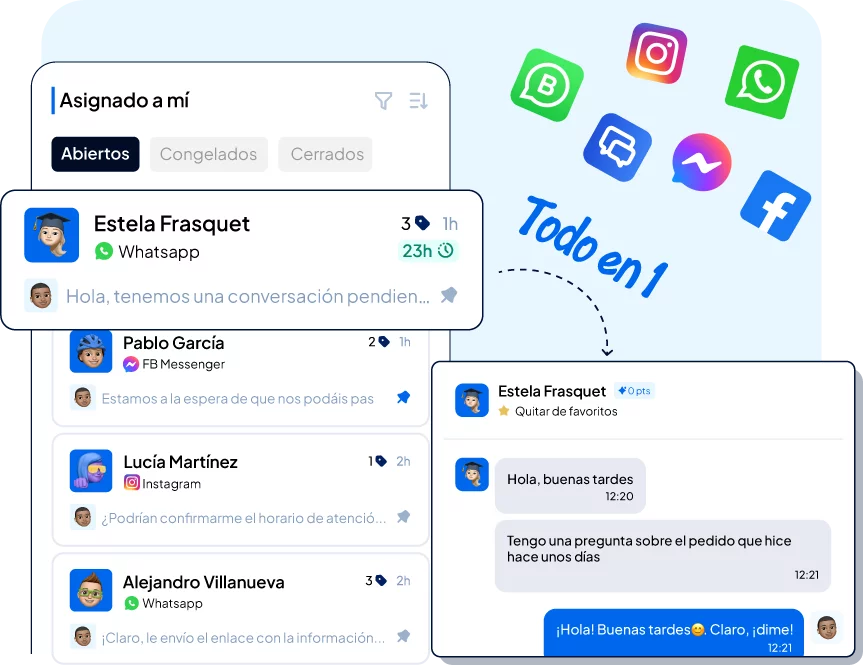
In short, a WhatsApp chatbot connected to a CRM is what you need: it thinks, sorts and acts…which means more sales, less friction and a great customer experience.
How to create a WhatsApp chatbot in Clientify?
The good thing about creating your WhatsApp chatbot on Clientify is that it doesn’t require you to have either technical knowledge or a programming expert .
It is generated using a dashboard that allows you to design automatic flows, define conditions and boost responses with artificial intelligence.
Step 1: Access the chatbots builder from your Inbox
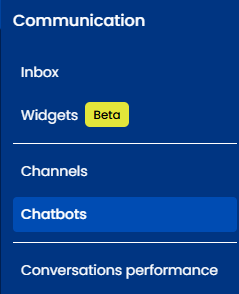
The first thing you need to do is log in to your Clientify account, select “Communication”, open the “Chatbot” option and click on “New chatbot”.
There you will be able to name the chatbot and select if you want the chatbot to be activated when a conversation comes from your ads.
Step 2: Design the conversational flow
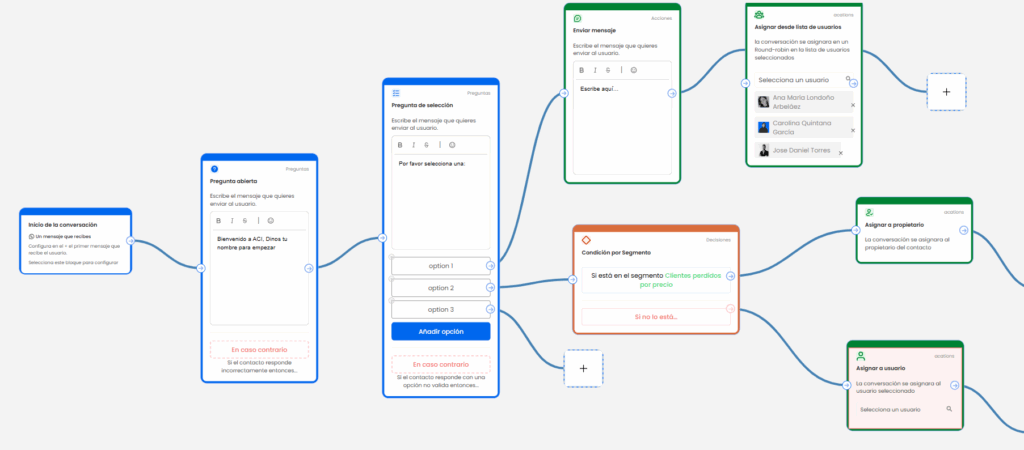
Once inside the visual editor, start building the conversation.
Each block represents a step within this chatbot: a question, an action, a decision and, optionally, you also have the option of the AI.
Your questions can be open-ended, multiple choice, list or interactive questions.
In the case of actions, the automatic flow can be to assign labels, assign contact to the specialist, send a message, activate, stop or end the conversation, among others.
Decisions focus on “if/then” conditions by field, segment and schedule.
In the case of AI, Clientify allows you to provide aknowledge base with information about your company so that the chatbot itself can design more complex and complete questions and answers.
In addition, depending on the user’s answers, the AI creates interactive forms to collect more relevant information.
And finally, you can tell the AI what the goal of this WhatsApp chatbot is, so that based on this, the chatbot guides the user to leave the necessary information.
Step 3: Connect the chatbot to your Inbox
A simple, but extremely important step. Go to your WhatsApp channel settings in Clientify and link the chatbot you have previously created.
Remember, the important thing about the WhatsApp chatbot is that it not only converses, but also collects and stores information in this CRM.
And the good thing about having everything integrated is that, every time a contact interacts, Clientify updates its file with tags, responses and lead scoring, which allows you to automatically segment according to the responses the contact has given, assign the contact to the right salesperson and trigger different types of automations (both internal and external).
In this way, your chatbot stops being a simple support channel and becomes an active marketing and sales tool.
Step 4: Activate and improve it whenever needed
Remember that, in addition to linking this chatbot to WhatsApp, Clientify also allows you to link it to your Instagram and Facebook channels.
So when you go to Clientify’ s conversation reports, you will be able to see how many conversations were generated by your bot, how many opportunities or leads were created, how long the response time was, etc, not only from WhatsApp, but from all your other channels.
And it is precisely with this data that you will be able to adjust texts, times and conditions to improve performance.
Best practices and compliance: GDPR, WhatsApp templates and quality
A word of advice… even if automations are key, don’t forget to always design your communications according to your company’s ethics and legal factors.
Here are the essential keys to keep in mind:
- Complies with the GDPR:
Informs that the user is talking to a bot and ensures the storage and use of their data with explicit consent. - Use only the WhatsApp API:
Avoid unverified solutions as then META may block your phone number. - Design your templates in advance:
WhatsApp requires that proactive messages (not reply but the first message your company sends) be sent using pre-approved templates. Take care of tone, language and clarity. - Maintain a reasonable frequency:
Don’t saturate with repetitive messages or constant promotions. Automation should not turn into spam. - Review the flows and use them frequently:
What works today may not work a few months from now. Adjust texts, buttons and rules according to the actual feedback you have obtained. - Measure the quality of your responses:
Monitor indicators such as delivery rate, reading and customer satisfaction to maintain an optimal level of service.
Frequently Asked Questions
1. What is the difference between a WhatsApp chatbot and WhatsApp Business?
WhatsApp Business is the professional version of the business app, while the WhatsApp chatbot is an additional functionality that automates responses.
You can use them together: the chatbot responds automatically and, when necessary, transfers the conversation to a human agent.
2. Do I need to have an API to link my chatbot?
You can create your AI chatbot directly from Clientify and then connect it to your WhatsApp Business.
What you need an extra API for is to connect, to Clientify, chatbots that you have generated with other platforms externally.
Can I connect my chatbot to other channels besides WhatsApp?
Yes, Clientify allows you to use the same bot on multiple channels: Instagram or Facebook Messenger, ensuring a consistent experience for your customers.
4. How can I make my chatbot sound more human?
Personalize the tone of your messages, use variables with the customer’s name and activate the option of intelligent responses with AI.
This way you will be able to offer a more natural, empathetic and context-sensitive conversation.
5. What if the chatbot does not understand a question?
You can set up messages such as “I didn’t understand your question, do you want me to refer you to an agent?” and activate automatic assignment to the corresponding team.
This keeps the conversation flowing without frustrating the user.
6. Is it legal to automate WhatsApp conversations?
Yes, as long as you comply with the GDPR and use official providers.
Clientify complies with European data protection standards and hosts the information on secure servers within the EU.
Conclusion
A chatbot is no longer a simple customer service tool…today, a WhatsApp chatbot is a process accelerator, a sales assistant and a satisfaction generator.
And it is precisely when you connect it with a CRM like Clientify that the real potential appears: every conversation becomes key information where you know who is writing, what they need and when to act.
Take advantage of our free free trial, design your questions and answers, and empower it with artificial intelligence, so you can respond in the best way but without losing that human touch that your customers value so much.