

Have you ever thought about how you communicate with your customers? In general, we think that communication with customers is only about answering messages. But nowadays it goes much further than that.
Communication with clients is the way you speak, write, listen and create… it’s everything that conveys your image and generates a real connection and experience; that makes your clients choose you and remember you.
And since it’s not just about being present, in this guide I want to show you how to move from a messy communication to an omnichannel strategy, where email, WhatsApp, phone and RRSS work together…and all thanks to a CRM.
Subscribe to Clientify’s blog
Do you like marketing, automation or just seeing how other people do things right? Then subscribe.
Every week we send you what we would like to receive: direct and actionable content.
Key ideas
- How to achieve consistent communication between all your channels and teams.
- How to integrate WhatsApp, email, chat, networks and telephony in one system
- Leverages AI and automation to personalize messages without losing the human touch
- Why playbooks within CRM help to standardize processes without losing flexibility.
How to achieve consistency in customer communication
As we said before, communication with customers is no longer just about answering a query or sending a promotional email.
Today, communication is used to build a two-way relationship, where each message reinforces trust and accelerates conversion.
And yes, today’s customers expect super-fast, simple and clear answers, but what’s the point of answering in this way if the messages are not consistent?
But be careful, it is not only a coherence between what you say in networks, what you answer by WhatsApp or what you transmit in every interaction… it is the coherence with which your whole company speaks.
And that is precisely why a CRM is so important. A CRM that centralizes every interaction, conversation, purchase, interest; and that all that history allows any member of your company to respond and pick up the thread of the conversation without missing any information.
Strategies to manage all your contact channels
What channels do you use to communicate with your customers? Do you control when and how you use each of them?
Always remember that the important thing is not to be everywhere, but to use the right channel according to each customer’s moment of contact. Knowing the strengths of each channel and how to integrate them into the same system is what allows you to provide a consistent, fast and personalized experience in each interaction:
WhatsApp Business: the most direct and close channel
We know that WhatsApp is the channel where customers already are. They spend a lot of hours with this application and that makes this channel a huge opportunity when it comes to creating a real relationship with them.
This communication channel is ideal for confirming appointments, sending quotes, sharing catalogs or even resolving doubts in seconds.
In addition, connecting WhatsApp Business API with a CRM allows you to centralize all conversations in a single inbox, tag conversations, assign them to agents, measure response times, automate messages and respond after hours.
Having everything unified on the same platform allows you to respond quickly and consistently, even when messages are handled by different people in your company.
Take advantage of the automatic flows of this channel to optimize communication, send personalized messages and launch a loyalty strategy that keeps the relationship with your customers alive.
Email: the channel to inform, educate and build loyalty
Although today there are many other channels, emailis still the most professional channel to maintain a structured communication with your customers.
It works especially well for sending confirmations, proposals, newsletters or follow-ups after a meeting.
As with WhatsApp, the good thing about having everything unified in a CRM, is that it allows you to automate email sequences customized to the behaviors, interests, purchases of contacts.
In addition, it allows you to measure key metrics such as open rate, clicks and responses, giving you accurate data on the interest and maturity of each contact.
Use email to reinforce your brand. With an eye-catching design, a clear message and a CTA you can share news, promotions or valuable content to keep your customers informed and connected.
Live Chat: the ideal tool for converting while surfing the web
Live Chat is the perfect channel to convert visitors into qualified leads at the exact moment they are interested.
Think about this: a user who is browsing your website and writes in the chat is because he already has an intention: he is comparing, resolving doubts or evaluating a purchase. And that’s why every minute counts.
With a CRM like Clientify you can create your own live chat, automatically assign the chat to the right agent and record the conversation in the same Inbox as the WhatsApp.
And the beauty of it is that, by providing an immediate response, it enhances the customer experience by making the customer feel that someone is available when they need them, leading to greater trust and retention.
IP Telephony: the conversation that humanizes your brand
Yes…I know that today there are many people who don’t want to talk on the phone: either because it seems like a waste of time, or because they are afraid to interact with a person who they don’t really know who they are.
But this means of communication remains the most effective channel for resolving complex or high-value issues. Nothing replaces voice when it comes to negotiating terms and conditions, managing incidents or providing personalized support.
And now the key is to integrate it with your CRM, which means that every call is recorded along with the customer’s complete history.
In addition, with Clientify IP telephony you can make and receive calls directly from the CRM, record them, analyze them and measure service times, which gives you a 360° view of the customer and allows you to identify patterns or points of improvement in your service.
Social networks: where the conversation begins
In the past, social networks were used as a channel for advertising and branding.
But today they have become the most direct channel of conversation. Every comment, message or reaction is an opportunity to connect and deliver value in real time.
And since the challenge is to respond quickly and with context (without having to jump between different applications), Clientify allows you to integrate your Instagram and Facebook profiles so that all messages arrive in this single inbox, preventing queries from being lost along the way.
| Channel | Primary Purpose | Main Uses | Advantages of integrating with CRM |
| WhatsApp Business | Direct and close channel for immediate attention and personalized follow-up. | Confirm appointments, send quotes, share catalogs, answer questions and automate after-hours responses. | Centralizes chats in a single tray, assigns conversations per agent, measures response times and allows automatic flows and personalized messages. |
| Professional channel to inform, educate and build loyalty. | Sending proposals, confirmations, newsletters and post-meeting follow-ups. | Automate customized sequences, measure opens and clicks, analyze behavior and integrate brand-consistent design, tone and CTAs. | |
| Live Chat | Real-time conversion channel during navigation. | Resolve doubts, accompany purchase decisions and capture qualified leads. | Integrates with CRM to record conversations, automatically assign agents and enhance the experience with immediate responses. |
| IP Telephony | Human channel for complex or high-value transactions. | Negotiations, incidents, personalized support and priority attention. | Calls are recorded in the CRM, with recordings, analysis and service metrics that provide a 360° view of the customer. |
| Social networks (Instagram and Facebook) | Real-time conversation and attention channel. | Respond to direct messages, comments or mentions, generate interaction and capture leads. | They are integrated to the omnichannel Inbox to attend messages from a single place, avoiding losing queries and maintaining consistency between platforms. |
Personalization and centralization: keys to customer communication
Be careful, because talking to your customers is not the same as communicating with them.
An effective customer communication strategy seeks to build trust, anticipate needs and offer a good experience… regardless of the channel or the person who attends.
Therefore, keep in mind these practices that make the difference in the relationship between your company and your customer:
Personalization with AI and context from the CRM:
Imagine how frustrating it is for the client to have to repeat his case every time he changes agents.
Well, that’s why a CRM centralizes all the history of messages, calls, notes, meetings, tags, etc.
And if you also use AI to analyze all that information and generate a summary of interactions, your team can respond quickly, consistently and in a personalized way, improving the customer experience and saving valuable time.
Personalization is no longer about including the customer’s name…it’s about including it and remembering what they said last time to anticipate what they need now.
A single message tray: Inbox
Has it ever happened to you that a customer writes by WhatsApp and then by email because he didn’t receive an answer? I’m sure you have.
And that’s exactly what happens when channels are disconnected and each agent manages his part without seeing the big picture.
As we said before, a unified Inbox avoids this chaos by centralizing WhatsApp, social media, email and chat messages in a single inbox.
Thus, all agents see the complete history and can continue the conversation without losing context .
In addition, it allows conversations to be routed between marketing, sales, support, billing, etc. teams according to the type of response or doubt expressed by the customer.
Implements a customer communication strategy
Communication with your customers is a key step. And although at first it may seem a bit chaotic, implementing a tool and building a system where each channel is connected and each message is tracked, allows you to have everything under control, provide consistent and personalized responses, and strengthen the relationship with each customer in a consistent way.
That’s why I put together this step-by-step…to help you put all this into practice:
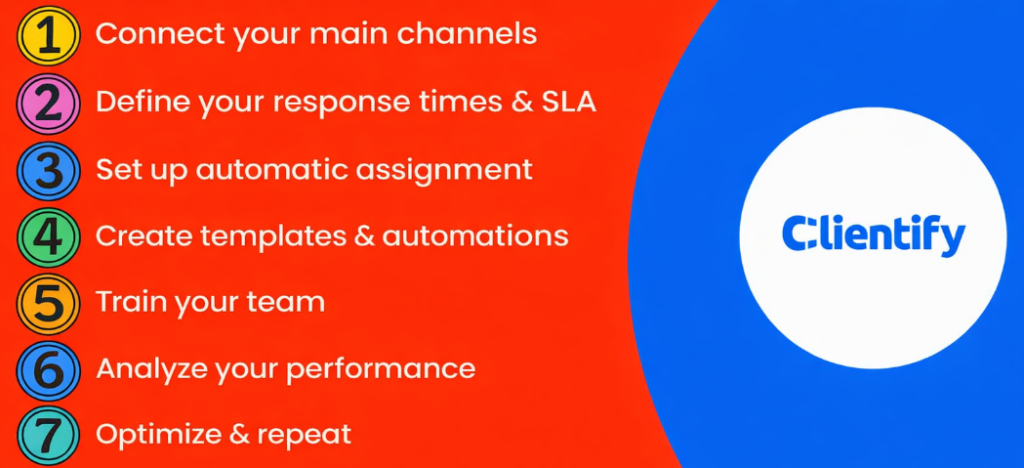
Step 1: Connect your main channels
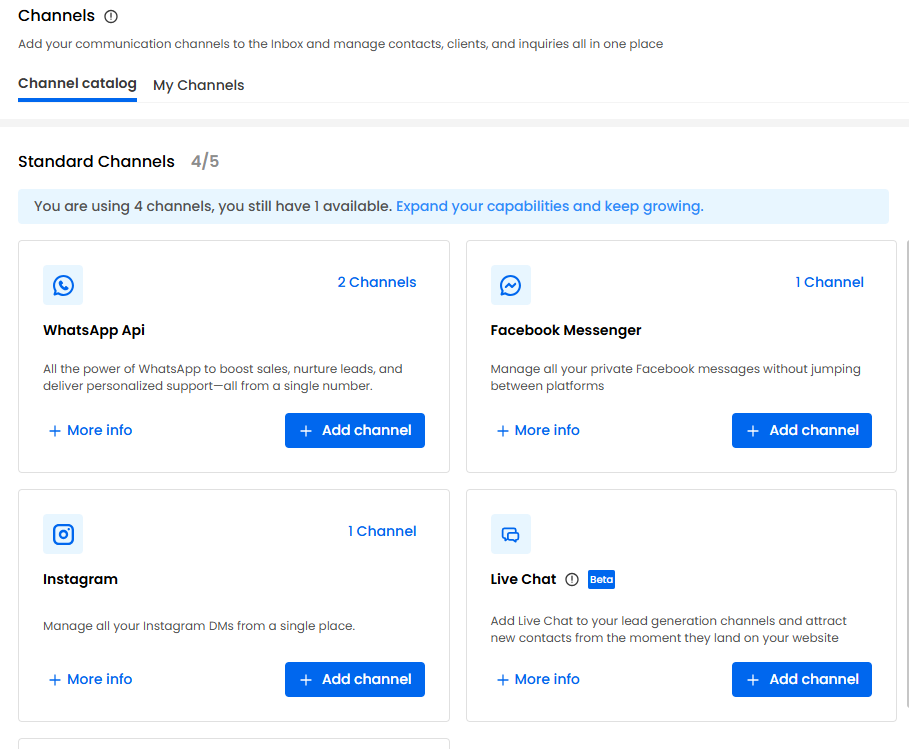
The first thing you have to do is to connect all your Whatsapp, email, network and telephony channels to the CRM.
Once they are integrated, you will start to see, in real time, how messages, calls, e-mails and queries are recorded in the contact’s file, which helps to have all the information more organized and prevents each team from giving inconsistent answers.
Step 2: Define your response times and SLAs
Before you start measuring results, you need to establish your service level objectives (SLA): how long it is acceptable to take to answer or resolve a query.
For example, you can set a FRT (First Response Time) of less than 10 minutes for WhatsApp and chat, and 2 hours for email.
This way, your team will know exactly what to respond to first and you can guarantee fast and consistent attention regardless of the channel or time of day.
Step 3: Configure automatic assignment
Think how organized your communication will be, as long as a CRM intelligently assigns the different messages.
Define, based on the customer’s response, who handles each type of conversation: sales, support, marketing or billing. And for these cases, the CRM can automate this process with rules based on keywords, channel of origin, type of contact, etc…
This is how you avoid delays, reduce manual work and ensure that each customer receives attention from the right area in the shortest possible time.
Step 4: Create your templates and automatic flows
If you want to offer fast and professional communication, then you should design different types of templates.
With CRM you can create messages for frequently asked questions, after-hours greetings, confirmations, automatic follow-ups; customizing them with variables such as name, company or product, so that the response offers proximity without losing agility.
In addition, you can build automatic flows that are triggered by events, such as the acquisition of a new contact, a pending appointment or an unopened email.
Think…the more repetitive tasks you automate, the more time your team will gain to focus on valuable conversations that actually drive sales or loyalty.
Step 5: Train the team
Yes, this tool is key…but even more key is that your team knows how to use it.
Spend time training your team in the use of CRM, explaining how to tag conversations, record notes, use templates or design automatic flows.
It is also important that they understand the why behind each process: to respond faster, provide consistency and maintain customer context.
I assure you that a well-trained team improves response times, conveys professionalism and generates confidence in every interaction.
Step 6: Analyze your performance
Once everything is in place, it’s time to measure.
From the CRM you can access different reports that show the performance of channels, agents, campaigns, etc.
And it is these reports that will help you detect bottlenecks and find opportunities for improvement.
Step 7: Optimize and repeat
Take the time to review CRM data, analyze which messages generate the best results and adjust flows or templates according to your customers’ behavior.
Remember that small adjustments, such as modifying a response or adding automation, can make big improvements in satisfaction and efficiency.
Success lies in listening to your customers, measuring your performance and evolving with each conversation.
Smooth and coordinated communication thanks to playbooks
Having a clear customer communication strategy does not mean that all teams must communicate in the same way. Each area of your company has its own objectives, timing and tone…surely the marketing team is looking to capture interest, sales needs to close opportunities and support needs to focus on resolving incidents and building loyalty.
Therefore, creating specific playbooks per team, and within the CRM, allows you to standardize processes without losing flexibility.
- For marketing, you can create a playbook that focuses on lead generation and nurturing.
For this, you have to create email or WhatsApp templates and design flows to be sent automatically to all the people who leave their data in a contact form.
This way, when someone downloads a guide or signs up for a newsletter, the CRM can send an automatic sequence that informs, educates and prepares the lead before moving on to sales, so the team doesn’t have to sit down to write from scratch every time a contact is interested in your company’s products or services.
- If you are in the sales team, playbooks can help you with follow-up. Design custom templates and define the automatic sending flow according to the stage of the funnel the prospect is in.
Thanks to these flows, each salesperson knows when to contact, what message to use and what information to include to move the conversation forward. In addition, by recording the entire history in the CRM, coordination between the different members of the team is facilitated , avoiding duplication of efforts and ensuring that no one steps on each other’s toes.
- For the support team, playbooks are essential in maintaining quality and response times.
You can create automatic flows that send confirmation messages or refer complex queries to the most appropriate agent.
Use standardized templates that maintain an empathetic and professional tone, ensuring that every customer receives prompt and similar attention no matter who is serving them.
So… what is the benefit of designing these playbooks? Smoother communication, better served customers and a more efficient business, where all conversations are managed from the same place, with the same tone and common goal.
Do it all with Clientify: engage, automate and close sales
Enter for free in the space where Clientify users share tips, help each other and learn how to sell more with AI.
Share your doubts and learn with others who are also growing their business.
Frequently Asked Questions
1. What is the difference between customer service and customer communication?
Customer service is reactive: it focuses on resolving doubts or incidents when the customer raises them.
In contrast, customer communication is proactive and continuous. It seeks to build relationships, educate, anticipate needs and maintain the connection even when there is no active consultation.
This difference marks the transition from a company that “responds” to a brand that “accompanies” its customers.
2. Which communication channel is most effective?
It depends on the type of business and the timing of the process.
For example, WhatsApp and live chat are ideal for immediate attention; email is best for detailed information, and social networks are key for building trust.
The key is to combine channels, centralize them in a CRM and maintain the same tone and context in all of them.
This way you achieve a consistent experience no matter where the conversation starts.
3. How to measure customer satisfaction in communication?
The most useful indicators are the CSAT (Customer Satisfaction Score) and the NPS (Net Promoter Score).
Analyzing these data allows you to detect patterns, evaluate the quality of service and measure the evolution of the relationship with the customer.
A good follow-up helps you to prevent customer churn and to reinforce the strengths of your communication.
4. When is it convenient to use automations?
When message volume is high or response times become difficult to control manually.
Automations are ideal for after-hours responses, reminders or frequent inquiries.
Properly configured, they maintain personalization and a human tone, without making your customers feel like they’re talking to a robot. And, above all, they free your team from repetitive tasks so they can focus on what really generates value: strategic conversations.
5. How to improve internal communication to better serve customers?
The basis is that all teams share the same information.
A connected CRM allows marketing, sales and support to work on the same conversation history, avoiding duplication or contradictions, and SLAs and automatic alerts help coordinate attention and define clear responsibilities.
When your team communicates well with each other, the customer experience automatically improves.
6. What common mistakes should I avoid?
The first is to respond late or without context; the second is to change the tone depending on the channel or agent. It is also a mistake not to record conversations or not to follow up afterwards. Every unrecorded message is a lost opportunity to learn, analyze and improve.
And remember: consistency in tone and speed of response are the two variables that most influence the perception of your brand.
Think of customer communication as a strategy.
Communication with customers is not just about answering messages…it’s about creating relationships that last over time.
When every channel is connected, every conversation recorded and every response automated with meaning, the customer experience improves and sales start to grow.
And you do all this with a CRM like Clientify, which allows you to integrate your different communication channels in one place, manage all interactions in a consistent way and automate processes so that your team works more efficiently and customers always feel cared for.