
Having your entire database centralized in a single tool is a huge advantage to close more sales and get more customers.
But let’s be honest: managing leads is not about accumulating contacts, it’s about understanding how each person interacts with your business: which pages they visit, if they open your emails, if they click on your links, if they respond on WhatsApp or if they abandon a cart before buying.
This is the information that really tells you who is really interested and what follow-up you should do. And that’s why a CRM is what makes the difference: because it centralizes, organizes, connects and allows you to see the whole history of each person.
So before we get into processes, nurturing or scoring, I want us to start by understanding the basics…what a lead is and what it means to manage it well; because without that, no CRM or strategy works well.
Manage everything from one place: engage, automate and sell with AI
Forget loose tools, centralize communications, sales and marketing with Clientify.
Activate your 7-day free trial and scale without complicating your life.
What is a lead and what types of leads are there?
Let’s start at the beginning: a lead is not simply someone who leaves their data. A lead is a person who is at a specific point on the path to purchase. And understanding that point completely changes the way in which you accompany them.
There are cold leads that arrive out of curiosity. They saw your content, something caught their attention and they decided to leave their email. They are far from buying and need more education, more context and more reasons to move forward.
Then there are the MQLs, those leads that have been following you for a while. They open your emails, consume your content, interact more than once and show clear signs of interest.
And finally there are the SQLs, those who write to you to ask for prices, those who fill out more advanced forms or those who respond directly saying “I want more information”. These are the ones you have to deal with quickly because they are just one step away from becoming customers.
What does “lead management” mean?
Be careful, because as we said at the beginning: lead management is not about collecting contacts or answering forms as if nothing happened.
To manage leads is to accompany them, understand them and move them from one point to another in the commercial process according to what they do, what they need and what they show in their behavior.
It is a living, continuous process, where each interaction adds up: the page they visited, the email they opened, the message they answered, the quote they accepted or rejected.
All of this helps you make better decisions about what to tell them, when and through which channel.
In addition, when you manage your leads well, you stop working blind. You know who deserves your attention, who needs more information and who is ready to receive a sales call.
What are the stages of the lead management process?
Lead management is not a one-time event. It is done during a tour.
And the clearer you are at each stage, the easier it becomes to identify what your contact needs and what step your team should take.
And I leave you with a SPOILER: a CRM is key to help you sort out all that path, from the moment a lead enters until it finally becomes a customer.
Capture and registration of leads:
It all starts when the lead leaves their data through some channel. Today it can come from your website, from a landing page, from a Facebook Leads form, from your ecommerce, from a chatbot or even from an abandoned cart.
The important thing is that all this information is not scattered, but flows directly to the CRM.
When you connect your website, your ads and your digital channels to Clientify, each new lead is automatically created in your database and updated every time they interact with you again. This way you avoid duplicates, better organize information and have a unique record per person.
Initial qualification:
Once the lead comes in, it’s time to understand if it really fits with what you offer .
This is where you start to look at basic data: their country, the size of their company, the product or service they are interested in or the channel they came through.
A lead who comes looking for specific prices is not the same as someone who just downloaded a guide out of curiosity.
This first qualification helps you to separate the urgent from the important and to know with whom you should go deeper first.
Lead scoring:
Let’s face it…you can’t contact all leads with the same speed and effort.
And that is precisely why lead scoring exists: a feature that allows you to automatically add and subtract points to each contact according to their behavior with your company .
If they visited several key pages, if they opened or responded to an email, if they clicked on a link, etc… it all adds up. And the best thing about having it in a CRM is that you don’t have to guess, it automatically tells you who is “hot” and ready for your sales team to act.
Lead nurturing:
Just as not all leads are the same…not all leads move at the same pace. Some need more information, more confidence or more examples to make a decision.
Lead nurturing allows you to accompany them without overwhelming them, with email or WhatsApp sequences that add value, resolve doubts and bring them closer to the purchase little by little.
And a CRM like Clientify allows you to create different flows of automated sequences, so that leads receive the right content depending on where they are. This way, when they show a sign of interest, the system detects it so you canintervene at the right time.
Assignment to sales and follow-up until closing:
When the lead is already qualified and shows clear intent, it is time to pass it on to the sales team .
The CRM has the ability to automatically move the contact to the corresponding funnel, create the opportunity, log calls, leave notes and schedule reminders.
The good thing is that everything is recorded in your file, so that anyone in the team can retake the conversation without losing the context. Thus, once you enter into a negotiation, the salesperson is in charge of guiding you, along with a follow-up, until you make the final purchase decision.
Do it all with Clientify: engage, automate and close sales
Enter for free in the space where Clientify users share tips, help each other and learn how to sell more with AI.
Share your doubts and learn with others who are also growing their business.
How to manage your leads with Clientify CRM?
With today’s tools, managing leads doesn’t have to be chaotic.
When everything happens within the same CRM, every step fits together exactly so your team can move forward without anything holding them back.
Clientify is the all-in-one CRM that allows you to manage leads in the most organized, clear and efficient way.
Step 1: Connect your website, ecommerce and social networks to Clientify
The first thing you need to do is to connect all of your lead sources to the CRM.
By all I mean all: your website, your ecommerce, your Facebook and Google ads… everything.
So when you make this connection, every new lead automatically enters your database and every interaction is recorded without you having to lift a finger.
So if someone completes a form, abandons a cart or writes to you from Instagram, it will be reflected, in this CRM, in real time.
Step 2: Design forms, landings and chatbots that capture the key data.
Once you have the channels connected, it’s time to define what information you need to better understand and classify your leads.
And that’s why Clientify allows you to create forms, landings and chatbots with AI and from scratch, adapting questions, fields and messages according to your objectives, and then linking them to your website and campaigns.
The good thing is that you don’t need external tools or to be an expert in development: everything is built inside the CRM in a very simple and intuitive way.
And keep in mind that the better you formulate these initial questions, the clearer it will be later on what type of lead has come in and what path it should follow.
Step 3: Understand the contact’s timeline and their interactions
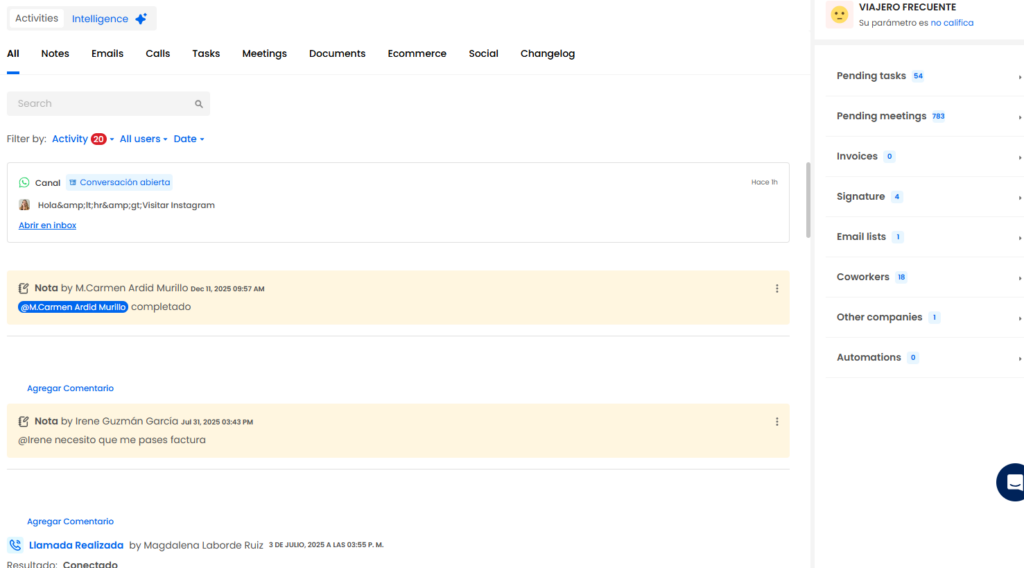
As we said before, all the person’s data is automatically transferred to Clientify generating a contact file.
And this is where everything appears: pages visited, emails opened, clicks, carts left halfway through, chats answered, quotes accepted or rejected, calls, meetings, comments… all organized in chronological order .
This tab is the functionality your sales team will use the most, so they know exactly who they are talking to and what that person has done before.
Step 4: Automate follow-ups, tasks and notifications for your sales team
Once you know who the lead is and what they are doing, the next step is to act. And this is where automations make the difference.
You can set up WhatsApp or email messages that are automatically sent based on lead behavior, create tasks for your team when someone shows interest, assign opportunities automatically, or receive alerts when a hot lead takes a key action.
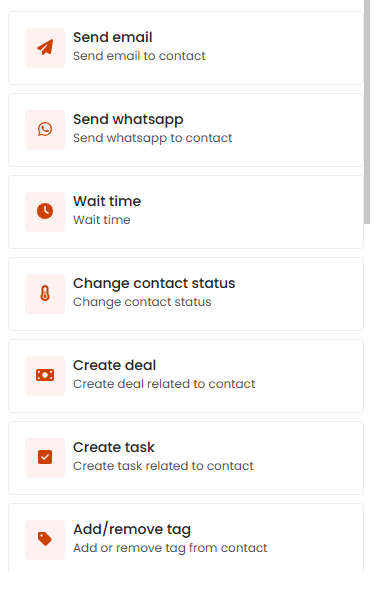
This ensures that no opportunity escapes you and that your team always arrives on time.
Step 5: Enter the different reports and measure results
Everything you do in Clientify can be measured.
You have reports that show whether your email and WhatsApp campaigns are delivered well, how many opens and clicks they generate, if there are any unsubscribes or bounces and how effective they were in moving leads between stages.
You can also analyze how many leads each campaign generated , see which channels and acquisition methods are generating the most contacts, verify how many opportunities each salesperson closed, how many conversations are open, etc.
Different reports that show you key data to make informed decisions, adjust your strategies and ensure that every action you take contributes to closing more sales and improving the experience and management of your leads.
Errors in lead management and how to avoid them with the help of a CRM
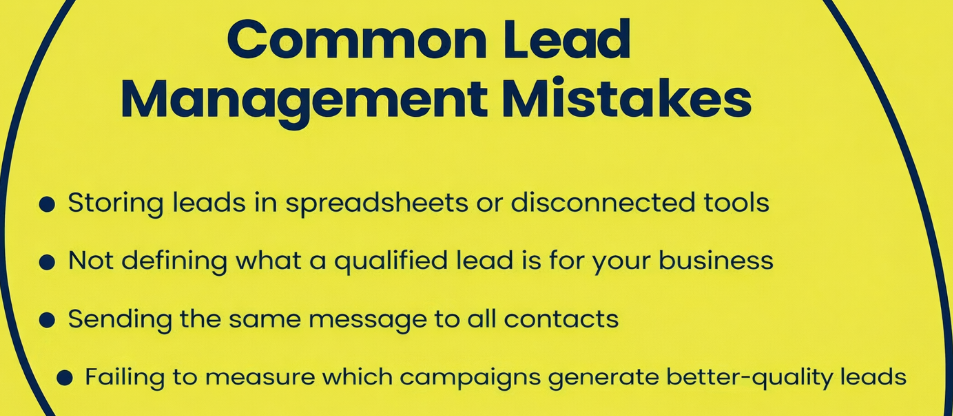
Now that it’s time to optimize your lead management process, it’s worth reviewing the mistakes most companies make; and correcting them, with a CRM, makes a huge difference in how contacts move through the funnel.
- Store leads in spreadsheets or disconnected tools:
When leads are spread out in Excel, isolated forms or inboxes, information gets lost and it’s impossible to follow up consistently. In addition, you end up with duplicates, different versions of the same lead and repeated tasks. By centralizing everything in a CRM, every interaction is recorded in one place and your team always works with the right information. - Not defining what a qualified lead is for your company:
If you’re not clear on what differentiates a cold lead from a sales-ready one, your team ends up prioritizing by intuition rather than data. This causes valuable leads to go cold and others without potential to take up unnecessary time. In a CRM you can establish clear criteria, statuses, tags and scoring rules so that they all follow the same standard. - Send the same message to all contacts:
Not all your leads are at the same time, nor have they shown the same interest, nor do they come from the same channel. If you send them the same emails or messages, communication loses relevance and response rates drop. With a CRM you can segment by behavior, origin, funnel stage or real interests and send more precise and effective messages. - Not measuring which campaigns bring the best quality leads:
Focusing only on lead volume can mislead you: a campaign may bring in a lot, but few that progress to purchase. Without data, it is impossible to know where to invest your budget. A CRM shows you which channel generates leads that open emails, request information, create opportunities and finally buy, allowing you to adjust your strategy with criteria.
FAQs
1. What are the main tools to capture and manage leads?
You can capture leads from your website, your ecommerce, forms, social networks, ads, chatbots or WhatsApp. The important thing is not only to capture them, but that all this information automatically reaches the CRM to be able to manage them without losing context.
2. What minimum data should I ask for in a recruitment form?
It depends on your business, but the basics are usually name, email or WhatsApp and a key question to help you know what the person is looking for. The rest of the information will be completed with their behavior, without the need to saturate it with fields.
3. What should I take into account to comply with GDPR when managing leads?
You need clear consent, inform what you will use the data for and allow the person to easily unsubscribe. By managing your leads from a CRM, everything is recorded and you can automate privacy processes.
4. Why is it not enough to have only the lead data and I need to see their interactions?
Think that a name, an email and a phone number tell you nothing about the real intention of that person. What really makes the difference in lead management is understanding how they interact with your business: which pages they visit, if they open your emails, if they click on your links, if they respond to you via WhatsApp or if they abandon a cart just before buying.
That information shows you where they are in the process, what they are interested in and what follow-up you should do. And you can only see that if you have a CRM that centralizes, organizes and connects all their history in one place.
5. How do you know which channel brings the best quality leads?
Don’t just look at how many leads come in, but how many progress to SQL, create opportunities and end up as customers. With Clientify’s reports you can see firsthand which campaigns convert and which ones just generate noise.
Conclusion
Lead management is not about having more forms, more campaigns or more contacts in your database… it’s about understanding who each person is, what they do, what they are interested in and where they are in their decision process.
When you work with a CRM that centralizes everything, shows you its path and helps you act at the right time, you stop chasing contacts blindly and start working with real opportunities.
The difference between filling the database and converting customers is in how you manage that process. And with Clientify, that path becomes much clearer, more orderly and predictable.
Start the 7-day free trial, see how each of your contacts behaves in real time and start transforming lead management into more sales.