

I understand that if you have not yet implemented a CRM in your SMB, implementing it may seem like a big leap… but think about it this way: when you start to grow, to have more customers and more communication channels, the information ends up dispersing and even getting lost.
Therefore, a CRM is a way to organize and professionalize your business. It helps you centralize all your customer information, track your sales opportunities and improve the attention you give at every point of contact.
And that’s exactly why I created this post… to tell you how to implement a CRM for SMEs quickly, cost-effectively and without headaches.
Subscribe to Clientify’s blog
Do you like marketing, automation or just seeing how other people do things right? Then subscribe.
Every week we send you what we would like to receive: direct and actionable content.
Key ideas:
- When is the perfect time to implement a CRM in your SMB?
- The essential steps to get your CRM up and running from day one
- What benefits you will notice in your sales and in the organization of your team
- The most common failures that hold companies back … and how to avoid them
When to implement a CRM in your SME?
Many companies believe that because they are “small businesses” they do not need to invest money in applications.
But when your business has several sales people managing opportunities, different communication channels open and more customers than you can follow up manually, then the problems start…contacts are duplicated, sales people forget to follow up, conversations are lost and you don’t really know at what stage each negotiation is at.
Do you see yourself in any of these situations? If your answer is yes… then let me tell you that the time has come to implement a CRM in your company.
And the best thing is that, just a few weeks after you start using it, you will notice the change: leads stop cooling off, communications flow more clearly and missed opportunities are drastically reduced.
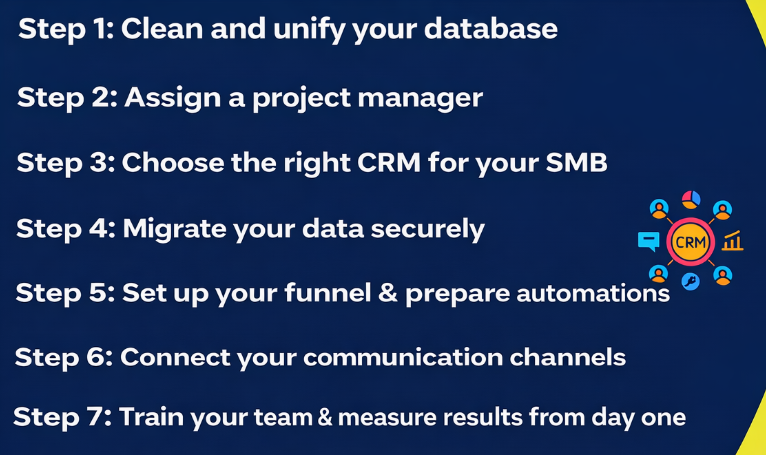
7 key steps to implement a CRM in your SME
Implementing a CRM successfully does not depend on doing it fast, but on doing it right.
That’s why I leave you with these 7 steps that will help you organize the process and get your CRM up and running effectively in no time.
Step 1: Clean and unify your database
Before you start working with a CRM, I recommend that you spend some time reviewing your contacts.
Eliminate duplicates, correct the personal information you have and make sure that each record has at least its name, email and phone number. The cleaner the database, the more reliable your reports and automations will be.
Step 2: Designate a project manager
Even if the CRM is used by the whole team, someone has to lead the implementation. That person must be in charge of defining the necessary data fields, validating the structure of the sales funnel and maintaining consistency in the information obtained from customers.
You don’t need to be a technology expert, but you do need someone who understands sales processes and has the authority to make decisions.
Step 3: Choose the right CRM for your SME
Keep in mind that not all CRMs are the same. SMBs should always look for an all-in-one platform with integrated communication, sales and marketing functionality.
It is also important that it has support in your language, and… why not ? why not? native integration with WhatsApp, email and a simple interface for your team to adopt it quickly.
Step 4: Migrate your data securely
Migration is usually one of the scariest steps, but if you plan for it, it doesn’t have to go wrong. Back up all your information before moving it and test with a small group of contacts. Make sure that fields (such as name, company or phone number) match exactly between your old records and the CRM.
And when you see that everything fits perfectly and that the small migration was done correctly, then you are ready to import the rest without any problems.
Step 5: Configure your funnel and set up your automations
Defines the stages of the commercial process: new lead, contact made, proposal sent, negotiation and closing.
Then, create simple automations to help you maintain the level of attention: have the system send a thank you email every time a contact leaves you their contact information or generate a task for the salesperson if an email has not been opened 3 days after it was sent.
Step 6: Connect your communication channels
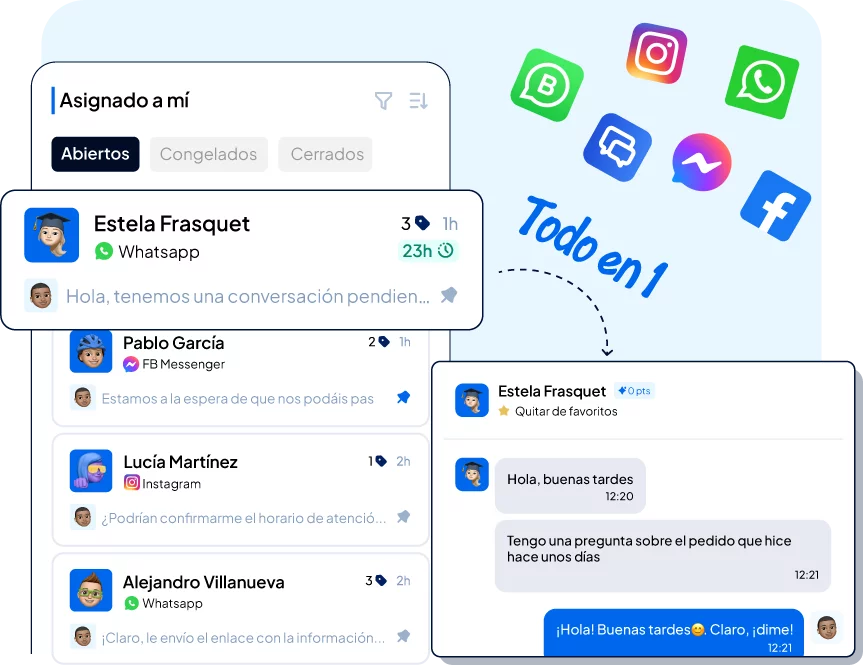
This is one of the most important steps. Link your WhatsApp Business API number, your corporate email, your IP telephony, your online store and your RRSS. This way, all conversations will go to the same place.
In fact, with an all-in-one CRM it doesn’t matter if they write to you via chat, reply by email or call you: everything is recorded in the contact’s file .
A key functionality that helps you improve your attention and analyze which channel converts the most.
Step 7: Train your team and measure results from day one
Remember that a CRM only works if people use it. Dedicate some sessions to explain how it works and show with real examples how to automate tasks or how to visualize the won opportunities.
And of course, don’t forget to establish the metrics you will track: opportunities created, conversion rate, closing times, tasks completed, etc.
If you implement your CRM with conscience and following each one of these steps, I am sure that in a few weeks you will see how everything flows in a more orderly manner and how everyone works in a much more efficient and coordinated way.
Benefits of implementing a CRM in your SME
Yes, implementing a CRM in your SMB is a big effort…but it really pays off: more agility, fewer errors and a team that works better connected.
See how much you can gain by having your data and processes centralized.
- You respond faster and with better context:
The time it takes you to reply to a new lead drops dramatically, because you no longer have to search for conversations in different places. All emails, WhatsApp messages or calls are centralized in one place. In many SMEs, this simple change reduces the First Response Time (FRT) from hours to minutes. - Increase the conversion of leads to opportunities:
When your sales reps or yourself know exactly where each contact is at, it is easier to follow up and close sales. - Manual tasks and forgetfulness are reduced:
Automating reminders, follow-ups or mailings frees up a lot of time. Repetitive tasks no longer depend on people’s memory but on the system. This reduces errors, improves the sense of control within the team and even increases customer retention by up to 15%. - The team gains visibility and collaboration:
Everyone sees the same dashboard: who is managing each opportunity, which customers are in negotiation or what tasks are pending. This transparency avoids overlaps and improves coordination between sales and customer service. - You have real data to make decisions:
Instead of relying on feelings, you can measure which channel brings more opportunities (WhatsApp, RRSS, web), how long an average sale takes or what percentage of leads are lost. A great starting point to optimize processes and grow your sales based on accurate data. - It shows in customer satisfaction:
When a customer receives a consistent response no matter who they talk to, they notice it. CRM allows for continuity even if the salesperson changes or if the customer contacts through another channel. As we said above, this consistency and coherence is one of the biggest drivers of customer loyalty.
| Main benefit | What improvement | Observable impact on the SME |
| You respond faster and with better context | First Response Time (FRT) and Initial Response Time (FRT) | FRT drops from hours to minutes by having all conversations (WhatsApp, email, calls) centralized in one place. |
| Increase the conversion of leads to opportunities | Commercial follow-up and sales closings | Knowing where each contact is at facilitates follow-up and increases closed opportunities. |
| Reducing manual tasks and forgetfulness | Task automation and operational efficiency | Reminders and follow-ups are executed automatically, reducing errors and improving customer retention by up to 15%. |
| The team gains visibility and collaboration | Internal coordination and pipeline management | Everyone sees the same dashboard with tasks and opportunities, avoiding overlaps and improving communication between sales and service. |
| You have real data to make decisions | Commercial control and analysis | You can measure which channel generates the most leads, how long an average sale lasts or where opportunities are lost. |
| It shows in customer satisfaction | Experience and loyalty | The customer receives consistent responses from any channel, which increases trust and strengthens the long-term relationship. |
Do it all with Clientify: capture, automate and close sales
Centralize all your communication, sales and marketing in one place. Try Clientify free and feel what it’s like to scale your business with AI without relying on experts.
How to plan the first 90 days of your CRM implementation?
You already know that implementing a CRM doesn’t happen overnight…but it shouldn’t be a never-ending project either. So take the first three months to plan, test and adjust, until the whole team feels comfortable and the system starts to work naturally.
- As mentioned in the implementation steps, during the first 30 days, focus on the preparation and base configuration.
This is the time to clean the database, import contacts, create sales funnels, define custom fields and set up basic automations.
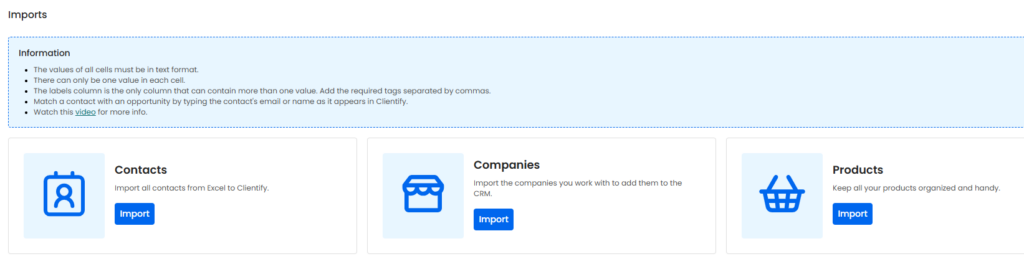
Don’t worry about measuring sales results; focus on getting all the information organized and getting your team to start recording their activities within the tool.
- The consolidation phase should begin between days 30 and 60.
Now that the CRM is up and running, it’s time to integrate the communication channels: link your website, connect your WhatsApp Business number and integrate your corporate email. These connections are a before and after…from one second to the next all conversations start flowing automatically into the CRM.
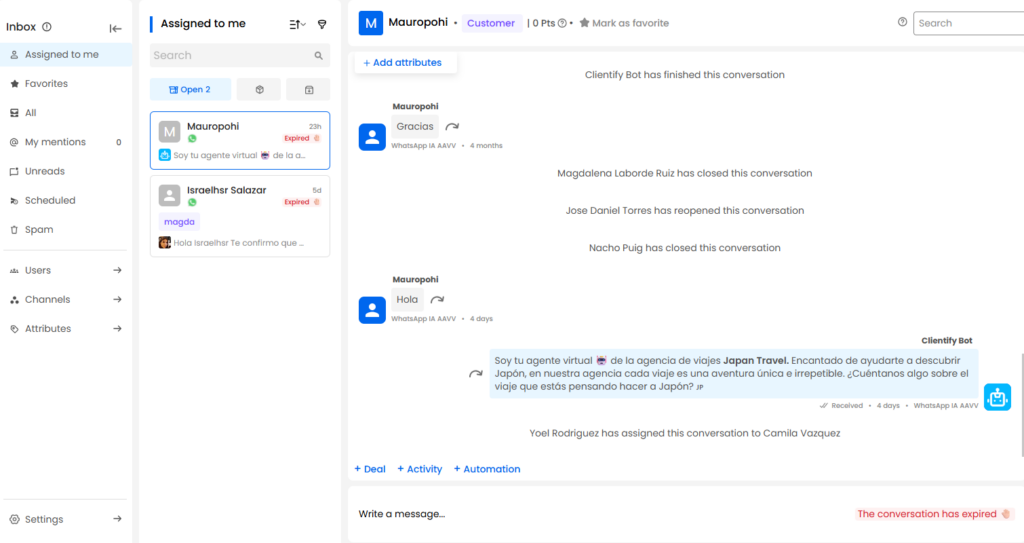
That is why it is very important that you plan some training sessions to explain and show how this now fully integrated system works.
- And finally, between days 60 and 90, comes the optimization and analysis phase. Now that the team is using the system and the channels are integrated, it is time to measure.
Analyze your conversion rates and analyze the complete funnel: how many leads enter, how many advance and how many close. See if there are stages where opportunities stagnate, check if there is missing information or if you can automate some more steps.
And keep in mind that this stage also serves to introduce improvements: new steps in the negotiation process, possible information fields and new automatic processes.
Think that the objective of these 90 days is to have a stable tool that provides valuable data and works as the basis of your commercial process.
Common mistakes when implementing a CRM for your SME
You have already seen that implementing a CRM is not difficult, but it is important to be methodical. That’s why, when it comes to implementing this tool, many companies stagnate.
And while most people think it’s a platform problem, it’s actually due to typical implementation errors:
- Wanting to do everything at once:
And yes, with the amount of functionalities that CRMs have, there are many teams that try to automate all their processes from day one; and unfortunately this ends up being chaos.
We recommend starting with the basics: sales funnel, contacts and tasks. And once the team masters the basics, you can start adding campaigns, reports and other integrations.
- Do not clean the data before importing:
If you migrate a base with duplicates, errors or obsolete contacts, the CRM will inherit those problems and multiply the confusion.
Remember the first implementation step: spend time debugging and consolidating information.
- Choosing a CRM that is too complex:
If the platform requires super advanced technical configurations and lots of weeks of training, then I’m sorry to tell you that you hired a CRM that is not the right one.
You are looking to implement a CRM in your SMB that is intuitive, with support in your language and scalable modules.
- Not including the rest of the team from the beginning:
It’s very simple…if no one understands or uses the CRM, then the CRM is useless.
Explain to your team why it is being implemented, how it will save them time and what benefits they will see in their day-to-day. It is imperative that the team understands the purpose of this new tool so that they begin to embrace it on their own.
- Lack of follow-up after launch:
Think of all you spent if you just set up the CRM and then left it abandoned out there.
Schedule weekly or monthly reviews to see what’s working, what’s not and what can be automated. Continuous improvement is what turns a CRM into a real competitive advantage.
| Common error | What happens | How to avoid it |
| Wanting to do everything at once | Trying to automate all processes from day one generates chaos and confusion. | Start with the basics: sales pipeline, contacts and tasks. When the team masters the basics, add campaigns and integrations. |
| Do not clean the data before importing | Migrating duplicate or outdated contacts causes the CRM to inherit the mistakes of the past. | Spend time debugging and consolidating your database before importing. This is the first step to a reliable system. |
| Choosing a CRM that is too complex | Advanced configurations and a long learning curve slow equipment adoption. | Choose an intuitive CRM, with support in your language and scalable modules that adapt to the growth of your SME. |
| Not including the rest of the team from the beginning | If people don’t understand why CRM is used, they won’t adopt or upgrade. | Involve your team from the start. Explain real benefits and how the tool will simplify their work. |
| Lack of follow-up after launch | Without regular reviews, the CRM becomes obsolete and the investment is lost. | Schedule weekly or monthly reviews to measure progress, detect improvements and keep the tool alive. |
Frequently Asked Questions
How long does it take an SME to implement a CRM?
It depends on the size of the team and the complexity of the business, but in most cases, an SME can have its CRM operational in 2 to 4 weeks.
The important thing is to proceed in phases: first the data loading, then the basic configuration and finally the automations. With good planning, you will see results in less than a month.
What minimum integrations do I need to get started?
If you are just starting out, you just need to connect your corporate email and your WhatsApp Business number. From there you can add IP telephony, social networks or an online store. The idea is that all conversations flow within the CRM, without relying on separate platforms.
How many people should use CRM within an SME?
There is no fixed number. Ideally, it should be used by everyone who has a relationship with the customer: sales, marketing and customer service. Even if you start with just the sales team, it is key that the whole company has visibility of the customer and can collaborate from the same environment.
What if my team is not used to using technology?
It’s completely normal. The learning curve for a modern CRM is short. With a hands-on training session and real-world examples, most users adapt quickly.
The important thing is to show tangible benefits: less manual work and more closed sales.
What should I have ready before implementing a CRM?
Before you start, it is a good idea to be clear about the information you are going to work with. Review your databases, clean up duplicate contacts and make sure that each record has at least name, email and phone number.
It is also useful to define your business process: what are the stages of a sale, who is involved in each phase and what tasks are frequently repeated.
If you come to CRM with that basis in order, the implementation will be much faster and more effective.
How do I know if my company is ready to take the plunge?
If you feel that you are missing opportunities, that information is scattered or that your team can’t follow up with all customers, then you already are.
Implementing a CRM in your SMB is not a luxury, it is an operational necessity to scale without losing control.
Conclusion
Did you see? Implementing a CRM in your SMB is no longer something unattainable.
With good planning, in just three months you can go from managing clients in Excel to having a platform that works for you.
And if you’re wondering where to start, Clientify is the ideal CRM… it’s just a CRM designed for SMBs that want to organize their communication, sales and marketing processes in a very simple way.
Try it free for free and discover how its features help you eliminate repetitive tasks, automate processes and spend more time on what really matters: growing your business and taking care of your customers.