

I’m pretty sure that if your database passed through several hands, Excel files, web forms, marketing campaigns or WhatsApp conversations, you have duplicate contacts.
Be careful, because it is not that you are doing something wrong, but this happens to all companies that start to grow and do not have a system that manages all the data.
What is a problem is that, when a contact is duplicated… you don’t even notice it. Imagine that, according to studies, companies have between 20 and 30% of duplicated data. And that is where small errors start to occur, which, over time, become a chaos that is difficult to fix.
So…how do you remove duplicates and merge contacts? Well…let me explain everything in this article.
Subscribe to Clientify’s blog
Do you like marketing, automation or just seeing how other people do things right? Then subscribe.
Every week we send you what we would like to receive: direct and actionable content.
What are “duplicates”?
Well, let’s start at the beginning: a duplicate contact is not just the same person appearing twice.
Think of it this way: the same lead enters through a form with their email, later writes via WhatsApp with their phone, and weeks later someone adds them by hand from a trade show or a sales call. This means you have three different records for one person.
And from experience I can tell you… this is how the chaos starts: a salesperson calls the lead without knowing that he already spoke to another colleague yesterday. The contact receives two identical emails from the same company and the automations are triggered badly because each record has only part of the information.
But when you look at the metrics, it all looks real: more contacts, more leads… but fewer sales.
And the worst thing about these duplicates is that they are not immediately detected. So when they are identified, many companies try to fix them quickly by deleting rows in Excel or even deleting contacts without much analysis.
And that’s when valuable information is lost: conversation history, business notes, open opportunities or even data that no one remembers where it came from.
Why does Excel fall short to manage your database?
You know…a database is not just a list of names. It’s where you store everything you know about your contacts. From who they are, what they’ve asked for, when they talked to you, what they’re interested in, what stage of the decision process they’re in, etc.
And yes, Excel allows you to save contacts, sort them and apply quick filters. But the problem appears when the base starts to grow: leads come in from different channels, several people use it at the same time and you need more than just rows and columns.
In addition, Excel does not know that this email and phone belong to the same person, does not save call histories, emails or WhatsApps, does not warn if you are creating a duplicate, does not help you to unify information without risk, and mainly, does not protect the data.
That’s why CRMs exist… so that your database is organized, centralized and so that each contact is unique, even if they interact through several channels.
And the good thing is that when you manage your contacts from a CRM, duplicates are no longer a problem because this tool allows you to detect, review and merge them without deleting anything important.
How to detect duplicates in Excel?
You have already seen that Excel is not the best tool to manage your database…but if your company is just starting up, don’t worry, it also allows you to detect duplicate contacts.
- Remove duplicates: this is fast, but only works well if the data are identical; if not, you may lose important information.
- Conditional formatting: it is safer, shows you duplicates before deleting them and helps you detect formatting errors.
- Power Query (advanced filtering): better for large databases, but even if it sorts and reduces errors, it is still a temporary solution.
How to unify contacts in Excel?
This step is key because this is where you start to see the difference between having contacts and managing them.
Keep in mind that when the same contact appears with different data (same email but different phone number), Excel does not make decisions for you. In these cases you are in charge of reviewing row by row to define which will be the main contact.
In addition, everything is manual: copy the missing information (phone, company, notes), delete the excess row and, above all, be confident that you have not lost any important data in the process.
On the other hand, Excel only works with single data: it does not keep the history of the contact, it does not register sent emails, calls, conversations or previous follow-ups… Thus, when there are duplicates with different information, control becomes much more difficult.
Therefore, unifying contacts in a correct way implies not only joining cells, but also keeping all the history and the complete context.
What should you consider when detecting and merging duplicate contacts in a CRM?
When you work with a CRM, in addition to managing contacts, you also manage relationships. Each contact represents a real person within a process. It doesn’t matter if it arrives by form, by WhatsApp, by a call or because someone creates it by hand: everything revolves around a single profile that is completed over time.
So when it comes to detecting and merging contacts in a CRM, the difference is huge.
As we said before…in Excel, cleaning means deleting. But in a CRM, cleaning means unifying without losing context. Here you don’t choose a row and delete the rest, but merge information to get a single complete and coherent contact.
However, the first thing you should ask yourself iswhy was a duplicate created? In most cases it is not an error, but rather that the contact entered by different methods of capture: a form, a WhatsApp conversation, an import or a manual creation.
After identifying the duplicate, it is always a good idea to review what information you have on each contact. But be careful, not only the basic data, but also the history of communications, notes, tasks, opportunities, etc.
Finally, you have to decide which will be the main contact, especially if there are different owners or active processes.
Did you see? The advantage of managing and unifying your database from a CRM is that you are not working blind. You can see everything before confirming and you know exactly what is going to happen; which allows you to clean it safely, without fear of deleting important information and make sure that the follow-ups are increasingly clearer.
Step by step: how to remove duplicates and unify contacts in Clientify”.
So…now that you know why unifying contacts in a CRM makes a difference, let’s see how to do it step by step with a CRM like Clientify.
Remember that, being an all-in-one CRM, it allows you to centralize contacts, their purchase history, communication, interactions and much more, allowing you to detect duplicates and merge them without losing context.
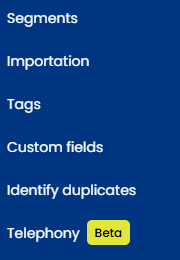
Step 1: Go to contacts and select “search for duplicates”.
The nice thing about working with Clientify is that you don’t have to guess who is a duplicate, but the system itself detects duplicates.
Step 2: Verify and compare the information of the records that are considered duplicates.
Once the CRM shows you the duplicate contacts, you have the possibility to open each of them to compare them and check if they are really the same person or if they just look alike.
Theimportant thing is that you look at fields such as phone, email, company, position, owner and any data that will help you decide which is the “good” contact to keep as the main one.
Step 3: Choose which will be the main record (the one that will remain as definitive).
Ask yourself which of these two contacts you want to be the definitive one in your CRM. Normally it will be the most complete or the one that is best connected to your business process.
Step 4: Review the preview before confirming the merger
To avoid any kind of scare, before merging them, check how the final contact will look like and what information will be preserved after the merge.
Step 5: Confirm the merging of records
Once you confirm the merge, Clientify unifies both contacts into one and from that moment on you no longer have, and no longer work with, two different versions of the same contact.
Step 6: Verify final contact
After merging, go to the final contact and make sure that everything important is left.
You see… with a CRM like Clientify you no longer need to go around copying, pasting and deleting data, rows and columns by hand.
What’s more, the great thing about this feature is that it allows you to organize your database without breaking it, even when there are already activities, follow-ups, automations and even campaigns underway.
Do it all with Clientify: capture, automate and close sales
Centralize all your communication, sales and marketing in one place. Try Clientify free for 7 days and feel what it’s like to scale your business with AI without relying on experts.
Frequently Asked Questions
1. Do I lose information when merging duplicate contacts?
No, as long as the merge is done from a CRM and not by deleting rows by hand. The purpose of merging is not to delete data, but to merge them into a single contact. Before confirming, you can review what information is retained and how the final record will look like. This way you avoid losing phone numbers, emails, notes or any relevant data.
2. What happens to the contact’s sent emails, calls or WhatsApps?
All that activity is part of the contact’s history. When you merge, the CRM unifies that history so you still see everything in one place. This is exactly what you can’t do in Excel, where the context is often lost or spread out in multiple places.
How do I detect duplicates if not all my contacts have email addresses?
Email helps, but it is not the only possible criterion. The telephone number, the name combined with the company or other fields can be used to identify duplicates. A CRM allows you to work with different identifiers, which is much more flexible than a spreadsheet.
Is it normal for duplicates to appear even if I already use a CRM?
Yes, it is totally normal when contacts enter through various channels such as forms, WhatsApp or imports. The difference is that in a CRM you can detect, review and merge them without losing information. The system does not 100% avoid duplicity, but it does give you control.
5. How often should I check my database for duplicates?
There is no need to do it constantly. With a regular check-up and a good catchment configuration, maintenance is minimal. The important thing is that the base is alive and tidy, not that you spend hours every week cleaning it.
Is it worth ordering and unifying contacts if my base is still small?
Yes, and in fact it is the best time to do it. When the base is small, the effort is less and the impact is greater. Ordering from the beginning prevents the problem from growing and becoming difficult to manage later on.
Conclusion
¿Y? You saw that having duplicatecontacts is not a failure… on the contrary. It is the consequence of your business moving, capturing leads through different channels and having several people interacting with the same contacts.
But remember that the problem appears when the growth of your company is not accompanied by a system that organizes it. So, if right now you are at that point where Excel no longer gives you peace of mind, but you are stillhesitating to take the leap… I confirm that starting to organize your base is the best first step.
With a CRM like Clientify, you no longer have to spend hours (or days) analyzing and deleting hundreds of rows and columns, but can safely unify duplicates, keeping all the history and focusing on what really matters: growing your business.