
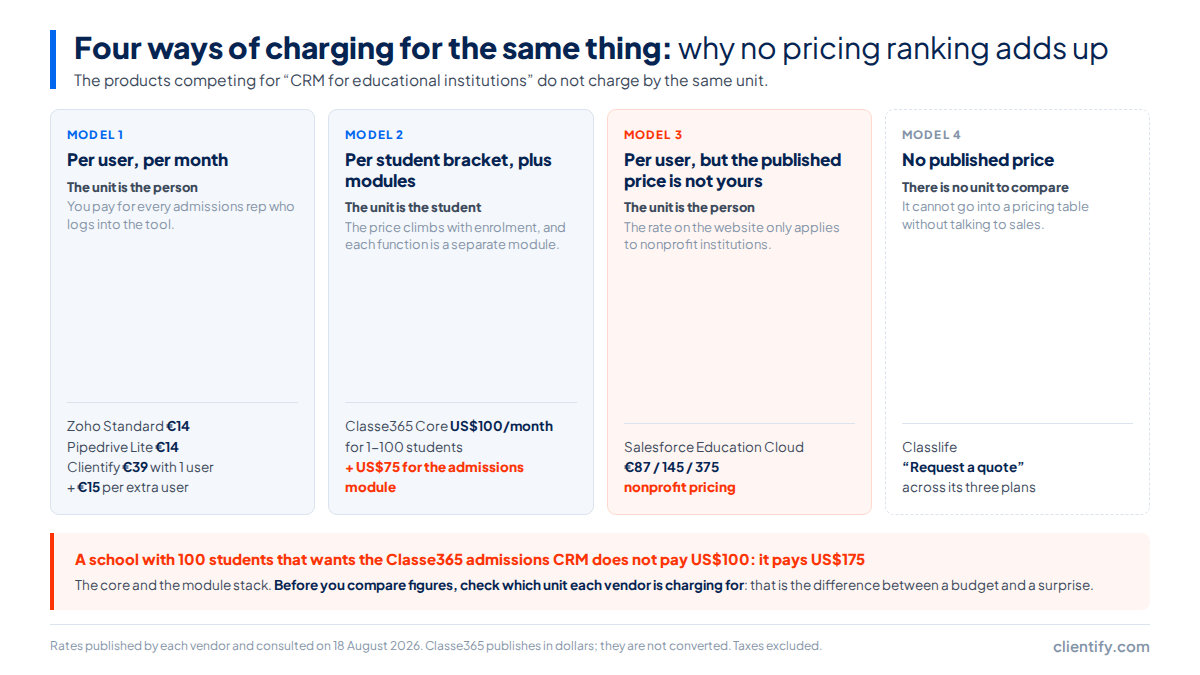
The products competing for an educational institution charge in four different ways, and that is why the comparisons never add up. Per user, per month: Zoho and Pipedrive from €14, HubSpot from €20, Clientify €39 with one user included. Per student bracket plus modules: Classe365, US$100 a month for up to 100 students. Per user on a rate that may not be yours: Salesforce Education Cloud, €87, the nonprofit price. And with no published price at all: Classlife, Alexia, Additio and Clickedu.
Why do comparisons of education CRMs never add up?
Anyone who has asked five vendors for a quote for the admissions department knows the scene. Five proposals arrive, you open them side by side, and there is no way to put them on the same spreadsheet. One talks about users, another about students, another about modules, and the fourth does not give a number at all.
It is not bad faith on the sales side. The sector sells four different products under the same label, and each one charges for whatever it suits them to measure. A general-purpose CRM charges for the person sitting in front of the screen, because its cost grows with the team. An education platform charges per student, because its cost grows with the academic database. And whoever sells to large institutions does not publish a rate at all, because their price is negotiated.
There is also a variable that does not exist in other sectors and here decides almost everything: who is going to use the tool. At a small institution, admissions is two people who also cover the front desk. At a mid-sized one there is an admissions team, someone in marketing and a head teacher watching the numbers. At a large institution the same system is touched by counsellors, programme coordinators and administration. The billing unit that suits you depends directly on that, because paying per user is cheap with three people and expensive with twenty, and paying per student is the other way round.
That is why this comparison starts with the billing unit and not with the products. Read that table first and the rest of the piece explains itself. Read it the other way round and any ranking looks rigorous when it is not.
| How it is charged | Examples and entry price | What is included | What it leaves out |
|---|---|---|---|
| Per user, per month | Zoho CRM €14 · Pipedrive €14 · HubSpot €20 list price · Clientify €39 with one user and €15 for each extra one | The full CRM for the team that uses it: lead capture, follow-up and admissions | The academic record. None of the four is an SIS |
| Per student bracket, plus modules | Classe365 US$100/month for 1-100 students, with brackets up to «1000+ students» | The core institution-management modules, with no published cap on users | The admissions module is charged separately: US$75/month and up to 2,000 form submissions |
| Per user, but on a rate that may not be yours | Salesforce Education Cloud €87 Enterprise · €145 Unlimited · €375 for both Agentforce 1 editions | The full platform and, on Unlimited, Premier Success Customer Support | Those prices are nonprofit rates. A for-profit institution does not buy at that rate, and no card can be purchased on its own |
| No published price | Classlife: «Request a quote» across its three plans | There is no way to know without talking to sales | Any chance of comparing it with the rest before the demo |
The practical consequence is uncomfortable: there is no honest ranking of these seven tools. To order them from best to worst you would have to compare them on a shared metric, and that shared metric does not exist when four of them do not charge for the same thing. What can be done, and what this article does, is set a scenario, say where every figure comes from, and make clear where the comparison stops being possible.
There is one more detail in the third row that deserves its own section, because it is the most repeated trap in the sector.
The prices Salesforce Education Cloud publishes are nonprofit rates. Its own page says so, word for word: These cards reflect nonprofit pricing. For-profit institutions, please view this pricing guide and connect with your Account Executive for more information.
The page does not publish what a for-profit institution pays, so it is not stated here either. What it does publish is the rest of the small print: Usage restrictions apply. These editions require an annual contract.
A mandatory annual contract and usage restrictions, with the warning that the page is informational and subject to change.
If you are coming from running admissions on spreadsheets and email, the jump you are weighing up is bigger than a change of tool, and it is worth looking at from that angle too: we cover it in the real alternatives to working in Excel.
What does an educational institution actually need: a CRM or a management platform?
This question resolves quickly and saves several demos. A CRM is for capturing and enrolling: it collects information requests, keeps the history of every prospect, automates follow-up and helps close the enrolment. An SIS, which is what the academic management platform is called, is for what comes afterwards: records, grades, transcripts, timetables, attendance and the relationship with the family during the school year.
| Lead-capture and admissions CRM | Student information system (SIS) | |
|---|---|---|
| Who it talks about | The prospect who has not enrolled yet | The student who is already inside |
| What it stores | Lead source, conversations, follow-up, application status | Records, grades, transcripts, timetables, attendance |
| When it is used most | During the enrolment peak | All year round |
| Examples in this comparison | Zoho, Pipedrive, HubSpot, Clientify | Classe365, Classlife and the Salesforce Education Cloud suites |
| What it does not do | It does not manage the academic record. Neither does Clientify: no grades, no transcripts, no timetables | It rarely brings sales follow-up automation at the level of a CRM |
Plenty of mid-sized institutions end up with both, and that is not waste: they are two different jobs on two different cycles. The problem shows up when somebody buys a CRM expecting it to hold the academic record, or an academic platform expecting it to solve lead capture. If you need the conceptual groundwork before going on, it is in what a CRM is and what it is for. The rest of this article compares only the capture and admissions side, which is where the two worlds genuinely compete.
How much does each option cost?
With the seams already declared, a scenario can be set and the sums can be done. The one below is the most common at the institutions that ask: an admissions team of five people at an institution with fewer than 500 students.
| Tool | Billing unit | Entry price | Five people in admissions |
|---|---|---|---|
| Zoho CRM | user/month, billed annually | €14 Standard | €70/month |
| Pipedrive | user/month | €14 | €70/month |
| HubSpot Sales Hub | user/month | €20 Starter list price | €100/month list price |
| Clientify | plan with one user included | €39/month | €99/month (€39 + 4 × €15) |
| Salesforce Education Cloud | user/month, annual contract | €87 Enterprise, nonprofit rate | €435/month at that rate. A for-profit institution does not buy at this price |
| Classe365 | student bracket, plus modules | US$100/month for 1-100 students, plus US$75 for the admissions module | Not calculable: it does not charge per user |
| Classlife | not published | «Request a quote» | Not calculable |
| Alexia, Additio and Clickedu | not published | No rate available to consult in August 2026 | Not calculable |
Three readings of that table, because they are not obvious at first glance. The first is that the lowest entry price and the real cost for the team are not the same thing: Zoho and Pipedrive start at €14 per person, which is €70 a month with five, while Clientify starts at €39 and lands at €99 with those same five people, because what grows is the additional user and not the whole plan.
The second is that some cells say the sum cannot be done, and that is information, not a gap. Classe365 does not charge per user, so asking it what five people cost is asking something its rate card does not answer. Forcing a figure in there would be the classic mistake of these comparisons.
The third is that three well-known Spanish products publish no rate. Alexia, Additio and Clickedu had no price available to consult in August 2026. We do not quote what we have not been able to read, so they appear in the table with no figure rather than with an estimate.
And one line is missing that almost never shows up in any table.
Data migration is almost never in the pricing table. Classe365 publishes it and it is worth reading before you sign: there is no setup fee, but onboarding and migration are charged, Virtual: From $2/student · On-Site: $1500/day
. At an institution with 500 students, virtual migration starts at US$1,000 as a one-off.
And there are two more limits in its small print: the admissions module includes up to 2,000 form submissions, and the alumni module up to 3,000 students. The AI module warns that usage is charged separately.
The general-purpose CRMs
They are ordered by entry price, not by preference. None of the four publishes anything specific to education on its pricing page: what you buy is a sales CRM, and the education use is what you add when you configure the forms and the stages of the admissions pipeline.
Zoho CRM, from €14 per user per month
The Standard plan costs €14 per user per month billed annually, and the ladder climbs to €52 on the highest plan. It is the option with the best ratio between price and depth of configuration if you have somebody willing to configure it, because almost everything can be modelled. That is also its limit: without somebody putting time into it, a freshly installed Zoho looks a lot like the spreadsheet you came from.
Pipedrive, from €14 per user per month
It also starts at €14 and its ladder reaches €79. It is the easiest of the four to get running and the one that works best when the admissions team thinks in stages and wants to see the pipeline at a glance. In exchange, anything to do with marketing, advanced forms or messaging is solved with integrations and add-ons, and that is where the invoice parts company with the price in the table.
HubSpot Sales Hub, from €20 per user per month
Its Starter plan costs €20 list price and is capped at five paid users, which fits the scenario of this comparison exactly and stops fitting the moment the department grows. Above it, the Professional plan sits at €54 per user per month, and that jump is the one to look at before signing, because many of the functions shown in the demo live up there. How a CRM invoice is really made up is worth checking plan by plan, because the entry price is rarely the number you end up paying.
Clientify, €39 a month with one user included
It changes the unit: you pay a €39 monthly plan that already includes one user, and each additional user costs €15. Five people in admissions come to €99 a month. It brings forms, follow-up automation, WhatsApp with a shared inbox and electronic signature inside, which in an enrolment process is precisely the block the other three sell separately. And it does not hold the academic record, so it does not replace a management platform.
The way to read these four profiles is the same one we use in implementing a CRM in your SMB: look for the plan where the function that made you change tools actually appears, then multiply by the people who are really going to use it.
The vertical education platforms
Here the product is a different one. These tools are not competing to be the best CRM: they are competing to run the whole institution, and lead capture is a module inside that.
That has a budget consequence worth anticipating. If you already have an academic platform, buying one of these means paying twice for the part that overlaps, or opening a replacement project that runs for months. And if you do not have one, buying it to solve lead capture is a decision of a very different size to signing up for a CRM.
Salesforce Education Cloud, from €87 per user per month
This is the option for large institutions and the one with the most configuration road ahead of it. The Enterprise edition appears at €87 per user per month, Unlimited at €145, and both Agentforce 1 editions at €375. With five people in admissions, Enterprise means €435 a month. Two warnings come attached to those figures: they are nonprofit prices, as its own page says, and all of them require an annual contract. If you are weighing up the wider Salesforce ecosystem, that is a comparison of its own and worth doing before you look at the education suite.
Classe365, from US$100 a month per student bracket
It charges by number of students, not by users: the core modules start at US$100 a month for the 1 to 100 student bracket, and the admissions and forms module is added at US$75 a month with a cap of 2,000 submissions. That is the right logic for an institution with few people in admissions and many students, which is exactly the profile for which a per-user CRM comes out cheap and a per-student platform comes out expensive. It publishes in dollars and they are not converted here, because the exchange rate on the day of the contract is not ours to decide.
Classlife, price on request
It is a Spanish platform covering the full student cycle, from capture through to the academic record. Its pricing page publishes no rate: it says “request a quote”. That does not disqualify it, but it does mean it cannot enter a comparison table with a number, and that the first meeting with them is going to be about budget rather than about product.
Alexia, Additio and Clickedu
All three are well known in the Spanish market and all three stay out of the pricing table for the same reason: in August 2026 they had no rate available to consult on their websites. It is worth asking them for a quote if your problem is academic management, but it is worth going into that conversation knowing the price will arrive after the demo and not before.
What if your problem is the enrolment peak?
There is one very specific case in which everything above sorts itself out: when the institution runs well eleven months a year and jams up in the six weeks of enrolment. Hundreds of information requests come in over three weeks, the team replies by hand, somebody answers the same prospect twice and fifteen others hear nothing until the following Thursday. There the problem is not the student file: it is response speed.
For that peak, what decides is not the power of the platform but three concrete things: that the form comes in on its own, that the follow-up goes out without anybody having to remember to send it, and that the conversation lives where the prospect is having it, which today tends to be WhatsApp. And it is worth measuring before you buy anything. Take the information requests from your last enrolment campaign and look at two numbers: how long the team took to give a first reply, and how many went unanswered. If the first is counted in days and the second is not zero, you already know what you have to fix and you can judge every demo by whether it fixes it. Without those two numbers, every platform looks good.
We have a whole piece on that last point, the WhatsApp strategy for SMBs, and the full campaign view is in marketing strategies for educational centers.
If the problem is the enrolment peak
Start with the obvious: if all you want is a cheap CRM for two people, Zoho and Pipedrive start at €14 per user per month and they do the job. We are not going to pretend otherwise.
Clientify costs €39 a month with one user included and €15 for each additional one, so five people in admissions come to €99 a month. What changes the sum at an educational institution is what comes inside without buying anything else: enquiry forms, follow-up automations for the people who ask for information and then go quiet, and business WhatsApp with a shared inbox, which in admissions is where the conversation actually happens. Also electronic signature for enrolment, and e-invoicing registered with VeriFactu, this last one in Spain only.
And the limit, said plainly: Clientify is not an SIS. It does not hold academic records, grades, transcripts or timetables. If that is what you are missing, what you need is in the vertical platforms section, not here.
How do you choose without booking five demos?
Four questions, in this order. Answered honestly, they leave one or two options on the table and rule out the rest without a single call.
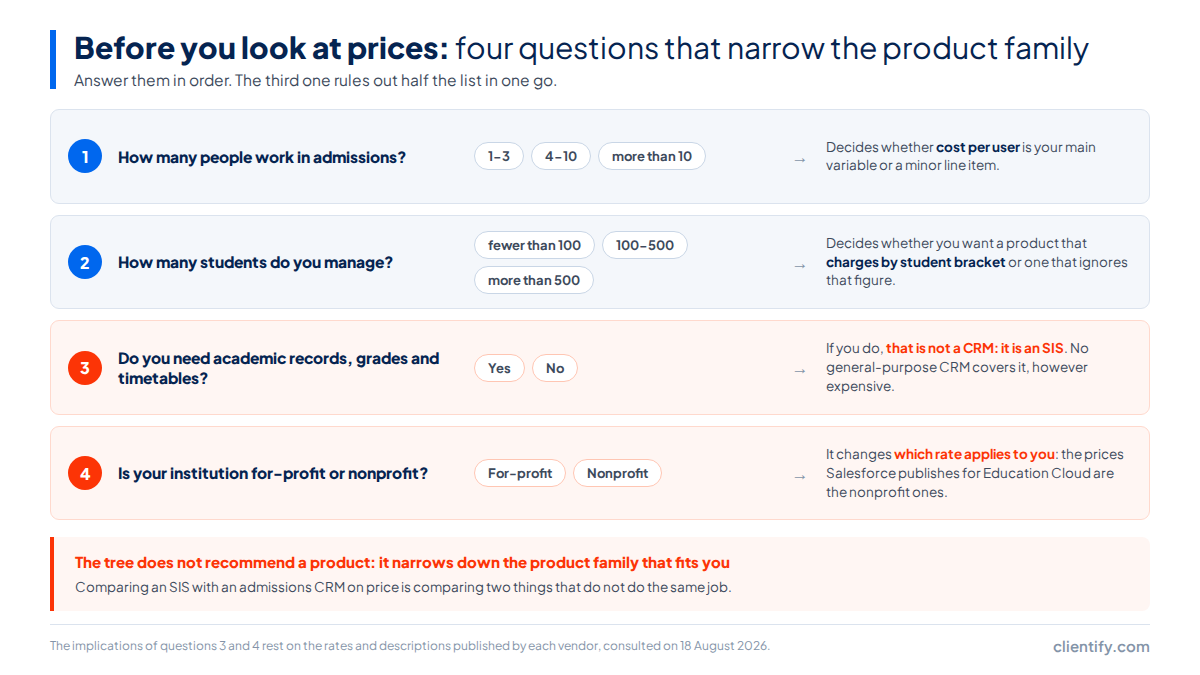
- How many people work in admissions?One to three, and almost any general-purpose CRM will do, with price as the decider. Four to ten, and the per-user price starts to weigh. More than ten, and you should check the full annual cost before the feature list.
- How many students do you manage?This is the question that changes the sum if you are looking at vertical platforms, because they charge by student bracket rather than per user. On a general-purpose CRM, the number of students does not move the invoice.
- Do you need academic records, grades and timetables?If the answer is yes, this is not a CRM: it is an SIS, and none of the general-purpose tools in this comparison covers it. You can have both and connect them, but do not buy one expecting the other.
- Is your institution for-profit or nonprofit?Only one thing changes, but it is a big one: the prices Salesforce Education Cloud publishes are nonprofit rates. If your institution is for-profit, the price you see is not the one on the website.
The order of the questions matters more than the questions. Starting with “do I need an SIS?” rules out half the list before you look at prices, while starting with price leads you to compare two products that do not do the same job. And the fourth question, whether the institution is for-profit or nonprofit, completely changes how the Salesforce Education Cloud rates read: if your institution is not a nonprofit, the €87 published is the rate Salesforce applies to the ones that are, and yours has to be requested from the account executive, which is literally what its page tells you to do.
One note on method, in case it helps: booking five demos is not free. It is five hours of meetings, plus the time spent preparing the data they will ask for, plus the weeks of sales follow-up that come afterwards. Filtering first with these four questions usually leaves the list at two, and two demos do compare well.
Frequently asked questions about CRMs for educational institutions
Does a CRM replace a student information system?
No. The CRM works with the prospect who has not enrolled yet: lead source, conversations and follow-up. The academic platform works with the student who is already inside: records, grades, transcripts and timetables. Plenty of institutions end up with both connected, not with one alone.
How much does a CRM for an educational institution cost?
It depends on the unit you are charged by. General-purpose tools run from €14 per user per month at Zoho and Pipedrive to €39 a month with one user at Clientify. Classe365 charges by student bracket, from US$100 a month. Prices consulted on 18 August 2026.
Do the Salesforce Education Cloud prices apply to a private institution?
The prices published on its cards, €87, €145 and €375 per user per month, correspond to nonprofit organisations. Its own page asks for-profit institutions to view the pricing guide and connect with their account executive. It does not publish that second rate anywhere.
What is an admissions module and why is it charged separately?
It is the part that captures enquiries and follows them up until enrolment. On vertical platforms it usually comes unbundled: Classe365 sells it as a module at US$75 a month, with up to 2,000 form submissions included. In a general-purpose CRM that function is already inside.
Is a general-purpose CRM any use for a school?
It is useful for admissions and for lead capture, which is where enrolments are lost. It is no use for the academic record, and none of the general-purpose tools in this comparison covers it. The useful question is not which is better, but which of the two problems you have now.
Where to start
If it had to be one sentence: decide first whether your problem sits before or after enrolment. If it sits before, you need a CRM and the rest is a question of how many people are going to use it. If it sits after, you need an academic management platform and no CRM is going to solve it for you. And if it sits in both places, the cheap move is to start with the side that is costing you money today, which is almost always the information requests that go unanswered.
One last note, because lead capture takes almost all the attention and then term starts: retaining the student you have already enrolled costs quite a lot less than capturing the next one, and it is also worked from the CRM. That is the second campaign to set up once the enrolment peak is over.
Try the CRM before the next enrolment peak
Free trial, no card required. Forms, automated follow-up and WhatsApp with a shared inbox.
Try Clientify for free