


The main Pipedrive alternatives are Zoho CRM, monday CRM, Freshsales, HubSpot Sales Hub, Brevo, Bitrix24, Odoo, Salesforce and Clientify. With a five-person team and annual billing, in August 2026 their entry plans ran from Freshsales at 45 € a month to Salesforce at 125 €, against the 195 € of Pipedrive’s Growth plan. The prices were read on the same day on each vendor’s official site and normalised to the same scenario. Below you have the table, the nine profiles, how to migrate without breaking the pipeline, and the three cases where staying put is the better call.
What Pipedrive does well (and why many teams stay)
Let’s start with the fair part: Pipedrive is a good product. If you got here looking for alternatives it is not because it failed you, and that is worth saying before comparing anything.
Its visual pipeline is still one of the best on the market. You drag a card from one column to another and the deal changes stage, with no forms and no menus. A rep who has never used a CRM in their life gets it in twenty minutes, and that short learning curve is exactly why the rollout survives. Almost every CRM fails the same way: not because it does not work, but because the team stops entering data in week two. With Pipedrive that happens less.
So if what you want is a tidy pipeline and nothing else, the honest answer is that you probably already have it. Full stop.
What people start asking of Pipedrive as the company grows
The problem shows up later, and it has nothing to do with the pipeline.
Picture the scene. Ana closes a client on WhatsApp from her phone on a Friday afternoon. The whole conversation, the haggling, the “I’ll confirm on Monday”, the “fine, go ahead”, lives on her handset. On Monday she logs it in Pipedrive as “Won” and the trail ends there. Then comes the quote, which is written in another program. And the invoice, which is written in a third one. And the welcome email goes out from the marketing tool, which has its own contact list, out of sync since March.
The CRM records that the deal was won, but not how, not what closed it, not what happened afterwards. When there are three of you that is survivable. When there are eight it is not.
| What you need | Does Pipedrive bring it? | What ends up happening |
|---|---|---|
| Running the sales pipeline | Yes, and very well | Nothing. It is its speciality, and that is why many teams stay. |
| Email marketing and automation | Campaigns, as a separate paid add-on | You end up hiring an email tool apart and syncing lists by hand. |
| WhatsApp as a sales channel | No, only through third-party integrations | The rep closes on WhatsApp from their phone and that conversation never reaches the CRM. |
| Quotes and invoicing | No | The quote is written in a different program and the CRM stops reflecting what is billed. |
| Invoicing compliant with Spain’s VeriFactu | No | You have to add Spanish invoicing software to the stack. |
| Cost as the team grows | Per user | Every new person adds the full price of their licence. |
Notice that none of those cells says Pipedrive is badly built. They say Pipedrive is a sales CRM, and that what many small companies end up needing is something wider. Those are two different things, and if you are still weighing up what a CRM is and what it is for, the distinction is where the money goes: confusing them is paid for in subscriptions.
What does Pipedrive really cost per year?
One thing before the figures: every price here is the European one, published in euros, and the invoicing criterion we use is the Spanish one, because that is the market this comparison is written for.
Pipedrive charges per user per month. Its Lite plan costs 14 € and its Growth plan, the first one that includes automations, costs 39 €. With one person that is 39 € a month. With five it is 195 €, which is 2,340 € a year. Every new rep who joins adds a full licence.
| CRM | Plan | Published price | Billing unit | Monthly cost with 5 users |
|---|---|---|---|---|
| Freshsales | Growth | 9 € per user per month | Per user | 45 € |
| Bitrix24 | Basic | 49 US$ per month per company, 5 users included | Flat rate per company | 49 US$ |
| monday CRM | Basic | 12 € per user per month, minimum 3 seats | Per user | 60 € |
| Zoho CRM | Standard | 14 € per user per month | Per user | 70 € |
| Clientify | Single plan | 39 € per month with 1 user included, + 15 € per additional user | Base plan + seats | 99 € |
| HubSpot Sales | Starter | 20 € per month per licence | Per licence | 100 € |
| Odoo | Standard | 24.90 € per user per month | Per user | 124.50 € |
| Salesforce | Suite Starter | 25 € per user per month | Per user | 125 € |
| Brevo | Sales Essentials | 26.08 € per month with 1 user included | Base plan + seats | Not calculable: it does not publish the price of the additional user |
| Pipedrive | Growth | 39 € per user per month | Per user | 195 € |
The interesting thing about that number is not how big it is, but how it climbs. Look at what happens as the team grows.
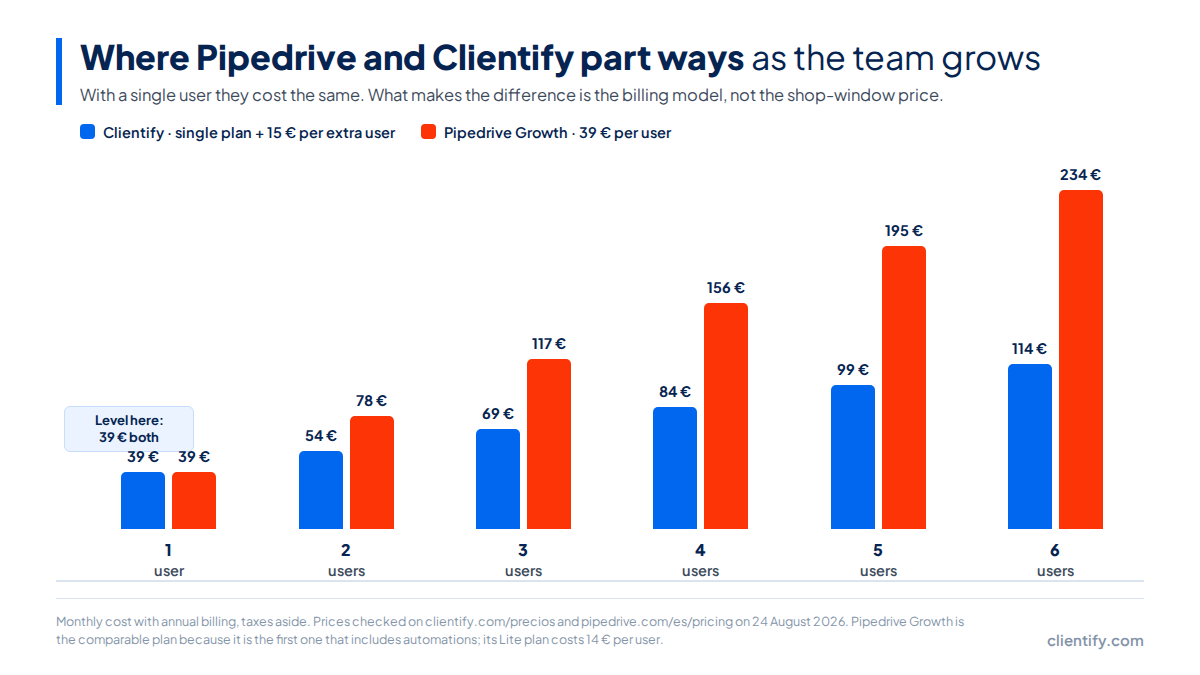
With one user, Clientify and Pipedrive Growth cost exactly the same: 39 € a month for both. There is no trick and no small print. The divergence does not come from the shop-window price, it comes from the billing model: one adds 39 € per person and the other 15 €. At five users it is 99 € against 195 €. At six, 114 € against 234 €.
That is the whole difference, and it is why comparing CRM “entry prices” is useless unless you say how many people are using it.
Three warnings before you compare these figures. Odoo’s 24.90 € carries an asterisk on its own site: the discount lasts twelve months. monday’s Basic plan forces you to contract three seats minimum, so its real entry point is 36 € a month and not 12 €. And Bitrix24 publishes its rates in dollars even on its Spanish site: converting them to euros here would invent a price its vendor does not charge.
One more note on temporary discounts, which is where almost every comparison cheats without meaning to. On the day we checked, HubSpot was showing its Starter struck through at 20 € with a promotion at 7 €. The table carries the list price. Why? Because a promotion that expires is no basis for deciding which tool you will live with for three years. Hiding the discount would inflate a rival’s cost; using it to compare would tell you a story that ends on its own.
How does each alternative charge?
They all publish an annual-payment discount and almost all offer a trial, but the small print varies a good deal. This table carries only what is printed on the pricing pages we consulted.
| CRM | Free trial | Permanent free plan | What happens when you add the sixth person |
|---|---|---|---|
| Pipedrive | 14 days | No | +39 € per month |
| Clientify | Yes, no card | No | +15 € per month |
| HubSpot | Free tools | Yes, up to 2 paid users | +20 € per month per licence |
| Zoho CRM | 15 days | Yes, up to 3 users | +14 € per month |
| Freshsales | 21 days | No | +9 € per month |
| monday CRM | 14 days | Yes, up to 2 users | +12 € per month |
| Bitrix24 | Indefinite free plan | Yes, with a storage limit | Included in the flat rate |
| Brevo | Indefinite free plan | Yes, with a daily sending limit | Not published |
| Odoo | 15 days | Yes, one single app | +24.90 € per month |
Watch the last column, which is the one that really matters twelve months out: it is what hiring the next person costs you. That is where a cheap CRM stops being cheap, or where one that looked expensive stops mattering.
The nine Pipedrive alternatives, one by one
Every profile carries the same thing: entry price exactly as the vendor publishes it, how it charges, and what is worth checking before you sign. That last point is our editorial judgement, not a figure off the pricing page, which is why it sits apart.
Before we start, a decision worth explaining. The lists of Pipedrive alternatives going around usually include Close, Folk, Salesflare, Copper and Streak. They are not here, and it is not out of disdain: they are good products. They are out because none of them has a full Spanish interface or invoicing adapted to Spanish regulation, and this article is written for teams selling from Spain or Latin America. Recommending a tool your back office cannot use would pad the list, not help you.
Zoho CRM
From 14 € per user per month on its Standard plan, with Professional at 23 €, Enterprise at 40 € and Ultimate at 52 €. With five people, 70 € a month.
It is the most direct alternative if the only thing grating about Pipedrive is the bill: same pipeline approach, a third less per licence. It also has a free plan for up to three users, which is enough for months for a team that is just starting.
Before you sign: Zoho is an ecosystem, not a product. Many of the things you expect, such as invoicing, chat or forms, live in Zoho Books, Zoho Cliq or Zoho Forms, which are separate subscriptions. The full suite is called Zoho One and it changes the maths completely.
monday CRM
From 12 € per user per month on its Basic plan. With five people, 60 € a month.
It is the option for teams where sales and operations walk arm in arm: it is the same platform half the world uses to run projects, with a CRM layer on top. If your rep also follows the delivery through, it saves you a tool.
Before you sign: the minimum is three seats, so the real entry point is 36 € a month even if you are on your own. And it is a generalist platform: the customisation that makes it powerful is also what forces you to build it.
Freshsales
From 9 € per user per month on its Growth plan. With five people, 45 € a month. It is the cheapest option on the list.
It brings things as standard that sit on higher tiers elsewhere, such as the phone dialler and lead scoring. If your team spends the day on calls, the profile fits.
Before you sign: live chat and customer support live in Freshchat and Freshdesk, different products from the same house. The CRM is only a CRM, the same as Pipedrive.
HubSpot Sales Hub
From 20 € per month per licence on the Starter plan, list price. With five licences, 100 € a month.
Its free plan is probably the most generous on the market and its marketing is the industry standard. As a step up from Pipedrive it makes sense if what you want is serious marketing.
Before you sign: the entry price is the one that will matter least to you. The jump from Starter to the next paid tier is where many small companies discover the tool no longer fits the budget; we did not verify that price on the day we checked, so look it up yourself before committing. We go into the pattern in the best HubSpot alternatives, where it repeats almost identically.
Brevo
From 26.08 € a month on Sales Essentials, with one user included. It is the option if you are coming from email marketing and the CRM is the missing piece, rather than the other way round.
Before you sign: its site does not publish the price of the additional user, so that cell in the table above is empty. We have not filled it with an estimate: an invented price in a price comparison is worse than a gap.
Bitrix24
From 49 US$ per month per company on the Basic plan, with five users included. It is the only one on the list with a flat rate: whether there are three of you or five, the bill does not move.
Before you sign: it publishes its rates in dollars even on its Spanish site, so your cost depends on the exchange rate and on what your bank charges you. And it is an enormous tool (CRM, tasks, intranet, video calls), which is either an advantage or a mountain, depending on the team.
Odoo
From 24.90 € per user per month on the Standard plan. With five people, 124.50 € a month.
It is the only one on the list, alongside Clientify, with invoicing adapted to Spanish regulation. If your problem is not the CRM but the fact that you run the company across five separate programs, Odoo is the one that genuinely solves that.
Before you sign: that price carries an asterisk on its own site, because the discount lasts twelve months, and Odoo is an ERP. Rolling it out is a project in itself, usually with a partner involved.
Salesforce
From 25 € per user per month on Suite Starter, verified on 13 August 2026. With five people, 125 € a month.
It is the industry standard and it is still the right answer when the operation is large: territories, approvals, forecasting by region.
Before you sign: the second tier costs 100 € per user per month. And above the licences sits the implementation, which is where the money actually goes: Salesforce is designed to be configured to measure, and that means someone dedicated to configuring it.
Transparency note: on 24 August the Salesforce site blocked our automated check, so its price is the one we verified eleven days earlier. We would rather tell you than present it as checked today.
Clientify
Clientify, and why it shows up here
We are the ones writing this, so the fair thing is that you judge the criteria and not the conclusion. Clientify is a Spanish CRM with marketing, WhatsApp and invoicing inside the same product. Against Pipedrive the change is not one of pipeline quality —Pipedrive’s is excellent— but one of scope: you stop paying three subscriptions and stop syncing them.
The price works differently: 39 € a month with one user included and 15 € for each additional person. With one person it costs the same as Pipedrive Growth. With five it is 99 € against 195 €. The Clientify vs Pipedrive comparison puts the two feature by feature.
When we are not the answer: if your team lives on outbound calling and you need a built-in dialler with recording and cadences, tools like Close are more specialised. If your operation is large-account with territories, approvals and forecasting by region, Salesforce is still the standard. And if Pipedrive is enough for you, we said it above and we repeat it: staying is also a correct decision.
What if what is missing is WhatsApp and invoicing?
Here, for us, is the criterion almost no Pipedrive-alternatives comparison looks at, and the one that decides more than price in Spain and Latin America.
WhatsApp is not a support channel: it is where deals close. If that conversation never reaches the CRM, your sales forecast is built on whatever each rep remembers to write down. And since electronic invoicing stopped being optional, having the quote in one place and the invoice in another went from awkward to a real administrative problem.
| CRM | Native WhatsApp | Quotes and invoices |
|---|---|---|
| Pipedrive | No, integrations only | No |
| Clientify | Yes | Yes, with VeriFactu |
| HubSpot | Yes, on higher plans | Quotes yes, Spanish invoicing no |
| Zoho CRM | Through Zoho Cliq and extensions | With Zoho Books, a separate product |
| Freshsales | Through Freshchat, a separate product | No |
| monday CRM | No, integrations only | No |
| Bitrix24 | Yes | Yes, without adaptation to the Spanish rule |
| Brevo | Yes | No |
| Odoo | Yes, with the corresponding module | Yes, with the Spanish localisation |
| Salesforce | Through Digital Engagement, a separate licence | Not out of the box |
We marked “Yes” only where the vendor brings it as standard. Solving it with a third-party app is legitimate and it works, but it adds a contract, an invoice and one more thing that can break in an update. If this is your case, the detail is in the best CRM with WhatsApp and in CRM for WhatsApp, everything you need to know.
How to migrate away from Pipedrive without losing the pipeline
This is the part nobody talks about, and it is what actually holds the change back. It is almost never the price. It is the fear of losing the history.
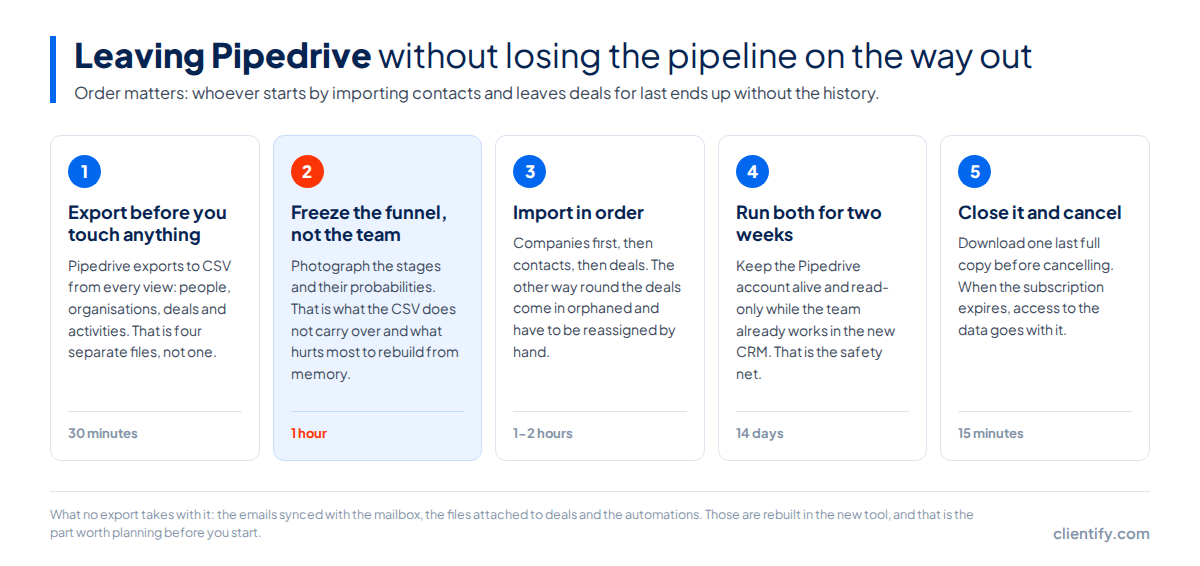
The good news is that Pipedrive lets you take your data out whole, and that the process, done in order, takes an afternoon.
-
Export before you touch anything
Pipedrive lets you take your data out from the account settings. Four sets come out: organizations, persons, deals and activities. Download them even if you are not migrating yet; having the copy turns the conversation from «let’s see if we can leave» into «we leave when we want to».
-
Photograph your pipeline before you export
The names of your stages —«Meeting booked», «Proposal sent»— do not travel well in the CSV. Take a screenshot of the pipeline and rebuild it in the new tool before importing anything. If you import deals with no stages set up, they all land in the first one and have to be moved by hand.
-
Import in order: organizations, persons, deals, activities
Each entity hooks onto the previous one. If deals go in before organizations, they end up orphaned and there is no automatic way to pair them afterwards. Take the chance not to drag the rubbish along: decide which custom fields you genuinely use and leave the rest out.
-
Run both for two weeks
Do not cancel Pipedrive on the same day. Keep both accounts in parallel while the team gets used to the new one, with a clear rule: anything new is recorded only in the new tool. Two weeks are usually enough to spot what did not migrate well, and you are still in time to recover it.
-
Close the account with a final backup
Before cancelling, export again: in those two weeks of coexistence something always ends up recorded in the old place. Keep that last file even if you never use it. Cancelling a subscription you have no copy of is the only part of this with no way back.
Step three is the one people get wrong. If deals go in before organizations, they end up orphaned and have to be reassigned one by one. If you are coming from a spreadsheet rather than a CRM, the route is different and we cover it in real alternatives to running sales on Excel.
When to stay on Pipedrive
There are three situations where changing is a bad idea, and we say so even though the opposite would suit us.
If your cycle is purely transactional and you do no marketing
Call, proposal, close, next. No campaigns, no sequences, no nurturing. Pipedrive is tuned for exactly that, and a wider platform would only give you tabs you are never going to open.
If there are one or two of you and the price does not hurt
At one user, Pipedrive Growth costs the same as most of the list. The financial advantage of changing shows up with the team, not before. Changing CRM costs the team weeks of adjustment, and you do not win those weeks back with twelve euros.
If your team has genuinely adopted it
This is the most important one and the most underrated. A CRM everyone uses is worth more than a better one nobody fills in. If your reps enter their data without you having to chase them, you have something hard to get. Do not break it over a pricing spreadsheet.
So which one do you go with?
It depends on what exactly is failing you, and that question has a better answer than “which is the best CRM”.
| If what is happening to you is… | Start by looking at | Why |
|---|---|---|
| I like Pipedrive, it just feels expensive | Freshsales, Zoho CRM | Same pipeline approach for 9 and 14 € per user, without changing how you work. |
| I pay for three tools and they do not talk to each other | Clientify, Odoo, Bitrix24 | Marketing, sales and invoicing in the same product: manual syncing ends. |
| We sell on WhatsApp and that never reaches the CRM | Clientify, Bitrix24, Brevo | They bring the channel as standard, not as a third-party app you have to maintain. |
| I need to invoice under Spain’s VeriFactu | Clientify, Odoo | They are the two on this list with invoicing adapted to Spanish regulation. |
| There are many of us and the per-licence cost is spiralling | Bitrix24, Clientify | Flat rate per company or base plan plus seats: growing does not multiply the bill. |
| We are about to pass fifty reps with territories | Salesforce, HubSpot | That is their ground. Here the price argument stops being the important one. |
| Honestly, Pipedrive works for us | Pipedrive | Stay. Changing CRM costs weeks of team time and only pays off if something really breaks. |
The short version: if the per-licence price hurts, look at Freshsales or Zoho. If what hurts is three tools that do not talk to each other, look at Clientify or Odoo. If you sell on WhatsApp, the list shrinks to the four that bring it natively. And if none of this sounds like your company, stay where you are, which is also an answer.
Frequently asked questions
What is the best Pipedrive alternative?
It depends on what is failing. If the problem is the per-user price, Freshsales and Zoho CRM start at 9 and 14 euros per person per month. If what is missing is marketing, WhatsApp and invoicing inside the same tool, the comparison changes and all-in-one platforms such as Clientify enter the picture.
How much does Pipedrive cost per month?
Pipedrive charges per user per month with annual billing: 14 € for Lite, 39 € for Growth, 59 € for Premium and 79 € for Ultimate, according to its official site checked on 24 August 2026. With five people on Growth that is 195 € a month, around 2,340 € a year.
Which Pipedrive alternatives have WhatsApp built in?
Pipedrive does not integrate WhatsApp natively: it is solved with apps from its marketplace. Of the alternatives compared here, Clientify, Bitrix24, Brevo and Odoo with its corresponding module bring it as standard. HubSpot and Zoho CRM also offer it, but on higher plans or through separate products.
How do I export my Pipedrive data to migrate to another CRM?
From the account settings, in the data export section, Pipedrive generates a file with organizations, persons, deals and activities. Before importing it into another tool, take a screenshot of your pipeline stages: the names do not travel in the CSV and rebuilding them afterwards costs more.
Is there a free Pipedrive alternative?
Pipedrive has no permanent free plan, only fourteen days of trial. Bitrix24 and Brevo do have one, as do HubSpot with up to two paid users, Zoho CRM up to three users, monday CRM up to two and Odoo with a single application. All of them limit volume, users or features.
Try it on your own pipeline before you decide
Free trial, no card. Import your Pipedrive CSV and check whether the change adds up for you.
Start free trial