
The entry plans of the CRMs most often compared in Spain sat, in August 2026, between the 9 € per user per month of Freshsales and the 25 € of the Salesforce Suite Starter, with HubSpot Sales Hub at a 20 € list price. That is the shop-window price. The one you end up paying is decided by five other line items: which plan the feature that makes you buy actually lives in, whether you bill monthly or yearly, the add-ons, the support, and the usage caps that trigger the next step. Here are all five, with published figures and a date.
How much does a CRM cost a month, really?
There are three brackets, and it helps to have them straight before comparing anything. In the first one sit the entry plans of the tools built for small teams: Freshsales starts at 9 €, monday CRM at 12 €, Zoho CRM and Pipedrive at 14 €. In the second sit the entry plans of the two big platforms: 20 € for HubSpot Sales Hub Starter, 25 € for the Salesforce Suite Starter. And in the third sits what the plans cost where the features most people actually switch CRM for live: between 54 € and 350 € per user per month.
All of them are prices per user per month, before tax, read on each vendor’s official Spanish site. Prices are quoted in euros for that reason, and the plan names are kept in Spanish for the same one: that is how they are published, and translating a plan name would invent a product that does not exist under that label.
That list is not a ranking and does not try to be one. If what you want is which one comes out cheapest with a team already set up, we compare that elsewhere: for the two big platforms, in our head-to-head with Salesforce, and for the other side of the market, in the best alternatives to HubSpot. And if you are still working out what the tool is supposed to do for you in the first place, start with what a CRM is and what it is for.
What we are doing here is the other thing. The first bracket is the one that gets compared. The third is the one that gets paid.
One obvious question is missing: what about implementation? The honest answer is that we do not know, and neither does anyone who hands you a figure. Ranges of every size circulate, from a thousand euros to thirty thousand, and none of them comes from a source you can open and check: they are estimates published by companies that sell precisely that service. HubSpot, for instance, does not publish an onboarding rate anywhere you can find it. So you will not find one invented here. The rule we follow in these articles is simple: a figure with no source does not get hedged, it gets deleted.
Why is the price you compare never the price you pay?
Think of a gym membership. You sign up for twenty euros a month, and then it turns out the classes are on the tier above, the joining fee is charged separately, and the advertised rate came with a minimum term. Nobody lied to you. You were simply looking at the number designed to bring you in, not the one designed to be budgeted.
A CRM works exactly the same way, and five line items separate one from the other.
All of them hang off the same question, and it is the one almost nobody asks before opening the comparison sheet: what is the feature you are actually switching tools for? If it is keeping a tidy list of contacts, anything in the first bracket will do and the entry price really is your price. But if it is sales forecasting, call recording or a sandbox, the entry price has nothing to do with you. You are reading the wrong column of the table.
The first line item, and the most expensive, is the plan step. The entry price rarely survives the second year, because the specific feature that made you switch is rarely in the entry plan. This is the table that almost never gets published: not what each vendor costs, but which plan holds what you are after, and what that plan costs.
| What you are after | HubSpot Sales Hub | Salesforce Sales Cloud |
|---|---|---|
| Sales forecasting | Profesional — 54 € with annual billing (60 € monthly) | Paquete Pro — 100 €. Advanced pipeline management moves up to Grandes empresas, 175 € |
| Call recording and analysis | Profesional — 54 € | Grandes empresas — 175 €, which is where Inteligencia conversacional starts |
| Sandbox | Enterprise — 90 €, a cuenta de entorno de pruebas estándar |
Sin límites — 350 €, a sandbox completo, which is not the same as the standard one |
| AI inside the sales flow | Starter — 20 € list price, 5,000 credits included | La IA se puede incorporar a Enterprise y versiones superiores. Agentforce is listed as Disponible para su compra |
| Premium support | Publishes no paid support plan on these cards | Premier Success Plan, included in Sin límites — 350 €. Disponible para compra on the lower plans |
The second is the billing mode, and it is the one that produces the most surprises, because it does not work the same way even within a single brand.
The discount for paying yearly is not uniform, not even inside the same vendor. The HubSpot Profesional plan drops from 60 € to 54 € per licence per month if you pay annually, a 10% cut. Its Enterprise plan costs 90 € either way: no discount there. Salesforce publishes its Suite Starter as facturado mensual o anualmente
without declaring a price difference, and monday CRM drops its Básico plan from 18 € to 12 €, a 33% cut.
Nought to a third, depending on who you buy from. That is why save by paying yearly
is not a market figure: it is a condition of each individual rate card, and you have to check it on yours.
The other three line items are the add-ons, the support and the usage caps. All three get their own section below, because all three have published figures you can go and check. The problem is that none of the three shows up on the pricing card you compare in a spreadsheet on a Tuesday afternoon.
How much does it go up at the second step?
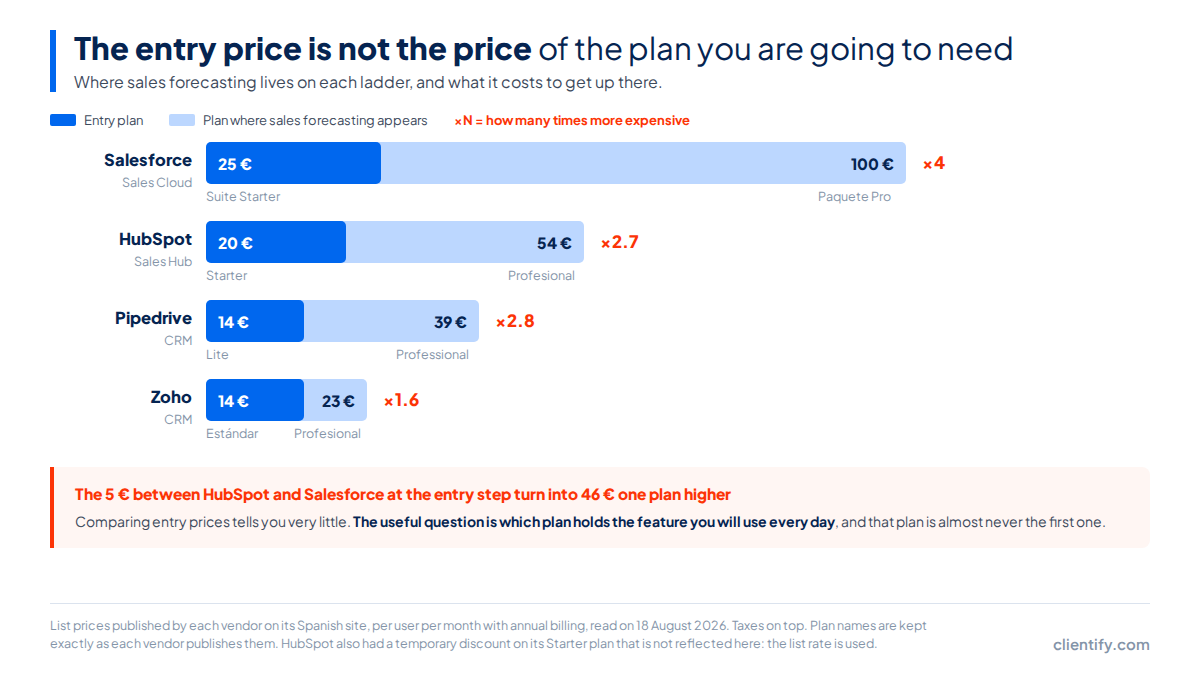
Rather more than the word “step” suggests. At Salesforce, going from Suite Starter to Paquete Pro means going from 25 € to 100 € per user per month. Not 20% more. Four times more, on the first jump. And if what you need sits in Grandes empresas, that is 175 €: seven times the price you came in at.
At HubSpot Sales Hub the jump is gentler but points the same way. From the 20 € Starter list price to Profesional there is a factor of 2.7, and up to Enterprise, 4.5. It is not exclusive to the two big ones either: the Zoho CRM ladder runs from 14 € to 52 €, and the Pipedrive one from 14 € to 79 €.
And now the part almost nobody tells you: that jump is not decided by a salesperson, it is decided by a counter. The vendors publish the ceiling of every plan, and once you go past it there is no negotiation to be had, there is a new invoice.
| Cap | Plan | Published value |
|---|---|---|
| Records in the database | HubSpot Starter | 25,000 |
| Records in the database | HubSpot Profesional | 250,000 |
| Records in the database | HubSpot Enterprise | 5,000,000 |
| Paid users | HubSpot Starter | up to 5 |
| AI credits included | HubSpot Starter / Profesional / Enterprise | 5,000 / 10,000 / 15,000 |
| Campaigns with influence per opportunity | Salesforce Paquete Pro | 3 (5 on the higher editions) |
Twenty-five thousand records looks like plenty until you have spent two years feeding in forms, imports and campaign contacts. That number is the real expiry date of your current plan, and it has been published since day one.
What do you pay for on top of the CRM?
Add-ons and support. Salesforce is the vendor that publishes this most clearly, so it makes a good example, and one detail is worth noticing: every one of its add-ons is advertised with a “from”, not with a closed price.
| What it is | How it is charged | Published price |
|---|---|---|
| Agentforce for Sales | per user per month | from 125 € |
| Revenue Intelligence | per user per month | from 220 € |
| Revenue Cloud | per user per month | from 200 € |
| Sales Programs | per user per month | from 100 € |
| Partner Relationship Management | per session per month | from 10 € |
| Standard Success Plan | — | Incluido en todas las licencias |
| Premier Success Plan | percentage of the licence | 30% of the net licence fees |
| Signature Success Plan | not published | Póngase en contacto con un ejecutivo de cuentas |
That “from” is not a courtesy. It means the published price is the floor of a range whose ceiling is not published, and that the actual figure comes out of a sales conversation in which your company’s revenue is already known. When an add-on is advertised from 220 € per user per month, the only thing you can take for granted is that it will not cost less.
Out of that table, the row that changes a budget is the Premier Success Plan: 30% of the net licence fees. It is not a flat rate. It is a percentage of what you already pay, so it grows with you every time you add a user or move up a plan. If you compare support between two tools by looking at two figures in euros, that row does not appear anywhere.
The Salesforce page itself adds the warning everyone who writes about pricing ought to give. Its wording is that the page is provided for information purposes only and is subject to change. That is exactly why every table in this article carries its reading date printed on it.
How do you work out your 12-month cost?
With a short formula and five minutes. It will not give you an exact budget, but it will give you the right order of magnitude, which is precisely what you do not have when you compare entry plans.
Every price in this article is before tax. VAT and its equivalents are charged on top, and the vendors say so themselves.
- Write down the feature that makes you buy and find which plan it lives in. Not which plan is cheapest: which plan has that feature. If the reason you are switching tools is sales forecasting, your starting price is not 20 €, it is 54 €.
- Count the users who will really log in, including the ones who only look. Almost every vendor charges per licence, and HubSpot caps its Starter plan at five paid users.
- Multiply by twelve and decide how you bill. Check whether the specific plan you need has an annual discount: inside the same vendor it can exist on one plan and not on the next.
- Add the add-ons you already know you will buy. If they involve AI or revenue intelligence, at Salesforce they start at 125 € and 220 € per user per month, on top of the licence.
- Add the support and look at the caps. The Salesforce Premier Success Plan costs 30% of the net licence fees, so it grows with your invoice. And check the plan’s record and credit ceilings: that is what triggers the next step without anyone calling you.
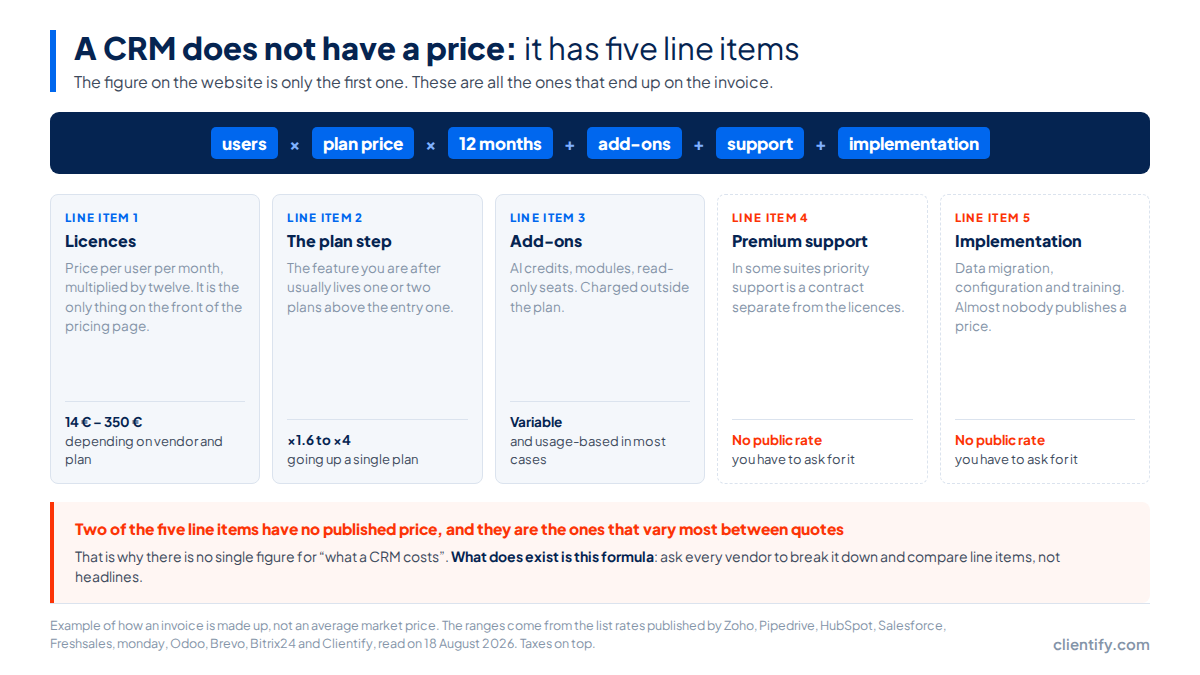
If the number that comes out feels uncomfortable, that is a good sign: it means you are calculating it properly. And if you want the other side of the equation, the cost of not having one at all is easier to see in the tools most teams are using instead, which we went through in is your sales team still working in Excel.
What does Clientify cost and what is included?
Measured with the same yardstick we have used on everyone else, and starting with the part that does not flatter us.
What Clientify costs and what is inside
A single plan at 39 € a month with one user included and 15 € for each extra user. Five users come to 99 € a month. One step, and it is published: there is no higher plan to climb to when you grow, and the feature you came for is not sitting behind an add-on.
Measured with this article’s yardstick, that means line items two, three and four are zero. And the obvious thing has to be said about the first one: there are cheaper CRMs than this at the entry price, starting with the 9 € of Freshsales and the 14 € of Zoho CRM and Pipedrive. If your criterion is price per seat and nothing else, we are not your option.
The argument is the other one: what is inside without paying extra. CRM with automations and electronic signature, professional WhatsApp with a multi-user inbox, forms, landing pages, chatbots and quotes, e-invoicing registered with VeriFactu (Spain only) and support in Spanish. Bought separately, that is three or four subscriptions.
What to watch: if you already have a marketing tool and you are not going to touch it, you are paying for a part of the product you will not use. A pure sales CRM works out better there.
Frequently asked questions about CRM pricing
How much does a CRM cost per user per month?
There is no single price. The entry plans published in August 2026 run from 9 € per user per month at Freshsales to 25 € at Salesforce, taxes on top. The catch is that the entry plan is rarely the one you end up buying: the feature you came for usually lives higher up.
Why is the price on the website not the price I pay?
Because the shop window shows the entry plan and the invoice adds five more line items: the plan step that forces you up, the billing mode, the add-ons, premium support, and the record or credit caps that trigger the jump without anyone warning you.
How much does the price go up when you move to the next plan?
At Salesforce, going from Suite Starter to Paquete Pro takes you from 25 € to 100 € per user per month: four times more. At HubSpot Sales Hub, going from Starter to Profesional takes you from a 20 € list price to 54 € with annual billing. These are prices published on 18 August 2026.
Is it worth paying for a CRM yearly instead of monthly?
It depends on the vendor and even on the plan. HubSpot Profesional drops from 60 € to 54 € when you pay yearly, a 10% cut, but its Enterprise plan costs 90 € either way. monday CRM drops its Básico plan from 18 € to 12 €. There is no standard industry discount.
What do you pay for on top of the CRM licences?
The add-ons and the support. Salesforce publishes Agentforce for Sales from 125 € per user per month and Revenue Intelligence from 220 €. And its Premier Success Plan is not a flat fee: it costs 30% of the net licence fees, according to its own pricing page.
Run the numbers on your own case
The price per user is the least important figure on the invoice. Take the feature that makes you switch tools, find which plan it lives in, multiply by your users and by twelve, then add the add-ons and the support. That number, and not the shop-window one, is what you have to compare.
And once you have it, the best way to check whether a tool works for you is to use it with your own data for a few days.
Do the maths with a price that has no steps
7 days free, no card. One plan, one published price and everything above included.
Try Clientify free