
Signing up for a CRM is a lot like signing up for a mobile phone tariff: the big number in the advert is almost never the one you end up paying by the end of the year. So here are the big number and the small print in the same place. With a single sales rep, Salesforce comes out cheaper than Clientify: 25 € per user per month on its Suite Starter plan against the 39 € of Clientify’s single plan. From the third user on the order flips, and on the second Salesforce step the price per person multiplies by four. Below you have the five plans with their August 2026 list prices, the twelve-month cost with one, three and five reps, and the three cases where the right answer is Salesforce and not us.
And yes: Clientify is writing this. That is exactly why every figure comes with the arithmetic beside it, so you do not have to take my word for anything.
What really separates Clientify and Salesforce?
Meeting room, somebody puts a quote on the table, and on the total line there is a four-figure annual number that nobody can tell is too much or too little. The question people ask under their breath is never “is this CRM any good?”. It is “am I overshooting here?”.
That doubt does not get settled with a table full of green ticks, and I want to tell you why: you are not choosing between two similar products. Salesforce sells you a platform you configure (objects, permissions, flows, reports), shapeable so it fits the operation you design. Clientify sells you a product that arrives already assembled for selling, with email marketing, automation, quotes and WhatsApp inside the same price.
Both sentences are honest and neither is a compliment in disguise. A configurable platform is an enormous advantage if you have someone to configure it, and dead weight if you do not.
Why does this matter before the price does? Because it has a consequence that shows up on no price list: the time until the first real use. Configuring objects, permissions and flows is work, and somebody does that work. If that somebody does not exist in your company, the project gets contracted out or it stalls half-finished, and a half-finished CRM is one the team abandons in week two. You know the useful comparison is not about which of the two has more features, which is nearly always the wrong question.
| Clientify | Salesforce Sales Cloud | |
|---|---|---|
| Plan structure | A single plan. There are no feature tiers. | Five plans, from Suite Starter to Agentforce 1 Sales. |
| What you pay | 39 € for the first user and 15 € for each additional user, on annual billing. | The plan price multiplied by every user, with no user included. |
| Commitment | Annual or monthly, your choice. | Monthly or annual on Suite Starter only. From Paquete Pro upwards, billed annually. |
| Paid add-ons | No add-ons for features. | Five published, all priced from: between 10 € per session per month and 220 € per user per month. |
| What you buy | A product that arrives already assembled for selling. | A platform you configure to fit your operation. |
| Free trial | 7 days, no card. | A trial is available on their site, subject to their conditions. |
Watch the commitment row. It moves the most money and it gets read the least.
How much does Salesforce cost in August 2026?
Its Spanish pricing page, with the currency selector on euros, publishes five steps for Sales Cloud. I am reproducing them with the billing column exactly as they write it, in quotes and in Spanish, because paraphrasing it would strip out the part that matters. The plan names stay in Spanish for the same reason: that is how they are published, and translating a plan name would invent a product that does not exist under that label.
| Plan | Price per user per month | Billing, as stated on their site |
|---|---|---|
| Suite Starter | 25 € | “Facturado mensual o anualmente” |
| Paquete Pro | 100 € | “Facturado anualmente” |
| Grandes empresas | 175 € | “Facturado anualmente” |
| Sin límites | 350 € | “Facturado anualmente” |
| Agentforce 1 Sales | 550 € | “Facturado anualmente” |
| Add-on | Starting price |
|---|---|
| Agentforce for Sales | from 125 € / user / month |
| Sales Programs | from 100 € / user / month |
| Revenue Intelligence | from 220 € / user / month |
| Revenue Cloud | from 200 € / user / month |
| Partner Relationship Management | from 10 € / session / month |
Two things in that table worth looking at twice.
The first is that the price is per user and includes no starting seat. If there are five of you, multiply by five. There is no first seat that comes with the plan.
The second is the add-ons. Five products with their own price, all advertised with a “from”, which in the case of Revenue Intelligence means from 220 € per user per month. I am not adding them to any sum in this article because I do not know which ones you would need, and putting a “from” into a calculator is the fastest way to lie with a spreadsheet. But if one of them is in your quote, you already know the price in the table above was not the total.
How much does Clientify cost?
One plan. Just the one. 39 € a month with the first user included and 15 € for every additional user, on annual billing. If you would rather not commit to twelve months, it is 65 € for the first and 25 € for each of the following, month by month and with no strings. Taxes on top depending on the country, 1,000 marketing contacts included and unlimited sales contacts.
The important part of that plan is what does not exist above it. There is no version where automation gets unlocked, or one that brings WhatsApp, or one that lets you issue quotes. That is what you get from day one, which is why the price does not depend on what you want to do but on how many of you there are.
If what you want is the full breakdown of where the money in a CRM actually goes beyond the licence (implementation, migration, training, integrations), it is in implementing a CRM in your SMB.
What do you pay over 12 months with 1, 3 and 5 reps?
Here is the only sum that really decides anything, and I am doing it with the Salesforce entry plan, which is the most favourable scenario for them.
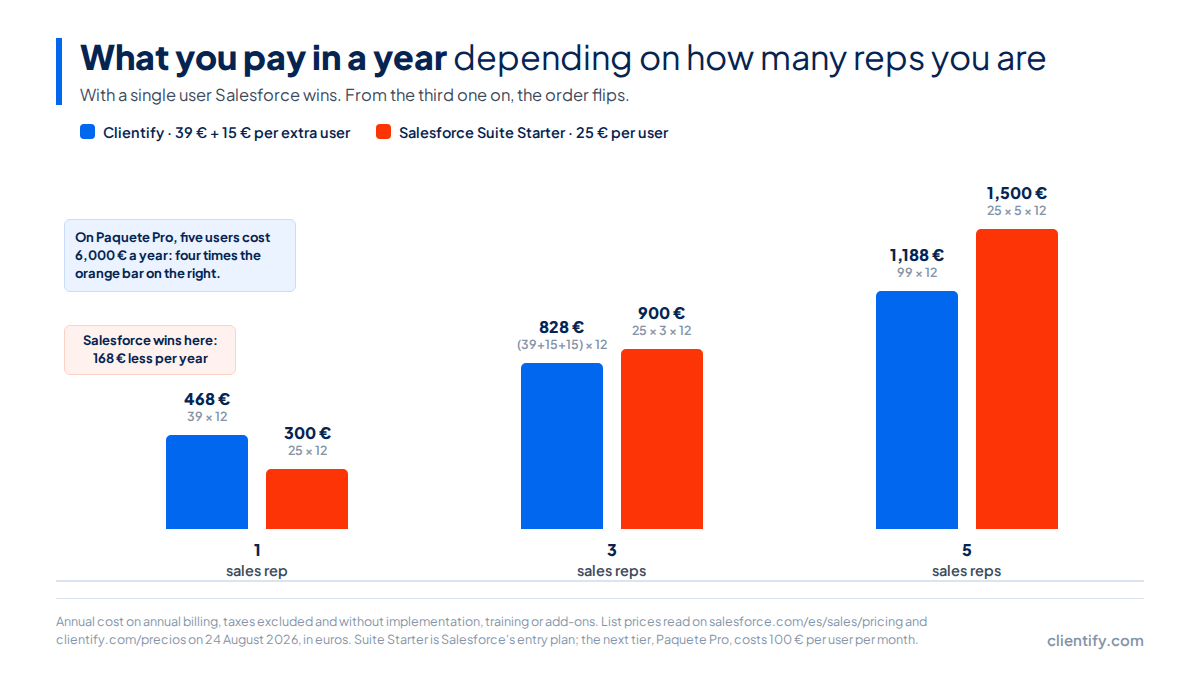
| Sales reps | Clientify per year | Salesforce Suite Starter per year | Difference |
|---|---|---|---|
| 1 | 468 €39 × 12 | 300 €25 × 1 × 12 | 168 € in favour of Salesforce |
| 3 | 828 €(39 + 15 + 15) × 12 | 900 €25 × 3 × 12 | 72 € in favour of Clientify |
| 5 | 1,188 €99 × 12 | 1,500 €25 × 5 × 12 | 312 € in favour of Clientify |
Let me start with the uncomfortable row. With a single user Salesforce wins: 168 € less a year, more than a third below our price. If you are going to be working alone, that fact matters more than anything I can tell you about our product.
With three reps the order flips by 72 €, and with five the gap is 312 € a year. Notice that none of those amounts is spectacular: we are talking about tens or hundreds of euros, not thousands. What changes is not the price, it is the slope. We add 15 € per person; the per-user model adds the full price of the plan.
And that is the honest comparison for as long as you stay on Suite Starter. The problem is that almost nobody stays.
Where is the price jump?
Suite Starter costs 25 €. The next plan, Paquete Pro, costs 100 €. From the first step to the second, the price per user multiplies by four.
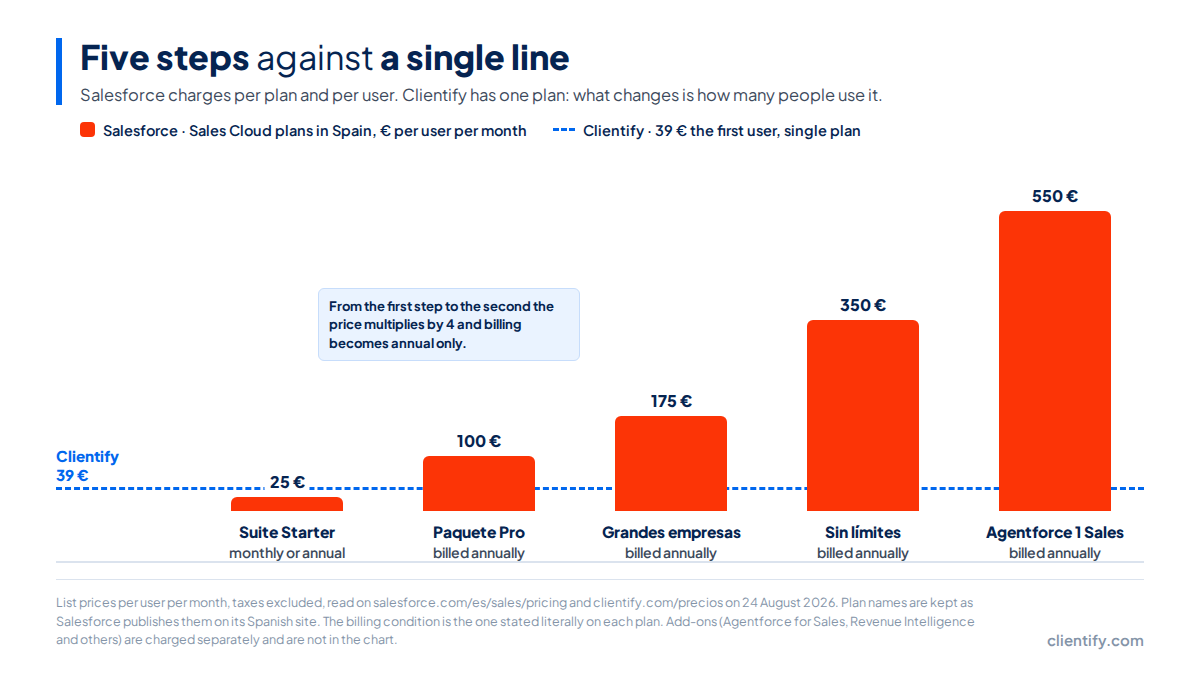
That jump also carries a second label that does not appear in the price. Suite Starter is the only plan their site marks as “Facturado mensual o anualmente”, billed monthly or annually. Every other one says “Facturado anualmente”. Which means that on the very step where the price quadruples, the monthly exit disappears and the commitment becomes twelve months.
With five people on Paquete Pro that is 500 € a month, 6,000 € a year. Against the 1,188 € of Clientify with those same five people, the gap is 4,812 € a year. I have not drawn that bar on the chart because a 6,000 € bar would force me to truncate the axis, and a truncated axis is the elegant way to lie with a graph.
Why do I keep going on about the second step? Because the practical question is not what the entry plan costs, it is whether you will still be on it in two years.
If Salesforce has quoted you and you want to leave the meeting with something checkable, there are three questions worth more than any comparison table. First: which plan is in the proposal, and what does the next step up cost in case I come up short? Second: which add-ons are included and which are billed separately? And third: how many implementation hours does the project carry, and who pays for them? The answers to those three turn an annual total into a figure you can compare with any other tool, ours included.
And WhatsApp?
If you sell over WhatsApp, this section affects you more than every price above it. The short answer is that in Salesforce the channel does not live in the entry plan: it shows up on their service pricing page, not the sales one, and their own table leaves it out of the two cheapest steps.
How this was checked. On 24 August 2026 both official Salesforce pricing pages in Spanish were downloaded, the sales one and the service one, and the word WhatsApp was searched inside the raw code of each. On the sales page, which is the product these prices are being compared against, it does not appear a single time. On the service page it does: inside a feature called Mensajería mejorada, described as integrating AI into more channels such as WhatsApp, Apple Messages for Business, Facebook Messenger and SMS.
What matters is where they tick it. Their own feature table leaves Mensajería mejorada unticked on the 25 € plan and unticked on the 100 € one. It starts being ticked on the 175 € per user per month step.
That does not mean WhatsApp costs 175 €: the 175 € is the price of an entire edition that includes that feature among many others. Nor does it mean the channel is impossible by another route, through an integration or another product in their catalogue. What it means is that the channel does not arrive solved in the entry plan you are comparing, and that how much solving it adds is published on neither page. You will not read an invented number here. If WhatsApp is your sales channel, it is the first question to ask before signing.
In Clientify the channel is inside. The WhatsApp conversation lands on the contact record, it can be automated, and it stays in the deal history the same way an email does. I am not saying that as a superlative: I am saying it because it is the difference between a Friday-afternoon “fine, go ahead” living in the CRM or living on your rep’s phone. In Spain and across much of Latin America that is where deals close, and a CRM that treats the channel as a paid extra is charging you for the place where you actually sell. If you want to see how different tools solve it, we compared them in the 7 best CRMs with WhatsApp.
When is Salesforce the right answer?
There are three situations where Salesforce is the right choice and we are not. I mean this seriously, without the false modesty of comparison posts that pretend to hesitate.
- You need real governance. Several business units, territory permissions, an audit trail of who changed what and when, approval hierarchies. When that is the requirement, what you need looks more like a platform than a CRM, and there Salesforce is playing in its own league.
- You have somebody to administer it. A dedicated person, in-house or a partner on contracted hours. A configurable platform with nobody to configure it ends up as a very expensive form the team half fills in.
- Your three-year plan goes past several dozen reps and you have budget for the implementation, not only for the licences.
If you recognise yourself in all three, close this tab and book the demo with them. And if you have already ruled Salesforce out and what you want is the wider map of the market, we drew it in the best alternatives to HubSpot for your business.
When is Clientify the right answer?
When you are an SMB of two to fifteen reps, you sell over WhatsApp and email, you invoice in Spain or Latin America, and nobody’s job description includes maintaining the CRM.
In that scenario what you notice before the invoice is that there is no implementation project. No three months of configuration before the first contact goes in, no consultant, and the team does not have to learn a new vocabulary to log a call. And if the team grows from three to eight people next year, the cost goes up in 15 € steps.
If you want the detail feature by feature, it is in our Clientify vs Salesforce comparison. And if HubSpot is also on your shortlist, we did the equivalent sum in Clientify vs HubSpot.
Clientify, in one line of pricing
39 € a month with one user included and 15 € for every additional user, on annual billing. There is no higher plan to climb to in order to unlock email marketing, automation, quotes or WhatsApp: they are inside that price. It includes 1,000 marketing contacts and unlimited sales contacts, and taxes are added separately depending on the country.
On monthly billing it is 65 € for the first user and 25 € for each of the following ones, with no twelve-month commitment.
If your team is going from three to eight reps next year, look at both shapes of the cost before you look at the feature list: on our pricing page you can work out your own with the exact number of people you are going to be.
Frequently asked questions
How much does Salesforce cost in Spain?
Sales Cloud starts at 25 € per user per month on Suite Starter and climbs to 100 € on Paquete Pro, 175 € on Grandes empresas, 350 € on Sin límites and 550 € on Agentforce 1 Sales, according to the list prices on its official Spanish site read on 24 August 2026. Add-ons are billed separately.
Which is cheaper, Clientify or Salesforce?
It depends on how many of you there are. With a single user Salesforce wins: 300 € a year against 468 € for Clientify. With three, Clientify costs 828 € and Salesforce 900 €. With five, 1,188 € against 1,500 €. All of it calculated on Suite Starter, the Salesforce entry plan.
Does Salesforce include WhatsApp?
It does not appear on its sales pricing page on 24 August 2026. It does appear on the service one, inside a feature called Mensajería mejorada, which its own table leaves unticked on the 25 € plan and ticks from the 175 € per user per month tier upwards. Do not assume it is included at entry level.
Can you pay for Salesforce month by month?
Only on Suite Starter, the plan its site marks as billed monthly or annually. From Paquete Pro upwards every plan says billed annually, so the twelve-month commitment starts on exactly the same step where the price per user multiplies by four. That step is worth reading twice before signing.
When is Salesforce worth it for an SMB?
When there are several business units with territory permissions and change auditing, when somebody is dedicated to administering and customising the tool, or when the three-year plan goes past several dozen reps. Without one of those three conditions, you are paying for capacity you will not use.
Next steps
You have the numbers now; pick where you go from here.
- Try it yourself. Seven days free, no card, with the full plan from minute one: that way you check whether the automation and the WhatsApp work for you before signing anything.
- Book a demo if you would rather have someone walk you through it with your own sales process in front of you instead of example data.
- Work out your own plan on our pricing page: you put in how many of you there are and the total comes out, with no “from”.
- Take the three questions from the price-jump section into your next meeting with any vendor. They work on us too.
One last note before the button. Every price in this article is a list price, taxes and implementation excluded, read on 24 August 2026 on both companies’ official sites. Tariffs change; if you are reading this months later, check the Salesforce one on their page before using my table to negotiate anything.
Do the maths with your team, not with the one in an example
7 days free, no card. Build your pipeline, connect WhatsApp and check whether the number adds up before you sign anything.
Start the free trial