
A click on the WhatsApp button does not measure itself. The wa.me link takes people off your site and onto somebody else’s domain, and it leaves no trace in Analytics. To measure it you have to push an event into the dataLayer when someone presses, catch it with a Custom Event trigger in Google Tag Manager, send it to GA4 as an event and mark it there as a key event. And then separate four things that are not the same thing: the click, the conversation opened, the conversation answered and the opportunity. Only the last one turns into money.
Why is there no WhatsApp button data in Analytics?
There is a misunderstanding here that comes up again and again: people assume that if the button is on their site, the click belongs to their site. It does not.
That button is an ordinary link to wa.me or to api.whatsapp.com, the click-to-chat link format WhatsApp documents itself. When somebody presses it, the browser leaves your page and opens something else: the desktop app, the phone app or web.whatsapp.com. None of that is yours. The GA4 script lives on your page, and your page stops existing the moment of the click.
So what GA4 sees is not a contact event. It sees a session that ended. At best it counts it as an exit and, if the user comes back later, as a fresh session with no relation to the previous one.
That changes the diagnosis, so it is worth being precise: the problem is not in Analytics and it is not in your property configuration. It is that you never told anyone that click mattered. The interaction events GA4 collects on its own cover the patterns Google can recognise unaided, such as scrolling or leaving through an outbound link if you have enhanced measurement switched on. That last case can give you a click with the destination domain, but mixed in with every other outbound link on the site and with no way of telling which button it came from. To work with the data, you have to declare it yourself.
How to measure the click, step by step
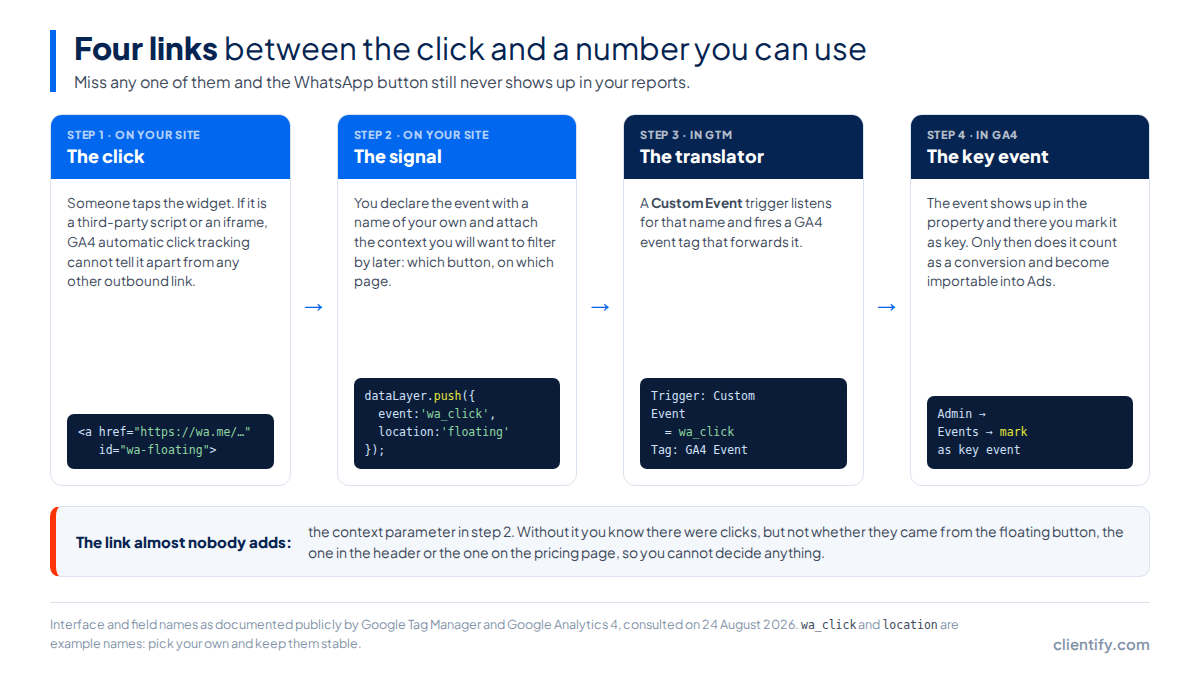
wa_click and location are example names; pick your own and keep them stable.Four links, and none of them optional. The click has to raise its hand, the signal has to reach Tag Manager, Tag Manager has to translate it into a GA4 event, and GA4 has to know that the event counts.
The signal is a dataLayer.push: the mechanism Google documents for passing information to Tag Manager from the page. You send it the event name and, if you are being smart about it, a second value with the location of the button.
If the button is a link of your own
<a href="https://wa.me/34600000000"
   id="wa-floating"
   onclick="dataLayer.push({event:'wa_click', location:'floating'})">
  Message us on WhatsApp
</a>
The onclick gets you out of trouble today, but it clutters the HTML and disappears the moment somebody re-edits that block from the builder. The version below is the one that looks after itself.
If a script injects the button (and it does not exist when the page loads)
document.addEventListener('click', function (e) {
  var button = e.target.closest('a[href*="wa.me"], a[href*="api.whatsapp.com"]');
  if (!button) return;

  window.dataLayer = window.dataLayer || [];
  dataLayer.push({
    event: 'wa_click',
    location: button.dataset.wa || 'untagged',
    page: location.pathname
  });
});
It listens on the whole document, so it works with buttons that appear later: the listener does not need the element to exist at load time. It covers both link formats WhatsApp uses, wa.me and api.whatsapp.com. And if you give each button a data-wa="header", you know which one gets pressed.
The second version is the one I would leave in place. It listens for the click on the whole document instead of tying itself to one element, so it keeps working when the button is painted by a script that loads later, when somebody duplicates the button on another page, or when the builder rewrites the HTML in the next update. closest() walks up from wherever the click landed to the link itself, which is what stops it slipping through when the user presses the icon rather than the text.
In Tag Manager you create a Custom Event trigger with the same name you used in the push, and hang a GA4 event tag off it. If you want to keep the location, pick it up with a Data Layer Variable and send it as an event parameter.
And then the step everyone forgets: in GA4, mark that event as a key event. Until you mark it, the event is recorded but does not count as a conversion, does not appear where you expect it and cannot be imported into Google Ads.
Before you take any of it as done, go through Tag Manager preview mode and check two things: that the event fires when you click, and that it fires at no other moment. A trigger left too wide, firing on any link at all, will inflate your number for months without you noticing.
Which installation method lets you measure, and which does not?
This is the part almost nobody mentions when you choose how to put the button in: the installation decision also decides what you will be able to measure afterwards. If the button does not live in your DOM, no listener can reach it.
| How you have it installed | Can you measure the click? | What it takes |
|---|---|---|
A wa.me link you wrote into the HTML |
Yes, no limits | Nothing special. It is your element: give it whatever id you like and the GTM trigger catches it by selector. |
| A button from the builder (Elementor, Divi, Webflow) | Yes | Add a custom class or ID from the advanced options panel. Every serious builder allows it. |
| A floating-button plugin | Almost always | Check in the inspector whether the link ends up in your DOM. If you can see it with right-click and Inspect, the delegated listener reaches it. |
| A third-party JS widget | It depends | If it paints the button into your DOM, the delegated listener does the job. If the widget exposes its own event, use that one: it survives their updates. |
A widget inside an <iframe> |
No, not from outside | The click happens in another document and never reaches yours. Either the vendor sends you the event, or you measure that stage in their dashboard, not in yours. |
The iframe row is not an opinion of mine, it is how the browser works: a document from another origin does not propagate its click events to the parent document. If your widget is served that way, you will measure that stage in the vendor’s dashboard or you will not measure it at all.
If what you actually need is to put the button up in the first place, I have covered how the widget is installed separately, along with the page for Clientify’s WhatsApp widget, which is the product side. Here we are dealing with what happens afterwards.
Which metrics actually matter?
I measured the five results that come up first for this search in Spain on 24 August 2026, one by one. Three of them explain how to install the button and never mention GA4 once. The other two explain how to measure the click with Tag Manager and stop exactly there. Not one of the five goes beyond the click.
And the click is the first of four stages.
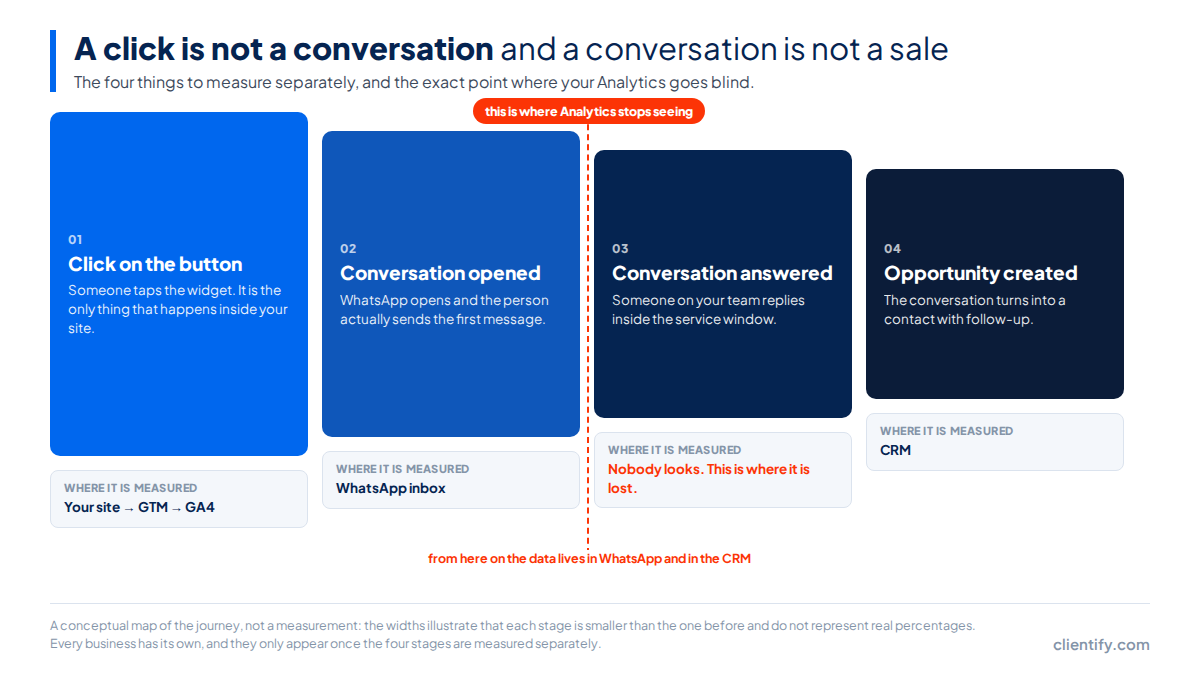
| What you measure | Where the data lives | What it tells you | What you change if it goes badly |
|---|---|---|---|
| Clicks on the button | GA4, through GTM | How many people want to talk to you, and from which pages | Where the button sits, the copy around it, which pages it appears on |
| Conversations opened | Your WhatsApp inbox | How many of those clicks ended in a message actually being sent | The pre-filled message: if it feels heavy or sounds like a form, people drop there |
| Conversations answered | The same inbox, if anyone looks at it | Whether your team gets there in time or people get tired of waiting | Coverage shifts, alerts, quick replies for the first contact |
| Opportunities created | The CRM | How many conversations were business rather than a passing question | Qualification: what your team asks in the first two messages |
The third one is the one that hurts, because it is invisible from both sides. Analytics cannot see it, and the team is not looking either: the conversation arrived on somebody’s phone, that somebody was in a meeting, and by the time they got back there were twenty messages on top of it. Nobody opens a report to discover that. Which is why conversations are better off somewhere other than a phone — somewhere you can see which ones are still unanswered, with a status and an owner, the way a multi-agent inbox works. There is more on the shape of that in what an inbox is and why it is good that it includes WhatsApp.
If you are only going to measure one of the four, measure the fourth. It is the only one that turns into money and the only one that tells you whether the button is worth having.
How do you know which campaign each conversation came from?
If you run ads into WhatsApp, there is a trap here.
Careful with ads that lead into WhatsApp. A click from a click-to-WhatsApp ad never passes through your site, so it creates no session, carries no UTM and will not show up in GA4 however long you stare at it. What does travel is the referral message the platform attaches to the first conversation.
Put plainly: the campaign it came from has to be read out of that message and saved on the contact by you. If you wait to see it in Analytics, it is never arriving.
What does exist is the referral object Meta attaches to the first message of a conversation started from an ad, and which arrives by webhook carrying the identifier of the originating ad. That is what has to be read and saved on the contact record the moment it comes in, because by the second message it is gone.
From there on it is ordinary campaign measurement. And if you are setting the ads up right now, the mechanics of the formats are in the WhatsApp marketing guide.
Where a CRM fits into all this
Stages 1 and 2 are solved by GTM and by your inbox. The two that get lost —who answered and what happened next— need the conversation to leave a trace somewhere other than a rep’s phone.
In Clientify, WhatsApp conversations land in a shared inbox and stay attached to the contact record, with their origin and their history. When one of those conversations turns into an opportunity, there is nothing to reconstruct: it is already in the same place where the sale gets closed.
What is that button costing your site?
None of the five articles I measured mentions this, which strikes me as odd, because it is the first thing I look at when somebody asks me to install a widget.
A wa.me link with an icon is HTML and CSS: it weighs nothing and blocks nothing. A third-party widget is a different animal. It is JavaScript you download from a domain you do not control, it may bring its own fonts and its own icons along with it, and it runs on the main thread while the user waits.
Two concrete consequences. If the button is visible without scrolling and it is large, it can end up being the element that defines your LCP, the metric that measures when the main content appears. And if the script loads without being deferred, it competes for the main thread at the worst possible moment, exactly when the user starts interacting.
The fix is nearly always the same: load the widget with defer, or wait for the first scroll or a couple of seconds of inactivity before injecting it. Nobody needs the WhatsApp button at millisecond zero.
And measure it. Run PageSpeed before you install it and again afterwards, same URL, on mobile. If the number moved, you know what that button is costing you and you can decide on evidence instead of on faith.
The ten-minute pass, in order
- Look at how your button is installed. Right-click, Inspect. If you can see the link in your DOM, you are clear. If you are inside an
iframe, jump to step 5. - Paste the delegated listener into GTM as a Custom HTML tag with a page-view trigger. A single block covers every button on the site.
- Create the Custom Event trigger with the exact name you used in the
pushand hang a GA4 event tag off it. - Check in preview mode that the event fires when you click, and only when you click. Then open it in the GA4 realtime reports.
- Mark it as a key event in GA4. Until you do, it does not count as a conversion and cannot be imported into Google Ads.
- Put a 30-day review in the calendar. Widgets update, builders rewrite the HTML and tags fall over without telling anyone.
If you do only one thing today, make it step 2: paste the listener, check in preview mode that the event fires, and leave it running. A month from now you will have your first real number for how many people want to talk to you, and you can decide the rest with that on the table.
Frequently asked questions
Does a click on the WhatsApp button count as a conversion?
It counts if you decide it counts. In GA4 a click only becomes a conversion once you mark it as a key event. Even then it measures intent, not a sale: between the click and the opportunity there are two more stages Analytics never sees, and they are worth measuring separately.
How do I send the WhatsApp button click to Google Analytics 4?
With three pieces: a dataLayer.push carrying the event name when someone clicks, a Custom Event trigger in Google Tag Manager listening for that name, and a GA4 event tag hanging off that trigger. Then mark it as a key event in GA4 so that it actually counts.
Can I tell which campaign each WhatsApp conversation came from?
Yes, but not from Analytics. A click-to-WhatsApp ad never touches your site, so it creates no session and carries no UTM. What does arrive is a referral message attached to the first conversation, naming the ad it came from: you have to read it and save it on the contact.
Does the WhatsApp widget slow down my site?
It depends on how it is installed. A wa.me link is plain HTML and weighs nothing. A third-party widget loads external JavaScript and can delay rendering. And if the button sits at the top of the page, it enters the LCP calculation: measure before installing it and again after.
Do I need Google Tag Manager to measure the WhatsApp button?
It is not compulsory: you can call gtag directly from your site’s code. But with Tag Manager you change the measurement without touching the template or asking for a deployment, and you get preview mode to check that the event fires before you take it as good.
No conversation left without an owner
Try Clientify free, no card. A shared WhatsApp inbox, every conversation attached to its contact and the opportunity in the same place where the sale gets closed.
Try Clientify free