
If the sale is signed in the CRM weeks after the click, do not try to send it to GA4 with the original date: Measurement Protocol only lets you backdate an event by 72 hours, and the offline event import accepts the two previous calendar days plus today. What does work is saving the visitor’s identifier the day the lead comes in, leaving it untouched in a CRM field and sending the conversion when it actually happens. GA4 attributes it using its conversion window (90 days by default for key events that are not acquisition events) and Google Ads accepts up to 90 days from the last click.
Why do GA4 and your CRM never say the same thing?
The conversation usually starts here: “GA4 tells me I got 40 leads from a campaign and the CRM tells me I closed three sales, but I have no idea which campaign they came from.”
Both systems are right. They are measuring two different moments of the same sale. GA4 measures what happens on the website, where there is a session, a cookie and a source; the CRM measures what happens afterwards, in calls, proposals and an opportunity somebody drags to won on an ordinary Tuesday. Between the measured moment and the closed moment there are weeks, and during those weeks there is no browser open telling Analytics anything.
This is the point to change the question, before touching a single setting. The usual question is “how do I send the sale to GA4 with the date it actually happened”, and past 72 hours that question has no answer. The useful question is a different one: what do I have to save the day the lead comes in so that, when the close arrives, it lands in the channel that brought it?
How long can GA4 accept a sale that closes weeks later?
This is where most implementations break, and not through carelessness. Measurement Protocol tutorials teach you how to build the request and almost none of them mention the time windows, so the integration gets built, the close is sent with the date of the original session, and the event is either rejected or filed in the wrong place without anyone raising a hand.
Every mechanism has its own margin and every margin is counted from a different point. This is the part worth having in front of you before deciding anything:
| Mechanism | Limit | Counted from | What happens if you go past it |
|---|---|---|---|
| Measurement Protocol · inherit the session attributes | 24 hours | the start of the online session | The event does not inherit the source, medium or campaign of that session. It also requires you to send the session_id |
| Measurement Protocol · backdate the event | 72 hours | the moment of the event | You cannot backdate any further. The forced timestamp_micros has to fall inside the session |
| Offline event import in GA4 | the 2 previous calendar days, plus today | the event date in the file | If you send no timestamp, the upload time is used instead |
| GA4 conversion window · key events that are not acquisition events | 90 days by default | the key event, looking backwards | It can be lowered to 60 or 30 days. The change only applies going forward |
| GA4 conversion window · acquisition key events | 30 days by default | first_open or first_visit, looking backwards |
The only published alternative is lowering it to 7 days |
| Google Ads · offline conversions | 90 days | the associated last click | The conversion is not imported and never shows up in your stats |
| Google Ads · enhanced conversions for leads | 63 days | the associated last click | Same effect, with 27 days less of margin |
Read in one go, the table says something uncomfortable: the first three rows are already closed for any sales cycle lasting more than a week. And there is a matter of proportion that is hard to see in a table and obvious in a chart: the margin for inheriting the session attributes, 24 hours, is three times smaller than the margin for backdating an event, 72 hours. They are two different things and they get confused all the time.
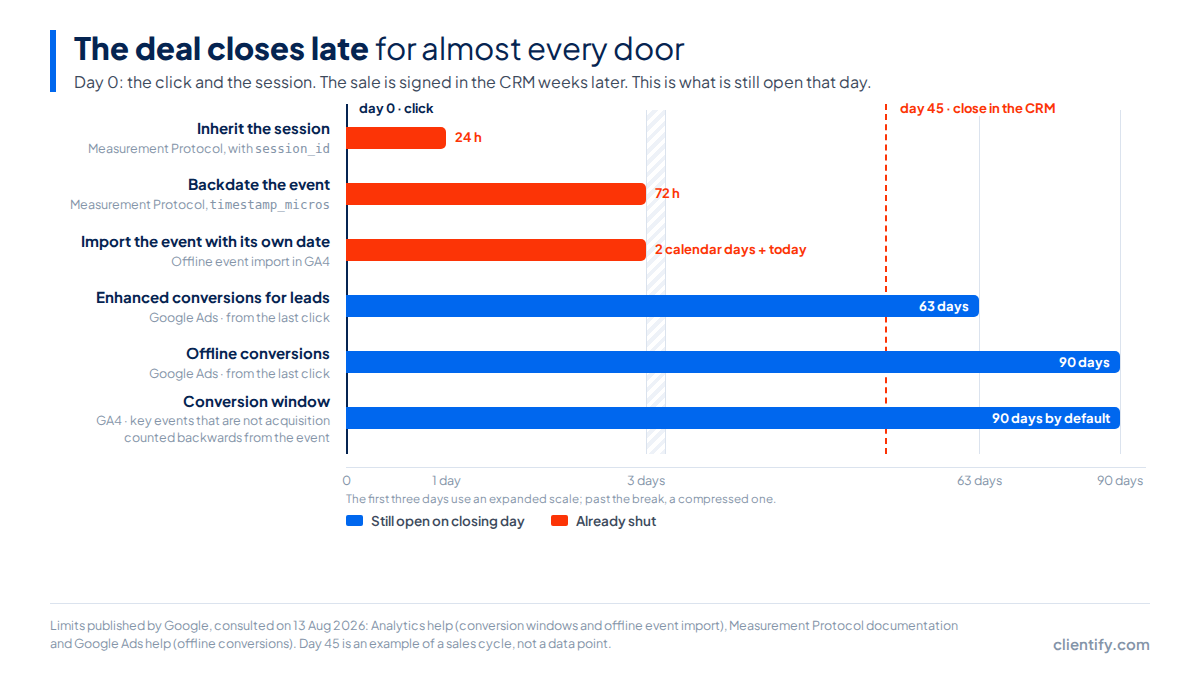
A close at 45 days, to take an example, fits comfortably inside GA4’s 90-day conversion window and inside the 90 days of Google Ads. But the deadline to backdate it expired on day 3. The practical conclusion is reassuring once it sinks in: the date of the event is not the problem you have to solve. The identifier is.
And while we are on windows, there is one GA4 behaviour almost nobody has in mind, and it is worth knowing before you touch the attribution screen:
Two neighbouring settings that behave in opposite ways. Changing the attribution model of your reports applies to historical and future data: you move the selector and reports from past months change. Changing the conversion window, on that very same screen, only applies going forward.
The practical consequence is uncomfortable: you can reinterpret the past, but you cannot widen it. If your sales cycle is longer than the window you had set, the closes that already fell outside it do not come back by changing the setting today.
Which identifiers do you have to save the day the lead comes in?
Here is the whole method, and it fits in one sentence: capture the identifiers in the form, store them in contact fields nobody edits by hand and send them back when the opportunity is won.
| Identifier | What it is | Where it lives on day 0 | What you will need it for |
|---|---|---|---|
client_id |
The identifier GA4 assigns to the browser | In the visitor's GA4 cookie | It is mandatory to send the event through Measurement Protocol. In the offline import you need either this or the app's app_instance_id |
gclid |
The identifier of the click on a Google Ads ad | As a parameter in the landing URL | It is the identifier Google Ads documents for importing offline conversions: it matches the sale with the click that started it |
| UTM parameters | The source, medium and campaign declared in the link | In the landing URL | To rebuild the origin inside the CRM and so the sales rep can see where the lead came from |
session_id |
The identifier of the specific session | As an event parameter in GA4 | Only if you want the event to inherit source, medium and campaign from that session, and only within the following 24 hours |
user_id |
Your own person identifier | It does not exist: you generate it | To join the same customer across several devices. Maximum 256 characters, and it cannot contain anything that lets a third party identify the person |
Of the five, the one that causes the most trouble is the last one, and always for the same reason:
The lead's email address does not work as a user_id. The GA4 documentation says it plainly: the user identifier cannot contain information that lets a third party identify the person. An email address identifies them directly, and a hashed email is still the same email for anyone who holds the list. What does work is the internal identifier of the contact in your CRM: opaque, stable and meaningless outside your own database.
Watch where the chain snaps, because it does not snap at the end but at the beginning. The identifier can only be captured once, at the moment the visitor submits the form. If it is not saved right then, no later query to the CRM will recover it: the data does not exist anywhere. Same logic as keeping the contact database clean: a field that arrives empty or duplicated is a decision you can no longer make.
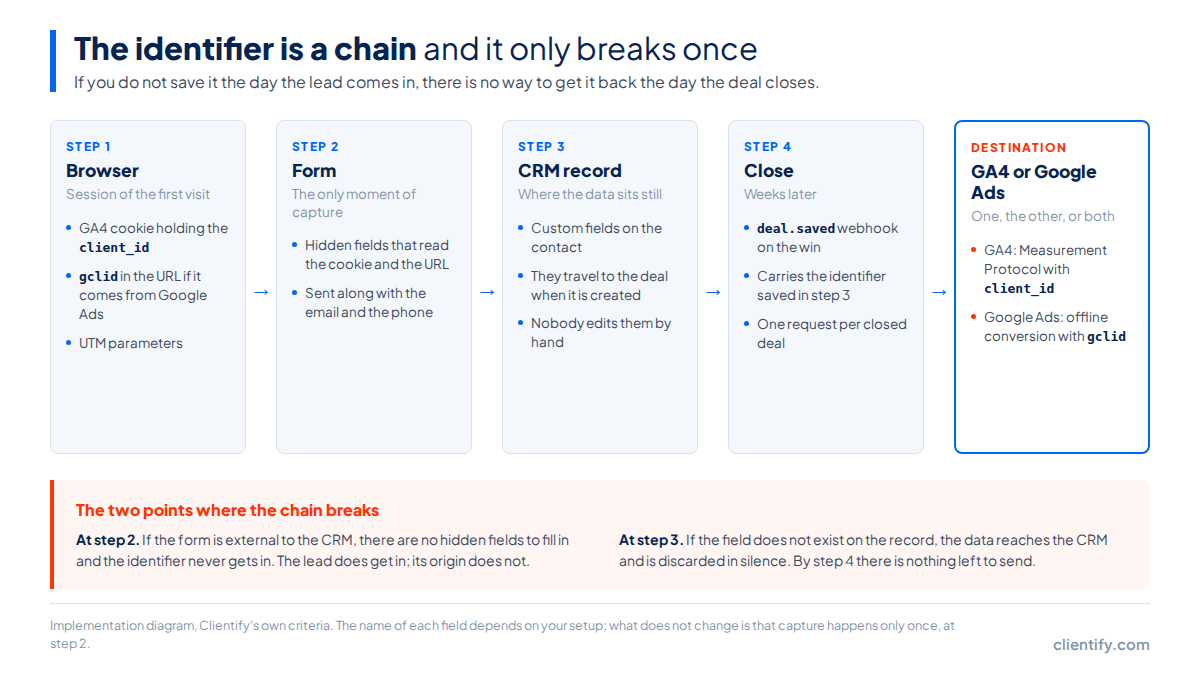
Two concrete checks before calling the setup done. First: fill in the form yourself with UTM parameters and a made-up gclid in the URL, then look at the contact record that gets created. If the fields arrive empty, the problem is in the form, not in GA4. Second: win a test opportunity and inspect the payload the webhook carries. If the identifier is not travelling in it, it will not travel on the day of the real close either.
Where do you close the loop: in GA4 or in Google Ads?
It depends on what you want the data for, and the answer is not the same in both cases.
| GA4 | Google Ads | |
|---|---|---|
| What it is for | Seeing the close in your acquisition and channel reports | Letting automated bidding learn from real sales instead of from submitted forms |
| Margin from the close | 72 hours to backdate through Measurement Protocol; the 2 previous calendar days plus today if you import it | 90 days from the last click, or 63 with enhanced conversions for leads |
| Identifier it demands | client_id or app_instance_id |
gclid, or the enhanced conversion data |
| What it does not do | It does not rewrite your session history, and it does not let you backdate beyond 72 hours | It does not show up in GA4 reports: these are two different systems with two different databases |
| What happens with a close at 45 days | It falls inside the 90-day conversion window, but it can no longer be backdated: it is recorded with the date it was sent | It fits in both cases, with margin to spare |
If you have to pick one to start with, start with Google Ads. The reason is a matter of deadlines: its 90 days from the last click are the only margin that survives a real sales cycle without acrobatics, and the benefit is direct, because automated bidding starts optimising towards closed sales instead of towards submitted forms. GA4 comes afterwards, when you want to see the close inside your channel reports next to everything else.
One note of judgement about the models: since November 2023 GA4 no longer offers first click, linear, time decay or position-based. What remains is the data-driven model and two last-click variants, with paid and organic last click as the default setting. If the way you split credit between channels depended on any of the retired ones, that conversation is closed on Google’s side and needs rethinking.
How you build it with Clientify
Let me start with what Clientify does not do, because it saves time: there is no native integration pushing the close into GA4. What Clientify’s CRM brings are three pieces you can build it with.
The Clientify pixel is installed in the <head> and captures the online channel, the UTM parameters, the browser, the language, the city, the country, the visits and the sessions. It comes with one important condition: it does not work with forms external to Clientify, because every record needs its own traceability and that is lost when the capture comes from outside. If your forms belong to another tool, the lead still comes in, but its origin does not.
In Settings → My account → Analytics pixels you can save the measurement ID of your Google Analytics property, which you find under Admin → Data streams, and apply it to forms from the analytics tab of the designer and to landing pages in the last step of their configuration. With that, GA4 sees the form submission. The close, not yet.
The close travels by webhook. Under Settings → Connections → Webhooks you have deal.saved, which fires when an opportunity is created, updated, won, lost or moved. Point it at n8n or at your own endpoint, filter by the won status and build the call to your chosen destination from there. It is one request per close, and that is how it should stay: no walking through opportunities in bulk and no parallel requests. The API publishes a limit of 1,000 requests per minute, and that number is there so you never have to think about it, not so you can get close to it.
If the same webhook is already firing your follow-up sequences, you have the wiring half done: automating lead follow-up and reporting the close upstream are the same event read twice.
Why does Clientify’s channel not match GA4’s?
Because they measure with different criteria, and that is by design.
Clientify uses the date of the first visit to the website as its attribution point to determine the Online Channel. GA4 retired the first-click model in November 2023 and today attributes with last click or with its data-driven model. A contact who discovered you through an organic search in March and came back through an ad in August will show up as organic in Clientify and as paid in GA4. Neither of the two is badly configured.
Inside the CRM itself there is a second distinction worth keeping clear, because it produces half the doubts. The Online Channel indicates how the contact arrived and is filled in automatically from the UTM parameters and the referrer host, with no manual editing possible. The Contact Source indicates where they registered: form, chatbot, WhatsApp, import, API. The documentation says it without hedging: the two fields do not always match, because they measure different moments of the contact’s life in the CRM.
So do not expect the numbers to reconcile. They will not, and chasing that reconciliation is the fastest way to lose a quarter. What you can get is for the three sales in the opening example to show up attributed to the same channel in both systems, even if the 40 leads are counted differently. That is enough to decide where next month’s budget goes, which is what measuring is for. If you are still deciding which data deserves a field of its own, this piece on data collection gives you the general frame.
Frequently asked questions
How long do I have to send GA4 a conversion that happens in the CRM?
It depends on the mechanism. With Measurement Protocol you can backdate the event up to 72 hours, and only 24 hours if you want it to inherit the attributes of the original session. The offline event import accepts the two previous calendar days plus today. Google Ads is far more generous: up to 90 days from the last click.
If I change the attribution model in GA4, does my historical data change?
Yes. Changing the attribution model of your reports applies to historical and future data, so reports change retroactively. The conversion window works the other way round: its changes only apply going forward. They are two settings that live on the same screen and behave in opposite ways.
Can I use the lead’s email address as the user_id in GA4?
No. The GA4 documentation says the user identifier cannot contain information that lets a third party identify the person, and an email address identifies them directly. Use an internal CRM identifier instead: opaque, stable and no longer than 256 characters.
Should I send the close to GA4 or to Google Ads?
To Google Ads if what you want is bidding that learns from real sales, because it accepts up to 90 days from the click. To GA4 if what you want is to see the close in your channel reports. They are not mutually exclusive, but each destination has its own window and its own identifier.
Why do my CRM and GA4 report different channels for the same lead?
Because they measure different moments. Clientify sets the Online Channel using the date of the first visit to the website, while GA4 retired the first-click model in November 2023 and today attributes with last click or with its data-driven model. The discrepancy is by design, not a badly configured setting.
Where to start tomorrow
Create the custom fields in the contact record today and add the hidden fields to your forms. It is the only thing in this guide that cannot be done later: the leads coming in tomorrow without those fields will have no recoverable origin, and the ones coming in with them will pay off the day they close.
Save the origin the day the lead comes in
7 days free, no card required. Create the fields, capture them from your forms and see where your closed sales really come from.
Try Clientify for free